

Modifying Logo In Artion
Hi, this might be a redundant question, but I am just starting to work with Joomla 4 and was not able to figure out how the Artion template manages to get the logo to do what it does (i.e., being in the background and then making its way to the logo position). Where do I change the logo, and can the animation be changed separately as well?
Thank you and best Tim
19 Answers
Order by
Oldest
Accepted Answer
I have figured it out. However, now I need to know how to change the point in time when the logo moves to the top left corner, i.e. when the animation is happening. I believe that this can be changed in the template.css file for the css class .animated-text. However, in template.css I was not able to determine exactly which parameter to change to make the animation occur earlier in the scrolling, for example right when the user scrolls a little bit.
Thank you!

Mehtaz Afsana Borsha
Accepted AnswerHi,
Thanks for contacting us. Sorry for this issue I need customization which is beyond our support policy. Its better you can contact any developer to do this. Hope you understand.
-Regards.
HC
Hashir Chaudhary
Accepted AnswerHey Tim,
Quick question i am currently using the Artion Theme but cannot work out where i can change the Logo - where did you find it?
Just to clearify, i can find the Theme Logo, which i did change but i mean the Logo on the Home Page that animates.
Accepted Answer
Hi Hashir, you can do that in the Frontend, under the Layers Tab. Select the top one and click on the image tab, then it will appear.
Accepted Answer
Hi Mehtaz,
I understand what you mean, but to be honest if you can't provide me with an answer to that the template is quite one-dimensional in its usage. Is there no chance you can reach out to one of your colleagues for support? I had some technical questions before that were answered as well. Also, this question is not really involved, it's just about documentation of how the template works.
Thank you and best Tim
CR
candyce Rowlandson
Accepted AnswerI have the same issue. i think it's not very useable while the rest of the template is nice. I tried tweaking it a bit but i am left still feeling unsatisfied. I don't like that overlap on other content either. I tried to disable the image but then when i apply a logo in the template it doesn't show. I tried different layouts but the logo does not appear. How can i then use the template feature for the logo (which is a built in function and i would expect it to work). A standard feature of the template should not be disabled, it should be an option.
PL
Patrick Ladner
Accepted AnswerI have created a logo as *.svg. Once in the same height as the Artion logo and once in the same width. But when I change it in the backend editor it does not appear. Or only very late when you scroll down the page.
Does anyone have a solution?
Do you have to follow special svg guidelines? e.g. svg 1.0 or 1.1 with special settings?
I can generate everything with Illustrator. Until now I don't see my various svg files instead of the artion logo.
PL
Patrick Ladner
Accepted AnswerHave you had a chance to look at this problem? Do you need anything else from me?

Pavel
Accepted AnswerI have figured it out. However, now I need to know how to change the point in time when the logo moves to the top left corner, i.e. when the animation is happening. I believe that this can be changed in the template.css file for the css class .animated-text. However, in template.css I was not able to determine exactly which parameter to change to make the animation occur earlier in the scrolling, for example right when the user scrolls a little bit.
Hi.
For CSS editing use custom.css file only. Never make changes in template.css. Create custom.css file (read Helix doc about it) copy code snippet from template.css to custom.css and edit it there.
To make the animation occur earlier in the scrolling, create custom.js (read Helix doc about it). Find in main.js code snippet, which is responsible for this behavior copy it and paste to custom.js. Then edit.
Here is part of the code for this in main.js.
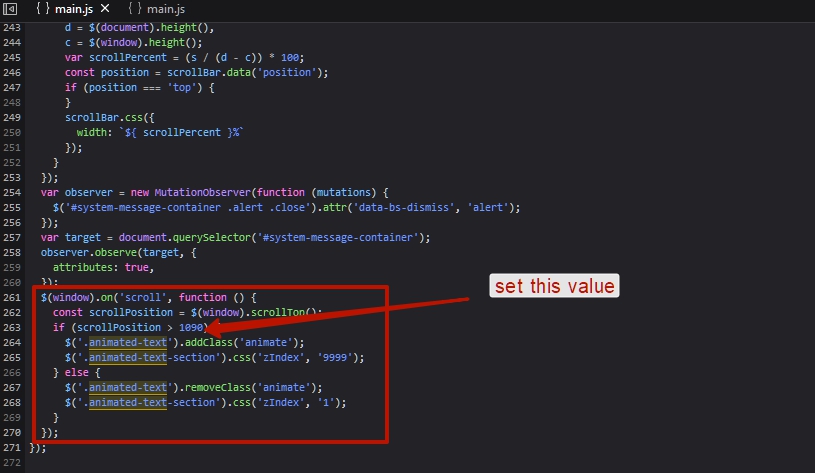
jQuery(function ($) {
  $(window).on('scroll', function () {
    const scrollPosition = $(window).scrollTop();
    if (scrollPosition > 1090) { //if window scroll position is more than 1090 px from top then the animation begins
      $('.animated-text').addClass('animate');
      $('.animated-text-section').css('zIndex', '9999');
    } else {
      $('.animated-text').removeClass('animate');
      $('.animated-text-section').css('zIndex', '1');
    }
  });
});
M
Mia
Accepted AnswerHello there! I'm trying to solve a very similar problem. Could you tell me please where and how I can install a custom.js?
Thanks!
Pavel
Accepted Answer
M
Mia
Accepted AnswerOk, I'll do, thanks.
But another question: I just created a costum.css and tried to change position and size of the logo as described above. Nothing happens. Why is that? How can I make sure that the values from costum.css are undertaken?
Thanks!
Pavel
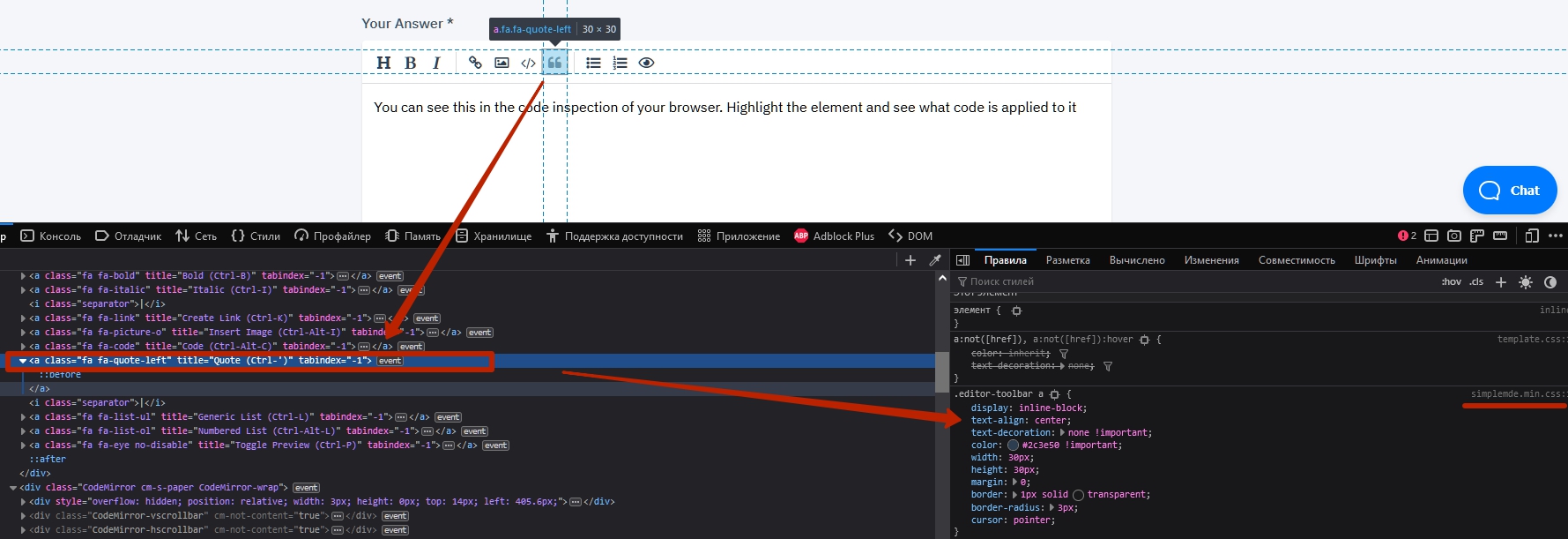
Accepted AnswerYou can see this in the code inspection of your browser. Highlight the element and see what code is applied to it.
Here is example
M
Mia
Accepted AnswerHey Pavel,
it was a problem of the browser cache, now it works, sorry.
On another note: Is it possible to set different values for different breakpoints? Logo animation works fine on smaller desktops but not on larger ones.
Thanks!
M
Mia
Accepted AnswerHey Pavel,
another question: Is it possible to block the js animation when coming back on the home page after leaving it? Because right now I've got the logo on the position where I left the page, please see screenshot attached.
Thanks!
Pavel
Accepted AnswerIs it possible to set different values for different breakpoints? Logo animation works fine on smaller desktops but not on larger ones.
Hi, yes. Find css rules via code inspector and write new rules based on it in breackpoints.
Is it possible to block the js animation when coming back on the home page after leaving it?
Perhaps, but you will need additional js coding for this. I am not a developer of this, I just showed the way how to edit it
S
Sven
Accepted AnswerAfter fiddling with all the solutions above, I have found a good link to export correct SVG-files for the web. Those instantly worked for me, after messing with the SVG's for 2 days.
Just use the following settings and all works fine: https://medium.com/@colinlord/how-to-export-svgs-for-the-web-from-illustrator-829bc1c841f6