

CSS For Body Font On Mobile & Tablet Views
CM
Christopher May
I'm using the Helix Ultimate template and have set the body font size to 17px in the template typography settings, however some of the block add-ons have their own values preset that override the 17px in the mobile and tablet views. I'd like to keep it at 17px for the font across all viewing devices. What is the custom CSS for this purpose? maybe include all values that are able to be chosen in the standard body template typography settings. Thanks
5 Answers
Order by
Oldest

Paul Frankowski
Accepted Answerand my last word
I was afraid that if I edited css.template files, it will be overridden during updates.
I am also wonder why people do not read Template / Helix documenation, where we explained how to use custom CSS! Please, we have written guides for all you guys, with all details >> https://www.joomshaper.com/documentation/helix-framework/helix-ultimate-2/custom-code-css-js-meta
Thanks Pavel, as always!
Paul Frankowski
Accepted AnswerHI Christopher,
It's totally possible, but maybe inside those addon you set different font-size for mobile/table view.
If you can share link to one of those pages, I can check in source code to tell more why is overriden.
CSS knowledge is available free of charge, only books and course costs. Probably in your case, example code should look like that:
@media (max-width: 860px) {
.com-sppagebuilder p, .sppb-addon-text-block .sppb-addon-content, .sppb-addon-text-block p
{ font-size: 17px;}
}
sometimes extra !important rule may be needed.
CM
Christopher May
Accepted AnswerHere's a page example: https://test.preventive-health.org/services/in-home-services
Check out the paragraphs below comprehensive planning. Also this section just below the Main H1 heading (Expert in-home assistance from a licensed health professional). I'm having the problem for many of the addons that have specific styling, so I was looking for an easier solution to work sitewide versus having to separately enter values on each page. Upon browser inspection, this is what font size the section ends up showing, despite being manually set in the addon:
@media (max-width: 767px) body { font-size: 13px; }
I think it is being overridden by the addon-block styling which I don't have access to other than in the template files. I was afraid that if I edited css.template files, it will be overridden during updates. Font size is set at 17px in the template for the body.
Similar issue with headings also. It seems when a block addon is used, it wants to use the internal addon styling (not anything I can change), instead of using the predefined heading values from the template. Not all cases, but enough that I've defintely noticed and had to enter specfic heading styling for each addon, when it seems as if it should pull from the predefined values entered in the template. Sitewide changes are always preferable to having to manually enter in each section.
In addition, I did go into the template css and change the small screen side menu line size as the submenu items were far too close together before. I have not idea if the change I made will be overridden at the next update?

Pavel
Accepted AnswerHi
Upon browser inspection, this is what font size the section ends up showing, despite being manually set in the addon: @media (max-width: 767px) body { font-size: 13px; }
You are mistaken about this. Font size is 14px - since you tuned it in add -on. There are no hidden adjustments to the addon to which you do not have access.
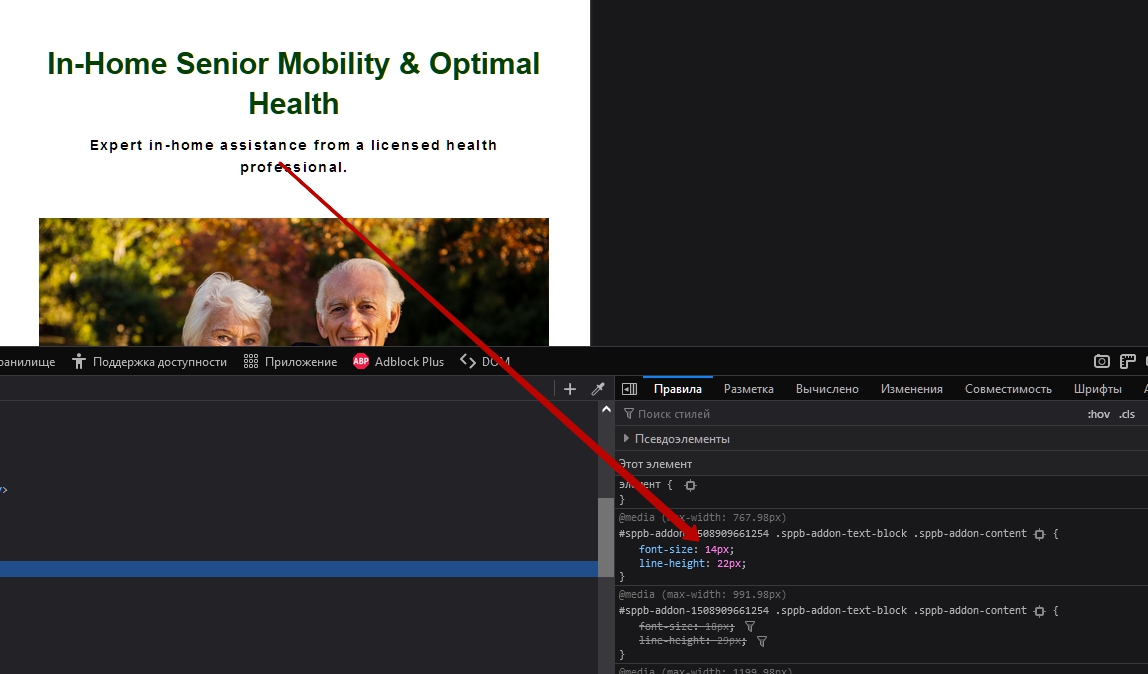
To control the font size without introducing the settings on each page, remove all the font size from the addons and use CSS by placing your CSS code in custom.css file. Never edit template.css.
body {
    font-size: 17px !important;
}
For general control over the headings, the same thing - delete all the values from the addons and configure all the headings through CSS.
Example
.h1, .h2, .h3, .h4, .h5, .h6, h1, h2, h3, h4, h5, h6 {
    margin-top: 0;
    margin-bottom: .5rem;
    font-weight: 500;
    line-height: 1.2;
}
h1 {
    font-size: 50px;
}
h2 {
    font-size: 40px;
}
h3 {
    font-size: 30px;
}
h4 {
    font-size: 24px;
}
h5 {
    font-size: 22px;
}
h6 {
    font-size: 20px;
}
In general, you can explore the code through the inspector, copy paste the entire code related to the typographic to the custom.css file and replace all with your values.