a lot of data-mce-style entries after inserting an H2 heading into a text field - Forum | JoomShaper
Solved SP Page Builder

a lot of data-mce-style entries after inserting an H2 heading into a text field

Asked by Marco 4 years ago Last activity 4 years ago

Hello,

I am editing a website with relatively many pages and have noticed that there are many data-mce-style entries in the code of the individual pages - sometimes very many!

https://prnt.sc/HCr5p5k77KUq

My versions are the following:
Joomla 4.2.3
SP Page Builder 4.0.5

Here is an example which can be reproduced:

Create a new line, add a text addon, add 2 or three words, make these words a H2 heading - this is how I created the code in the screenshot.

Having just encountered the problem now, and having already made more than 100 web pages, the post-processing is a lot of work, sometimes impossible, if it is an H2 heading, if it is an H3 heading, then this problem does not exist.

Greeting - Marco

Accepted answer

Marked as the solution
Paul Frankowski Senior Staff

JCE is based on TinyMCE engine, that's why I mention about that.


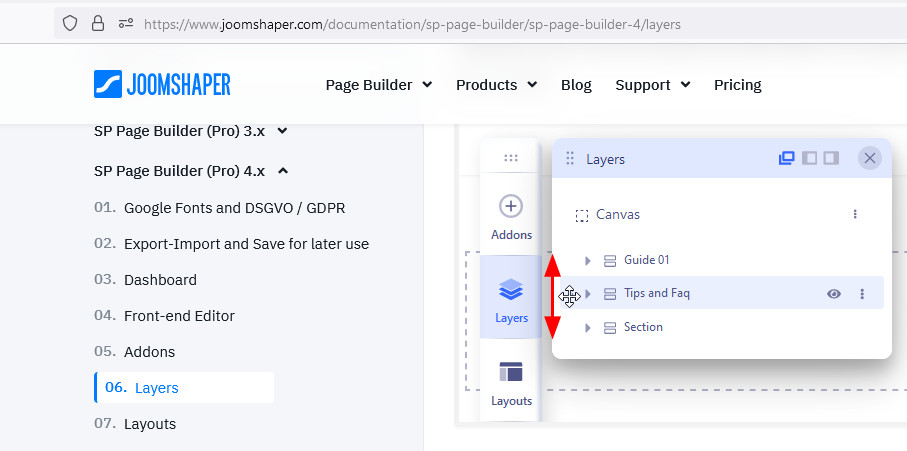
About Rows Up/Down, only from "Layers" (screenshot from documenation)

foto_9120_2022.jpg

12 more replies

Toufiq Senior Staff

Hi there,

Thanks for contacting us. Sorry for the inconvenience. Will you please provide me the Joomla administrator access to check the issue? I will check & get back to you soon. 

-Thanks

Marco Asked this

Hi Toufiq,

I have fixed all the problems with the headings!

That here code was deposited, as I have shown it in the graphic, reported to me my SEO program Seobility.de used by me - it showed after the scan many pages (all new created by me since the change to the new SP Page Builder version) with many empty headings.

Strangely, this code is not visible in the Text AddOn under Code, only when I scan the page with the Inspector or look at the source code.

To get rid of this problem I usually had to replace the whole line - finally I copied the line from a "clean" page, pasted it into the page I wanted to edit and adjusted the text in the Text AddOn again, then deleted the "contaminated" line - a lot of work!

Currently I have only one example page saved where you can see the problem - and I have to correct myself, no matter if I insert a H2 or H3 heading or even normal text in the existing or in a new Text AddOn - in the source code I get the entries "section data-mce-style=" or "h1 data-mce-style=" shown and quite a lot of them!

The example is the SP Page Builder page with ID 126

Greetings - Marco

Marco Asked this

I also have another question - how can I move a line down or up in a SP Page Builder page? Somehow I don't manage to move it in the new version - thanks!

Toufiq Senior Staff

I need your assistance. Can you share a screencast video about the full scenario?

Toufiq Senior Staff

Please check now. There was junk code in your text addon. I just removed the junk code.

Marco Asked this

May I know how you did that?

The problem was not removing the junk code, as I wrote, many pages had such code.

The question is more where did this code come from? The sources for my content are mostly the same, I've never had any problems with that.

I also posted here a problem with onmousover in a text addon - the HTML code was simply changed by SP Page Builder and the onmousover technique, which I could use in earlier versions of SP Page Builder, suddenly didn't work anymore - fortunately it still works in a module.

When asked how this could be, Mehtaz unfortunately couldn't give me an answer because she has too little information about it.

So I assume that it could also have to do with the text addon.

I also asked you how I can move a line.

Paul Frankowski Senior Staff
4 years ago · edited

If I may...

data-mce-style

is from TinyMCE as I remember ...

  1. If you use JCE Pro set filtering options for Paste to remove all extra styles from Paste text. I use it all the time.

  2. To remove "data-mce-style=...." and "data-mce-type=..." from current pages you have to use DB Replacer from Regular Labs (Made in NL) and put whole phrase to search and replace with empty. Using this in two minutes you will clean all pages.

  3. Yes, we are working also to improve text addon filtering in SPPB 4.0.7 and upcomming updates

Marco Asked this

thank you Toufiq, thank you Paul,

@Toufiq - now I ask again: can you please explain me how you removed the junk code and with which editor? As I already wrote, I didn't see this code in the addon and the JCE editor (not even in the code view).
I managed to insert a new line with the text addon and copy the text - then the junk code was removed.

@Paul - thanks for the tips, I use JCE Pro and have the filter enabled, I don't use TinyMce.

If I had learned about the DB Replacer earlier, I would have saved myself a lot of work - well now I know!

And I answered my own question that Toufiq didn't want to address yet - how can I move rows up or down? - via the layer view ...

Greetings - Marco

Log in to reply.