Solved Templates

Font Awesome not loaded in some pages

Asked by Claudio Bartoloni 4 years ago Last activity 4 years ago

In my site I'm trying to use the template Helix ultimate.
It works quite well with pages created by SP Page Builder.
But when a page generate from other components are showed, Font Awesome is not loaded and many symbols disappear.
Could you please suggest how to load Font Awesome also for this pages?

To see how the site works please use the following URL that directs to a Live Staging copy of the production site where I'm trying to use Helix Ultimate.
http://pm-online.it/livestaging/ERG52bfc9638b075b6bdde5a5a5ac6f79ca47df3393cb6c035aea73bdf7b16c83d2T
When you access this link you will see a yellow border around the page that shows your are navigating the Live staging site.
If you access the Home page or the Certification pages the pages are correctly presented.
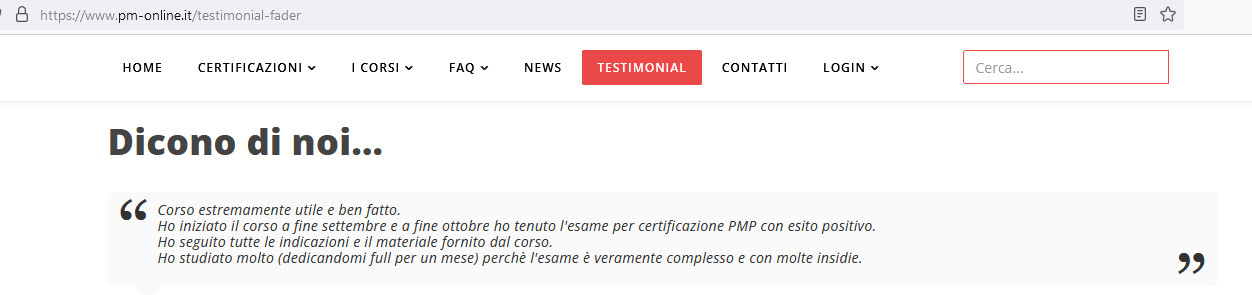
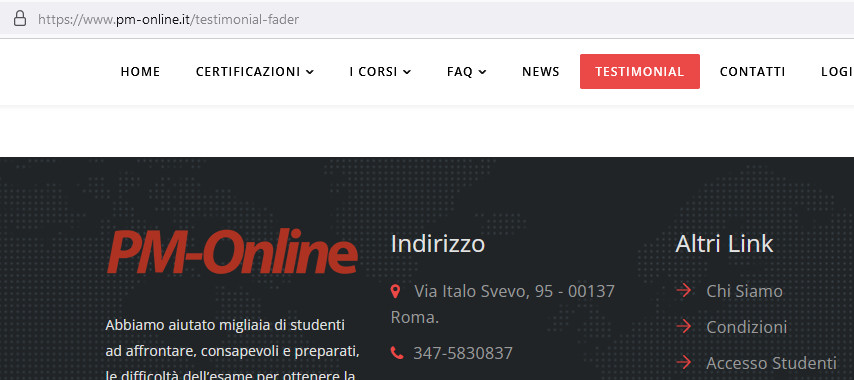
If you access the testimonial page, for example, (https://www.pm-online.it/testimonial-fader) you will see that the symbols on the menu changes and the symbols on the bottom of the pages disappear.

Could you please help?

Accepted answer

Marked as the solution
Paul Frankowski Senior Staff

Nessun problema, sono qui per aiutarvi.

Solution 2. is the quickest.

Helix Ultimate > Template Options > Advanced (tab) > Font Settings > Enable Font Awesome: Yes/Si

foto_9101_2022.jpg

Save changes!

8 more replies

Paul Frankowski Senior Staff

Ciao Claudio,

Here I see all font awesome icons in menu and in testimonial area
foto_9098_2022.jpg

also in the bottom

foto_9099_2022.jpg

Paul Frankowski Senior Staff
4 years ago · edited

Please share URL where there are no icons! And you don't see them on all browsers, Chrome, Firefox, Edge etc.


But when a page generate from other components are showed, Font Awesome is not loaded and many symbols disappear.

In most cases it's caused when other component loads it's own font awesome file that is OLDER than v5.15.x then indeed becuase component files are loaded after template there could be conflict between Font Awesome versions. To be honest that mess was made by FA developer, he made a lots of changes in class names. You can fix it in few ways.

2nd reason. Becuase right now Font Awesome Free 5.15.1 is loaded only from SP Page Builder, not from Helix Template which was disabled by you, on some subpages where you do not have any SPPB object, template cannot use Font Awesome 5.15 becuase it's not loaded.

Paul Frankowski Senior Staff

Thanks for links.

Read "2nd reason" from my last post. This is a reason in your case.

Idea how to fix it:

  1. Publish SPPB Module with at least one icon on the "bottom1" position instead of using Custom Html module as you have now, then FA will be loaded directly from SPPB component.
  2. Turn on Font Awesome from Template Options > Advanced - but it will load Font Awesome file twice, that doesn't make sense if we talk about speed optimization.
Claudio Bartoloni Asked this

Thank you Paul
Do you mean I should enable Helix Template?
Could you please explain why and how?
I supposed Helix Ultimate was a complete replacement for Helix3 plugin
I beg your pardon but I'm not expert about this components

Claudio Bartoloni Asked this

Thank you very much
I used solution 2 and i works.
Now I will try solution 1 that I understand its better than solution 2
I'll let you know.... Thanks

Claudio Bartoloni Asked this

Now I have adopted solution1 and this fix the problem
Thank you very much.

Log in to reply.