Please could you assist. I cannot make spaces between image rows once I duplicate a row.
Staff replied
SP Page Builder
I cannot make spaces between rows once I duplicate a row
7 replies

Rashida Rahman Staff
Hi there!
Thanks for contacting us.
Would you please share ascreencast with us showing your desired function and issue? It will help us to understand it better and advise accordingly.
Best Regards

Paul Frankowski Senior Staff
Kim, If I may....
change Row ID used in 2nd, cloned Row. Row Options > Section ID > change name there or add your own, for example, put "second"
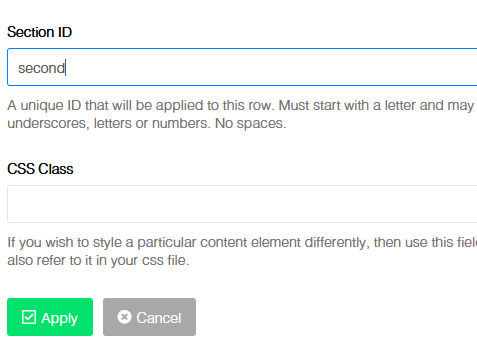
it should help.
If not, instead of margin you can also use padding value.
(!) Remember about Joomla cache or SPPB cache, if you use Production mode.
Kim Tabori Asked this
Thank you for your feedback I tried both suggestions and unfortunately both options did not work.
Paul Frankowski Senior Staff
3 years ago
· edited
That's weird. I use this feature every day.
What SPPB version you have?
Can you show us LINK and tell us which rows?
And yes, You can always use custom CSS to put margin for selected Section. Not very elegant, but it works.
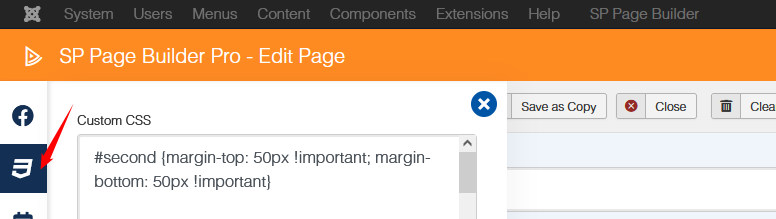
#second {margin-top: 50px !important; margin-bottom: 50px !important}
it will work with "second" Section ID name, as I mentioned before
Kim Tabori Asked this
yes sure please find the link below
https://sharula.co.za/
Kim Tabori Asked this
sp page builder pro version 3.8.9
Paul Frankowski Senior Staff
3 years ago
· edited
I noticed that You don't know how to use custom CSS inside SP Page Builder :(
You didn't read SPPB documenation about that.
Yes, you made few basic mistakes!
Please use:
#second {margin-top: 50px !important; margin-bottom: 50px !important}
#third {margin-top: 50px !important; margin-bottom: 50px !important}
not inside class name field - but here
Log in to reply.