Solved Templates

Mega Menu display issue

Asked by Sandra97 3 years ago Last activity 3 years ago

Hi,

I have some menu display issue.

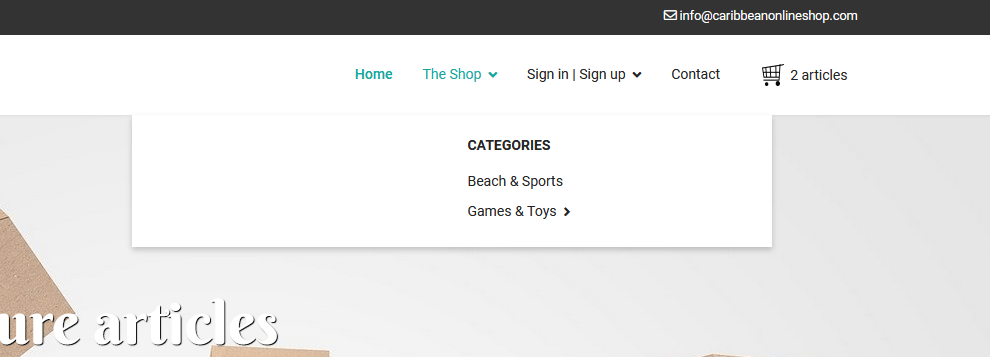
I have some white space on the left, I don't know why, and if I removed the "Categories" menu link (URL), and put the sub menus directly under "The shop" (what I would like to do), then these items are not displayed at all.

Can you tell me what's going on? And how to solve these issues?

Thanks

Accepted answer

Marked as the solution
Mehtaz Afsana Borsha Staff

As I see before my CSS there are too many CSS have already used on that portion that's why it creates this issue. I think its better to keep a backup and remake this menu again. Please delete that CSS also.

Make sure you have full site backup.

By the way if you want to hide this menu then i can also do it via CSS. Let me know what you want.

6 more replies

Mehtaz Afsana Borsha Staff

Hi

Thanks for contacting us. Could you please give me a screenshot of your issue?

-Regards.

Sandra97 Asked this

Here it is

I have some unwanted blank space at the left, and I remove "categories" and put the sub-menus under the shop instead of under categories, then the sub-menus are not displayed at all

Mehtaz Afsana Borsha Staff

Hi

Use this custom CSS

.sp-dropdown.sp-dropdown-main.sp-dropdown-mega.sp-menu-center {
    width: 180px !important;
    left: 0 !important;
}

ul.sp-mega-group-child.sp-dropdown-items{
    position: relative;
    left: -40px;
}
a.sp-group-title{
        position: relative;
    left: -40px;
}

Path towards custom CSS: Extensions>Templates>Styles> Click on your current default template name then choose Template Options. Then find custom CSS within the custom code.

Sandra97 Asked this

Hi,

Thanks but it doesn't solve any of my issues, display is still bad and i still can't display sub menu items if I removed "categories".
There's still an empty div which should not be there:
<div class="col-sm-6"><ul class="sp-mega-group"><li class="item-122 menu_item item-header"></li><li class="item-349 menu_item item-header"></li></ul></div>

I need to launch the site asap but I can't because of this issue.

Thanks in advance for your help

Sandra97 Asked this

Hi,

Rebuilding the menu solved the issue. We're good now.

Thanks.

Mehtaz Afsana Borsha Staff

Glad to know that.

Log in to reply.