Hello,
there's some problem from 4.0.7 to 4.0.8 (and 4.0.9) with hide/show section based on devices.
Awaiting an answer
SP Page Builder
Inconsistent design, i can't update from 4.0.7 to 4.0.8
24 replies
Morphinestyle Asked this
Here a screenshot of a "strange" responsive menu: duplicate menu in english and also italian language.
Morphinestyle Asked this
FIRST ISSUE: HIDDEN/SHOW SECTIONS
In hidden content you'll find some display issue: responsive no more working correctly.
I use two page covers: one for desktop and one for mobile, after the upgrade you can see doubled page covers, after the update it display both mobile and also the desktop covers (sections) at the same time.
You'll find some example page urls 4.0.7 and 4.0.9 pages in the hidden content.
SECOND ISSUE: COLUMN ORDER NOT WORKING WELL
4.0.7 using 600px width viewport shows correctly the column order set for resposive
IN THE 4.0.9 UPDATED WEBSITE using 600px width viewport it no more respect column order for mobile/tablet devices
You'll find some example page urls 4.0.7 and 4.0.9 pages in the hidden content.

Toufiq Senior Staff
Hi there,
I appreciate you reaching out. I sincerely apologize for this oversight. We just released a new version. Would you please check & let us know.
V 4.0.10
-Thanks
Morphinestyle Asked this
3 years ago
· edited
Hi Toufiq!
Unfortunately SPPB 4.0.10 solve only one of the two issues which we discussed, so i still cannot upgrade the website over the SPPB 4.0.7 version.
Workflow:
- removed files and databases
- installed a website backup with SPPB 4.0.7 (perfectly working version)
- upgraded to 4.0.10
- disabled and cleared every server, page, and system cache.
STILL REMAIN DOUBLE COVER.
Can you see the websites by urls in the "confidential data".
I'm willing to cooperate quickly to fix at least this website which is the only one we have on SPPB 4.x (built directly with 4.x). But that seems to fail to maintain compatibility and reliability with a couple of older versions.
I will wait your news.

Paul Frankowski Senior Staff
3 years ago
· edited
Ciao,
If I may... a small problem probably caused by missing translation, that cause confusion in Hide settings.
If you would use ENGLISH version of SPPB you would see real list of settings.
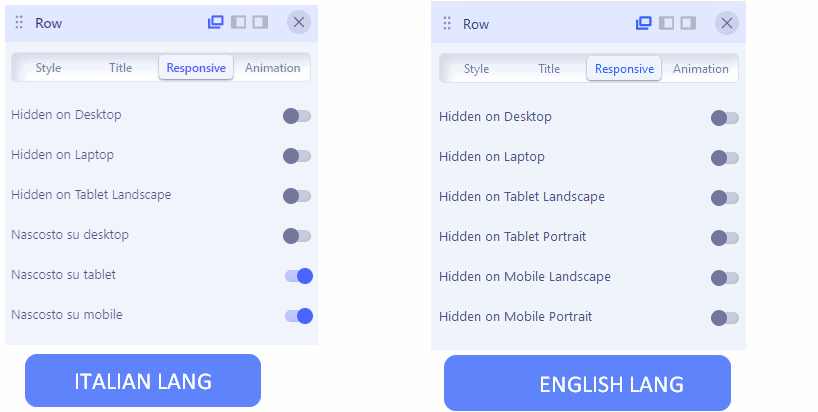
I will try to prepare you IT LANG fix for that.
And yes, please keep SPPB 4.0.10!
Paul Frankowski Senior Staff
please download, unzip, and using FTP override all files (!) keep folder struture.
then check ROW Options > "Responsive" tab again !
Morphinestyle Asked this
Hi Paul!
I have the response.
-
about the main issue it still remain: i have THE DOUBLED SECTIONS (PAGE COVER), it stop me to upgrade to 4.0.10 the live version (see previous hidden content: you can find the urls with online live 4.0.7 and 4.0.10 version of the same website)
-
about the translations files: your ZIP was correctly loaded and now that panel is displayed just a little bit better in a strange "italISH" https://ibb.co/1Jvnbtr
-
about the translations: please let me take care of SPPB italians translations! it now are bad capitalized, and translated, and the last ZIP you gave me was partially translated and partially not in the same sentence! I'm already translator for NextEnd, hCaptcha and other Joomla and Wordpress extension developers. Give me this opportunity, please.
Paul Frankowski Senior Staff
3 years ago
· edited
Sorry for "italISH" - I made it quick for that area only - you have to correct that in administrator/language/it-IT/it-IT.com_sppagebuilder.ini
edit that file in Text Editor, make changes. Indeed lot more phrases needs to be translated.
You have to compare with that file:
administrator/language/en-GB/en-GB.com_sppagebuilder.ini
it contains all needed phrases.
Paul Frankowski Senior Staff
3 years ago
· edited
Can you help me a little more,
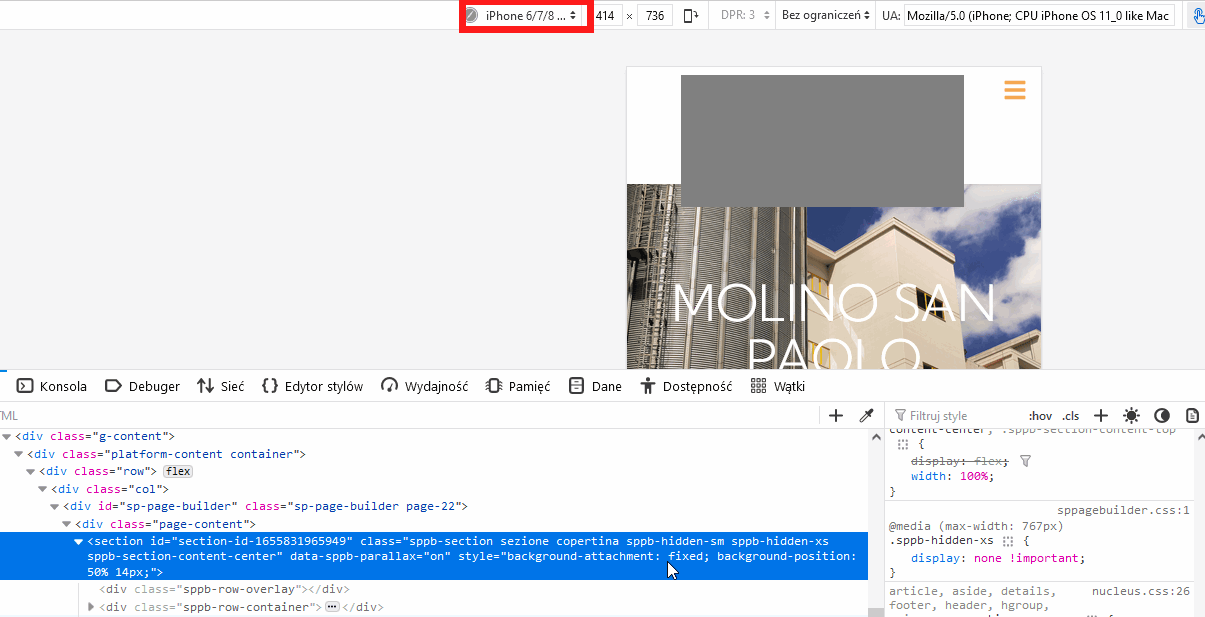
for example here (I hide logo with grey box). Row is already hidden on mobile view, that is correct or not?
Robert Deutschmann
Hi
Today i tried to update vom 4.0.7 to 4.0.10 and i do have the same issue like Morphinestyle:
about the main issue it still remain: i have THE DOUBLED SECTIONS (PAGE COVER), it stop me to upgrade to 4.0.10 the live version (see previous hidden content: you can find the urls with online live 4.0.7 and 4.0.10 version of the same website)
br, Robert
Morphinestyle Asked this
Sorry for the delay Paul.
There is two SIMILAT (but not the same) row/sections.
One is designed to be displayed on mobile and tablet.
Another one (similar but not the same) is designed to be displayed on desktop.
In the live website (SPPB 4.0.7) everything is working perfectly.
In the hidden website (SPPB 4.0.10) everything is no more working perfectly.
(urls of LIVE and HIDDEN websites are in past hidden content)
Paul Frankowski Senior Staff
3 years ago
· edited
In SPPB 4.0.10 there are more options to hide Rows. And we will keep it.
Before I get crazy, please do that:
-
on Joomla where you have SPPB 4.0.10 with new translation even if it has small mistakes.
-
Create a new Page
-
Add two rows with different image addon
-
Set different "Hidden" values, Hide one on Desktop and second row on Mobile etc.
-
Save settings
-
Preview
-
Tell me it it works or not.
Morphinestyle Asked this
Hello Paul,
i tried again your ZIP: please delete every translation and use this one in this order:
Nascosto su Desktop
Nascosto du Laptop
Nascosto su Tablet orizzontale
Nascosto su Tablet verticale
Nascosto su Mobile orizzontale
Nascosto su Mobile verticale
PLEASE DON'T ADD PERIODS
it will replace this https://ibb.co/HT44NXm
About the responsive test you ask for i will give you feedback soon.
Morphinestyle Asked this
Hello Paul,
about the responsive issue: i tried as you asked to make a responsive on new page and this is the response:
It works well for tablet/mobile, but it is buggy for Laptop/Desktop mode.
Between Laptop and Desktop there's no difference! It never worked!
I'm very thrilled about some future correction of this feature that will impacts again with page design: please fix it now and make it working as well.
However,
about my website: excluding the Laptop/Desktop issue, the responsive is working well on new page, but: WHY I LOST EVERY PAGE CONFIGURATION UPGRADING over 4.0.7???
May I need to reconfigure again from scratch: 8 pages x 2 rows x 3 languages = 48 element???
Paul Frankowski Senior Staff
WHY I LOST EVERY PAGE CONFIGURATION UPGRADING over 4.0.7???
Sorry, but it's not question to me, but I agree - it shouldn't be like that :(
sometimes legacy is a painful pin.
Hopefully, you have only 8 pages, not 80.
Thanks for Italian language update, I will update my private file.
Paul Frankowski Senior Staff
3 years ago
· edited
Between Laptop and Desktop there's no difference
There is:
- Desktop - hide if screen resolution is min 1400px or bigger
- Laptop - hide if screen resolution is min 1200px or bigger
easy to check&confirm in browser Code Inspector and CSS preview
and works tested!
Morphinestyle Asked this
3 years ago
· edited
Hi Paul,
desktop and laptop: it is not working properly!
Please, please, please test before answer me!
In hidden content you'll find a page.
In that page you will find a
"DESKTOP" title HIDDEN ON LAPTOP, and
"LAPTOP" title HIDDEN ON DESKTOP.
The behaviour should be:
DESKTOP title visible only on DESKTOP (>= 1400px: visible on DESKTOP, hidden on LAPTOP)
LAPTOP title hidden only on LAPTOP (>= 1200px AND < 1400px: visible on LAPTOP, hidden on DESKKTOP)
It not works as should be: please try it before answer me!
And more: in editing mode, clicking on Desktop and Laptop switcher nothing changes at all!
So i cannot see any difference if set visibility properties!
I've been reporting this issue since version 4.0!
You can find a test page in hidden content.
P.S.: you will not see any title on desktop (BUG) please try on <1200px
Paul Frankowski Senior Staff
3 years ago
· edited
desktop &laptop hide is working fine (1690px my default)
= removed privacy =
min 1200px in CSS means 1199px
So 1200px and all above .... are hidden.
= removed privacy =
- max-width works from the number.
- min-width works below the number
Paul Frankowski Senior Staff
Maybe read that "Grid options" >> https://getbootstrap.com/docs/5.0/layout/grid/
Morphinestyle Asked this
We are wasting time here: we can't understand correctly on this issue.
I propose you a videocall please.
Also: please keep urls private.
However i'll try to explain with other words:
1 - if i HIDE IN LAPTOP why my title is hidden also in desktop???
it should hide only in LAPTOP range: from 1200 to 1400px
2 - in editing mode DESKTOP and LAPTOP not showing completely my title, the element seems like disappeared: i need to turn to mobile or tablet to click on my element!
Please: with 1minute videocall i can explain exactly this issue!
Let me know!
Paul Frankowski Senior Staff
Create a video + share link
Morphinestyle Asked this
Hello Paul,
here explained in a video what i mean, it's in the hidden content, let's elaborate HD version, give it some minute.
These are the bugs:
1 - If you HIDE on LAPTOP and leave VISIBLE on DESKTOP an element is not working: is always hidden on DESKTOP! (bug on frontend and backend)
2 - Frontend and backend visualization are inconsistent: if you choose to HIDE on DESKTOP and leave VISIBLE on LAPTOP: on backend is not working, i can see only on frontend! (bug on backend)
I hope I was as clear as possible this time.
Paul Frankowski Senior Staff
Thanks, shared with developer.
Morphinestyle Asked this
Hello Paul and Toufiq!
Any update about this issue?
Log in to reply.