How can I remove the spacing or color the background so the numbers appear to be on a solid bar?
https://prnt.sc/LCiJA2jdGiFH
Thanks,
How can I remove the spacing or color the background so the numbers appear to be on a solid bar?
https://prnt.sc/LCiJA2jdGiFH
Thanks,
Hi there!
Thanks for contacting us.
You may try to increase the background width from the countdown settings. Here is a screenshot for your convenience:
It may help to achieve it as a single line.
Best Regards
I'm still having quite a bit of an issue trying to format the countdown addon. I need to be able to set it so that it is on one line with a solid background and centered on all devices. If I increase the background width, it forces the right edge outside of the column.
https://prnt.sc/WeLavHBYeQMa
Any assistance gratefully recieved.
Thanks,
Hi. There is no way to correctly configure this, except for the use of CSS.
.my-count .sppb-countdown-timer {
    display: grid;
    grid-template-columns: repeat(4, 1fr);
}
.my-count .sppb-countdown-timer.sppb-row > div {
    max-width: 100%;
    padding: 0;
}
.my-count .sppb-countdown-number {
    display: block;
    width: 100% !important;
}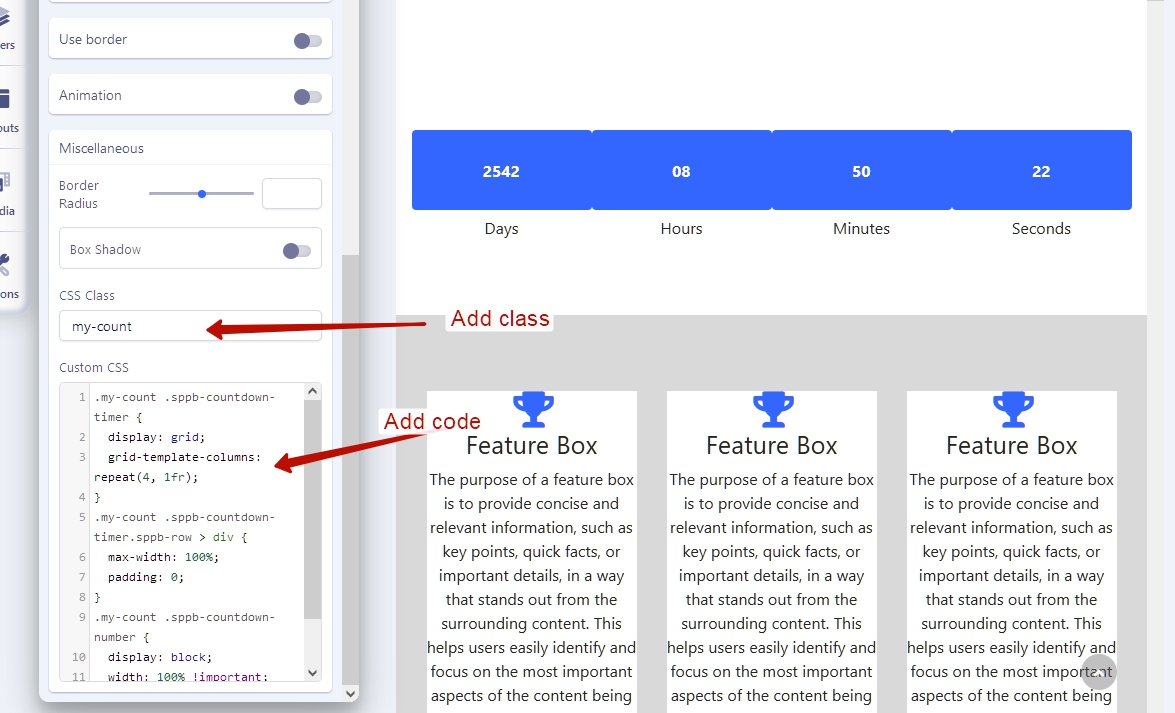
In the addon settings, use only height option. Width option will not work after using this CSS code.
The remaining things, like background and border radius, you can configure through the addon's settings.
Thanks, that worked great for the clock, but when the clock runs out, this is how the text looks
https://prnt.sc/11jbyRhxRu5q
Can that be stretched back out?
Hi. Here is an additional code for that
.my-count .sppb-countdown-finishedtext-wrap {
    grid-column: 1/-1;
}Hi,
All that is working great. What would be the code for removing some of the space above the finishedtext?
https://prnt.sc/uQvdkyiN32si
Hi
.my-count .sppb-countdown-finishedtext {
    margin: 0 !important;
}
