Hi, I made a feature box with text . I would like to know if I have the possibility to have two different text alignments between desktop and mobile. I would like it to be aligned justified on desktop and centered on mobile. Unfortunately, if I change the alignment on one mode, it also keeps it on the other. Thank you
Staff replied
SP Page Builder
Text Alignment
5 replies

Paul Frankowski Senior Staff
Hi,
Possible, but custom CSS may be needed.
- First set Left align in addon settings
- Then use below Custom CSS for Mobile view
@media screen and (max-width: 680px) {
.sppb-addon-feature .sppb-addon-text,  .sppb-addon-feature .sppb-media-content {
  text-align: center !important;}
    }
PC&GRAPHIC Asked this
Paul thanks for your reply. I inserted the code in the style section of the future box in custom css but it doesn't change anything.
I'll explain:
In the desktop part the text must be justified while in the phone mode it must be centered. If I make the change to the form it applies it for all desktop tablet and phone view types.
I entered the css code putting the text set to left but it remains unchanged
Paul Frankowski Senior Staff
Before told about alignments it means text-align.
Now you talk about text-justify. Those are two different CSS Properties!
Which one you want to change? Decide.
PC&GRAPHIC Asked this
Maybe I explained myself wrong...
in the future box I have a text that I would like to be aligned to the left...up to here there are no problems.
the same text that is in the left-aligned feature box I would like it to be center-aligned when viewed in mobile.
If I put the interface on mobile and make the change in the center accordingly, it also changes the alignment in desktop mode.
I noticed that instead with the font size it manages to manage the two things separately but as far as text alignment is concerned, no.
Paul Frankowski Senior Staff
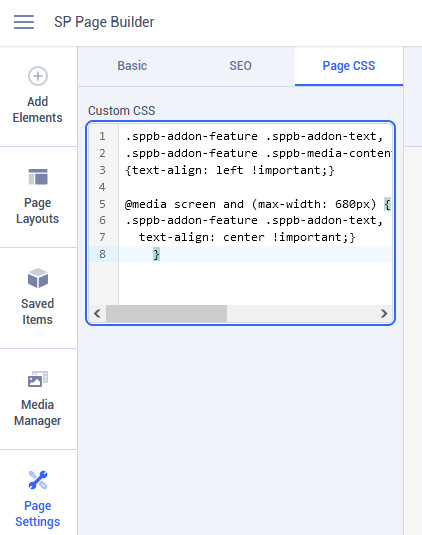
Ok, so if you can align to left in addon settings - do it, if not - copy and paste Custom CSS code inside that page: Page Settings > Page CSS
.sppb-addon-feature .sppb-addon-content,
.sppb-addon-feature .sppb-addon-text,
.sppb-addon-feature .sppb-media-content
{text-align: left !important;}

@media screen and (max-width: 680px) {
.sppb-addon-feature .sppb-addon-content,
.sppb-addon-feature .sppb-addon-text,
.sppb-addon-feature .sppb-media-content {text-align: center !important;}
 }
yes, it works, I tested on my own website!
Log in to reply.