Hello I would like to ask you, how can I create with HelixUltimate template 2.0.13 a permanent LEFT MENU like offcanvas menu? When I put in left position the menu shows all submenu in a column without dropdown effect.
What is nessasary to do? How can I appear menu in another posiotion (left) with dropdown effect?
Awaiting an answer
Templates
vertical meni i n left possition
7 replies

Mehtaz Afsana Borsha Staff
Hi
Thanks for contacting us. Allow me some time please. I need to talk about it with our team then I will let you know.
-Regards.

Paul Frankowski Senior Staff
If I may....
YouTube tutorial: https://www.youtube.com/watch?v=bl3pDMUjHEc
iig75 Asked this
It can be real! I saw it youtube link before ask you. The version of template is very old 1.1.2, the describtion is different than now 2.0.13. The classes are missing or different, too. Tell me a tutorial which is actual.
Paul Frankowski Senior Staff
We don't have - that video was made by one of members, like you.
You have to improvise or use template premium that already have that sidebar.
iig75 Asked this
What is the name of temlpate premium I use to be?
Paul Frankowski Senior Staff
For example, Fixter >> https://demo.joomshaper.com/2018/fixter/

Pavel
3 years ago
· edited
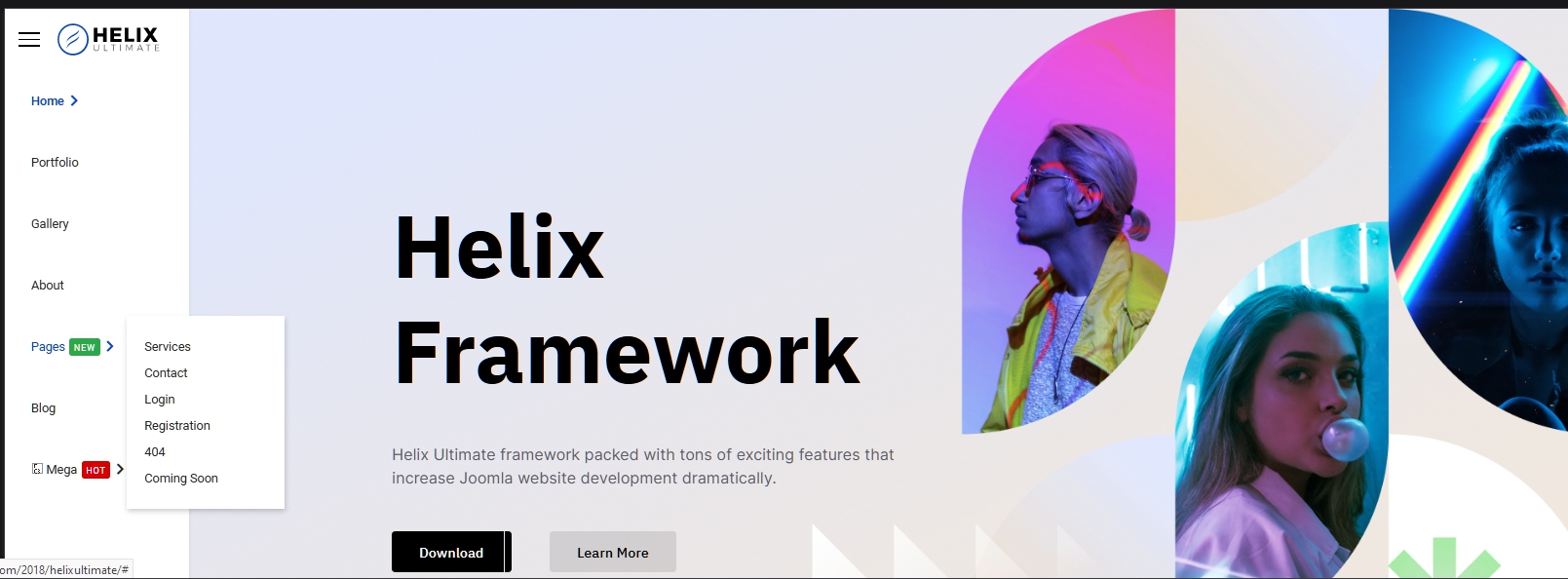
Hi. In general, this video is 90% relevant, but too complicated. Everything can be done easier. Only CSS is enough. And some interface settings like offcanvas position (OFF for desktop), turning OFF sticky Header and not using Mega Menu
@media (min-width: 992px) {
    .body-innerwrapper {
        width: calc(100% - 210px);
        margin-left: auto;
    }
    .sticky-header-placeholder {
        display: none;
    }
    #sp-header {
        position: fixed;
        top: 0;
        left: 0;
        width: 210px !important;
        height: 100%;
        animation: none !important;
    }
    #sp-header .row {
        flex-direction: column;
    }
    #sp-menu>.sp-column {
        justify-content: start !important;
    }
    .sp-megamenu-parent {
        display: flex !important;
        flex-direction: column;
        margin: 0;
        float: none;
    }
    body.ltr .sp-megamenu-parent>li.sp-has-child>a::after,
    body.ltr .sp-megamenu-parent>li.sp-has-child>span::after {
        content: "\f054";
    }
    body.ltr .sp-megamenu-parent .sp-dropdown.sp-dropdown-main.sp-menu-right {
        left: 100%;
        top: 0;
    }
}
Log in to reply.