Custom H1 Text Colors - Forum | JoomShaper
Staff replied SP Page Builder

Custom H1 Text Colors

Asked by Scott 3 years ago Last activity 3 years ago

Hopefully JS dev team will done upgrade the Tiny editor to include coloring of individial letters and words. both H tags and paragraphs.

In the meantime, I googled this and here is what I found it is doable but not a solution becuase I am uanble to add words after.

Code I found to be nserted fo rthat spectifi page and h1 text. The only word that goes in th etitle text are is EVER the css forces PLAY next to it, unfortuantely I cannot add the word Mats in the title text

h1:after {
  content: "PLAY";
  position: relative;
  color: #f00909;
}

The video explains it more clearly

https://clipchamp.com/watch/ZXQKxldpw2E

5 replies

Pavel

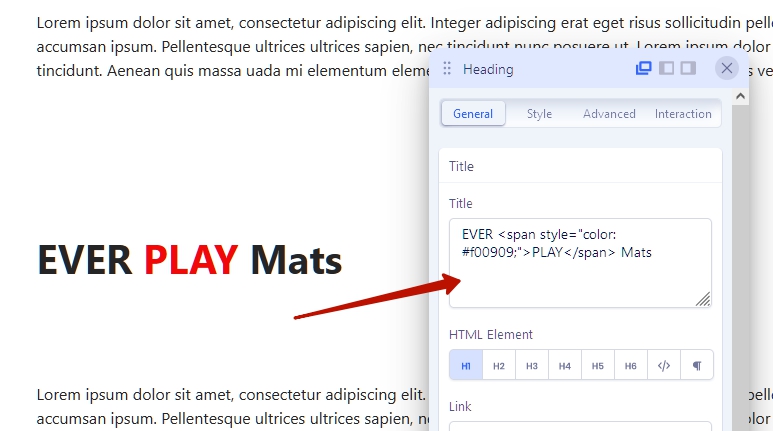
Hi Scott. You complicate. Everything is much simpler. CSS no need, HTML with inline style only.

Insert it in the Title field.

EVER <span style="color: #f00909;">PLAY</span> Mats

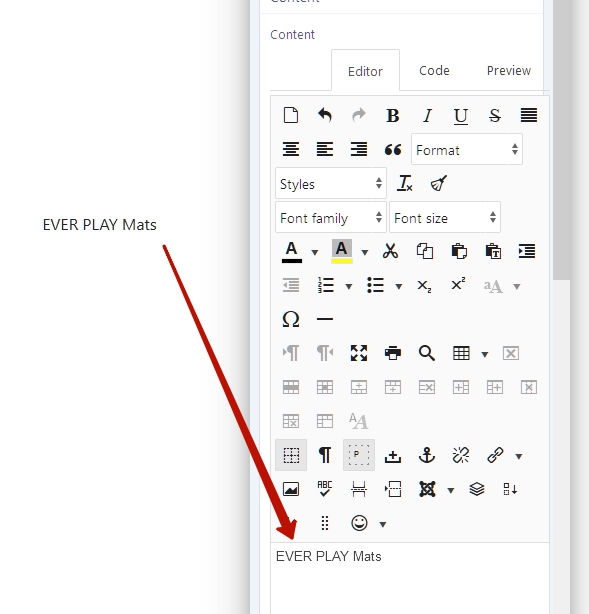
If it is difficult for you to write this code yourself, use a text addon to color the text, then switch to the code mode, copy and paste where you need.

Example using JCE editor.

1

2

3

Scott Asked this

Hi Pavel, thank you I'll give it a go

Pavel
3 years ago · edited

If you prefer to use TinyMCE, open the article editor in a separate browser tab and generate the code there. Since the use of TinyMCE is very not convenient inside SPPB.

Scott Asked this

Perfect thank you

Mehtaz Afsana Borsha Staff

Hi

Thanks for contacting us. And it's good to see that we have a nice user community where everyone tries to help each other. Thanks, Pavel for sharing the solution with him.

Scott you can now close this post by accepting the answer.

-Regards.

Log in to reply.