Staff replied Templates

Submenu items in a megamenu are not clickable

Asked by Matt Carr 3 years ago Last activity 3 years ago

The submenu items in the Megamenu are not clickable None of the Megamenu links are clickable. How to fix please?

I have tried your recommendation below but it doesn't solve the problem:
To make the submenu items in the Megamenu clickable, you need to add the class "sp-has-child" to the parent menu item. To do this, go to the Menu Manager in your Joomla admin panel, select the parent menu item, and add the class "sp-has-child" to the "Link CSS Style" field. After that, save the changes and check the website.

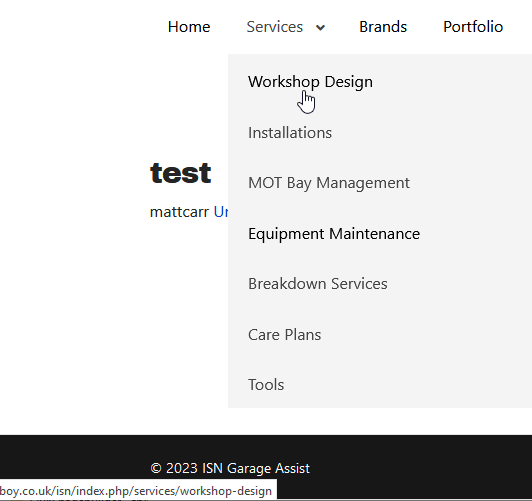
2 replies

Paul Frankowski Senior Staff

Hi Matt,

are you sure? I can click them and all those submenu items works
info_1370_2023.gif

Paul Frankowski Senior Staff
3 years ago · edited

Matt,

BTW

Have you see that in your website source code:
<link href="/isn/components/com_eshop/assets/bootstrap2/css/bootstrap.min.css" rel="stylesheet" />

it' loads Bootstrap v2.1.1 (from 2012) hello!!!

Our template is using Bootstrap v5.1 and Joomla 4.3 core is using Bootstrap v5.2 - and that very old v2 from shop may cause conflicts & problems, please talk with eshop developer or check settings how to disable this ancient version.

Log in to reply.