Hello Joomshaper, after the last update and migration to Joomla 4 I have problems with Font awesome again on Educon template. Some icons are displayed correctly, others are not. Maybe you have a tip for me how I can fix this. This approach has only partially solved the problem:
@font-face {
font-family: 'Font Awesome 5 Free';
font-style: normal;
font-weight: 400;
font-display: auto;
src: url("../media/jui/fonts/fontawesome-webfont.woff2?v
In the dropdown-menu on the left of the columns, arrows are missing. The style of the module "latest" has completely vanished.
Thanks in advance, Jens
Solved
Templates
Font awesome problem after migration to joomla4 on Educon template
Accepted answer
Marked as the solution
Paul Frankowski Senior Staff
3 years ago
· edited
Hi Jens,
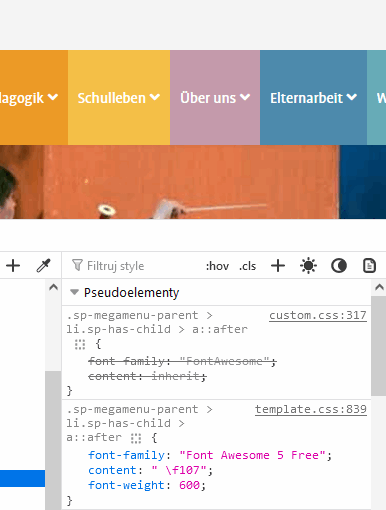
You forgot to check one important thing. In your custom.css you have request for old FontAwesome, not a new one FA5 that is used now. For example in line 317 etc. - please delete that:
.sp-megamenu-parent > li.sp-has-child > a::after {
  font-family: "FontAwesome";
  content: inherit;
}
And it will fix missing arrow icon in menu items, check why.
So it's not template bug, but ...
In general delete
font-family: "FontAwesome"; -from whole custom.css file, and should be much better after.
2 more replies
Paul Frankowski Senior Staff
3 years ago
· edited
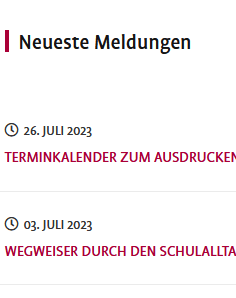
About style of the module "latest" - I will improvise:
.latestnews {text-transform: uppercase; }
.latestnews > div
{border-bottom: 1px solid #ebebeb; margin: 0 -30px; padding: 20px 30px;  display: grid; }
.latestnews > div:hover {background:#f9f9f9 }
.latestnews > div > a {order: 2;}
.latestnews > div > small {order: 1;}
.latestnews > div > small::before
{content: "\f017"; margin-right: 5px; font-family: "Font Awesome 5 Free";}
after using it in custom.css after line 470
Jens Funk Asked this
Hello Paul, of course, I accept both answers. As always, you have the solution(s). I didn't think of the custom.css of course. Also in the template.css I still found an outdated declaration. Thanks a lot, Jens
Log in to reply.