Addon Table - Forum | JoomShaper
Solved SP Page Builder

Addon Table

Asked by Thomas 3 years ago Last activity 3 years ago

Hello,
I’m using the addon table with each two rows containing some specific information on a topic with the first column covering two rows and containing the name of the topic. In my questions I refer to Table 1 on the webpage (http://www.isnr.de/index.php?option=com_sppagebuilder&view=page&id=14)

My questions are:

  1. Can the content of the first cell be aligned vertically (i.e. “ANSTO”) on the top of the cell?
  2. Can the height of the rows be adjusted? E.g. reduce the height of the Header row .
  3. In the search box above the table content the search icon is overlaying the text. Can it be moved to the right?

Many thanks for your help in advance.

Joomla! 4.3.3 Stable [ Bora ]
SP PageBuilder 5.0.8
http://www.isnr.de/index.php?option=com_sppagebuilder&view=page&id=14

Accepted answer

Marked as the solution
Mehtaz Afsana Borsha Staff
3 years ago · edited

I have already gave you, use this CSS for search box

#sppb-addon-cba15a72-a74d-405c-bc4d-7a616ec493e3 .sppb-addon-table input[type="text"].sppb-addon-table-search{
  padding: 15px 20px 15px 40px !important;
}

Please check now, it is fixed already

https://prnt.sc/HPirlBNqrdtd

Thomas Asked this

Many thanks for all your help.
Really outstanding!

Best regards

Thomas

9 more replies

Toufiq Senior Staff

Hi there,

I appreciate you reaching out. I sincerely apologize for this oversight. Can you share a screenshot that you want to do exactly?

-Thanks

Mehtaz Afsana Borsha Staff
3 years ago · edited

Hi

Thanks for contacting us.

1: Could you please give me any example what kind of actually you are looking for?

2: For reducing the height you can use this custom CSS

#sppb-addon-cba15a72-a74d-405c-bc4d-7a616ec493e3 .sppb-addon-table-main.bt tbody td:before, #sppb-addon-cba15a72-a74d-405c-bc4d-7a616ec493e3 .sppb-addon-table-main.bt tbody td:before, #sppb-addon-cba15a72-a74d-405c-bc4d-7a616ec493e3 .sppb-addon-table-main th{
  padding: 5px 20px !important;
}


3: For search box use this CSS


.awesomplete .form-control{
  position:relative;
  left:40px;
}

Go to system--> https://prnt.sc/tDbSUJh6LiGu --> Default template-->Template options--> https://prnt.sc/A5nlsBvCQsqs And add your CSS there.

-Regards.

Thomas Asked this

Hi,

thanks for your answers.

  1. The table should look like
    http://www.isnr.de/images/questions/Table.png
    i.e. the names in the first column should be aligned top in each cell.

  2. For the header the solution worked fine. Is there a way to apply it also for the other rows? (please see http://www.isnr.de/images/questions/Table.png on the right)

  3. Followed your advice, but still get the output http://www.isnr.de/images/questions/ShiftSearch.png

Here a screenshot of the CSS-field http://www.isnr.de/images/questions/CSS.png

Many thanks!

Thomas Asked this

Sorry for the late reply,

You can download the files via https://gigamove.rwth-aachen.de/de/download/ad409da65c83ba865b4be6bb1f5bf9d2

Thomas Asked this
3 years ago · edited

Hi,
appreciate your help and patience very much!

Maybe we are talking on different things. My problems are on Table 1, i.e. the table below the caption “Table 1. Operational neutron imaging instruments at user facilities: status and access information.” within the text at http://www.isnr.de/index.php/ni-facilities
Directly below this caption is the input line for the search in the table following the caption. Here, the “search icon” is overlapping the text. Can text be moved to the right, that the text is not overlapped by the icon (or the icon shifted to the left)?
For 1, please download the files (screenshots) via Gigamove via the following link: https://gigamove.rwth-aachen.de/de/download/ad409da65c83ba865b4be6bb1f5bf9d2
The zipped file contains three screenshots/sketches:

  • ShiftSearch: the mentioned problem with the search icon ![Hi,

    appreciate your help and patience very much!

Maybe we are talking on different things. My problems are on Table 1, i.e. the table below the caption “Table 1. Operational neutron imaging instruments at user facilities: status and access information.” within the text at http://www.isnr.de/index.php/ni-facilities
Directly below this caption is the input line for the search in the table following the caption. Here, the “search icon” is overlapping the text. Can text be moved to the right, that the text is not overlapped by the icon (or the icon shifted to the left)?
For 1, please download the files (screenshots) via Gigamove via the following link: https://gigamove.rwth-aachen.de/de/download/ad409da65c83ba865b4be6bb1f5bf9d2
The zipped file contains three screenshots/sketches:

  • ShiftSearch: the mentioned problem with the search icon http://www.isnr.de/images/questions/ShiftSearch.png
  • Table: sketch, how the table should look like http://www.isnr.de/images/questions/Table.png
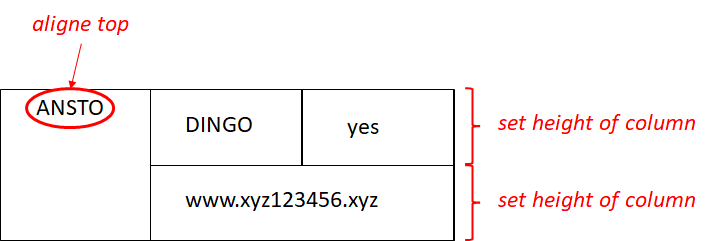
  • CSS: solution you suggested to overcome the problem with search icon (not working - or I did something wrong)

Your solution 2 already helped in getting the right heights of the rows. Now only the names “ANSTO”, “FRM II” in the left column should positioned top not centered in their cells.
Many thanks!

]()

  • Table: sketch, how the table should look like
  • CSS: solution you suggested to overcome the problem with search icon (not working - or I did something wrong)

Your solution 2 already helped in getting the right heights of the rows. Now only the names “ANSTO”, “FRM II” in the left column should positioned top not centered in their cells.
Many thanks!


Mehtaz Afsana Borsha Staff

Ok got it, Allow me some time please, I will check and get back to you soon.

Mehtaz Afsana Borsha Staff

Use this custom CSS

#sppb-addon-cba15a72-a74d-405c-bc4d-7a616ec493e3 .sppb-addon-table input[type="text"].sppb-addon-table-search{
  padding: 15px 20px 15px 40px !important;
}

.sppb-addon-content h5 strong{
  position:relative;
  bottom:20px;
}
Thomas Asked this

Great, the positioning via the bottom-value is working for the first column!
Many thanks for this.

Finally, there is only the question left concerning the search icon http://www.isnr.de/images/questions/ShiftSearch.png
I already realized that it's in the class "sppb-addon-table-search-wrap", but have not figured out, yet, how to seperate the icon and the text.

Many thanks

Log in to reply.