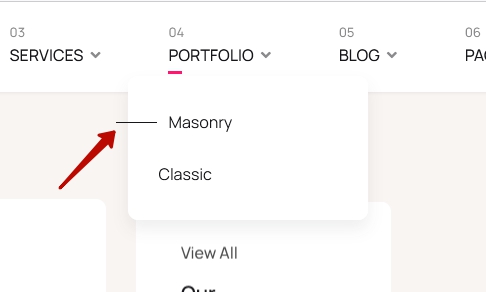
Child Menus of a Main Menu not Showing. - Forum | JoomShaper
Solved Helix Framework

Child Menus of a Main Menu not Showing.

Asked by Duck & Shark 3 years ago Last activity 3 years ago

Accepted answer

Marked as the solution
Rashida Rahman Staff
3 years ago · edited

Hi there!

Thanks for contacting us.

Please use the following code in your custom CSS:

.sp-megamenu-parent .sp-dropdown .sp-dropdown-inner {
    overflow: visible;
}

Hope this helps!

Note: Path towards custom CSS(Joomla 4): System>Site Templates Styles> Click on your current default template name then choose Template Options. Then find custom CSS within the custom code.

https://prnt.sc/5mBuSRh907N3

https://prnt.sc/ooiq-lkMEXr_

https://prnt.sc/nunlX-f5AhK1

I have put that in Wimble default and transparent styles already. Please check.

Best Regards

Rashida Rahman Staff

Thanks for accepting the answer...

1 more reply

Pavel
3 years ago · edited

Hi. Try this code

.sp-megamenu-parent .sp-dropdown .sp-dropdown-inner {
    overflow: visible;
}

But keep in mind that the Joomshaper team set it overflow: hidden; from the box for design reasons. If you apply this code, then the lines will climb outside.

And you will need additional CSS coding to get rid of this.

The design of this template is not designed for the 3rd level of the menu. This is not a bug, but an erroneous design feature. I would do it differently so as not to affect the 3rd level of the menu. But what is, that is.

Use commercial templates as it is. Or pump your CSS skills if you want to change it.

The best template for developing any design is pure Helix Ultimate

Log in to reply.