Dear friends,
I just can't remove the title from my frontpage performed in SP PageBuilder. Though I made all relevant setting in Joomla. The title is still there.
The title I do want to hide is "portada"...
How can I do that.
Dear friends,
I just can't remove the title from my frontpage performed in SP PageBuilder. Though I made all relevant setting in Joomla. The title is still there.
The title I do want to hide is "portada"...
How can I do that.
Hi Beatriz,
Probably becuase Title is from Menu item > Page Title settings, it's not part of SPPB.
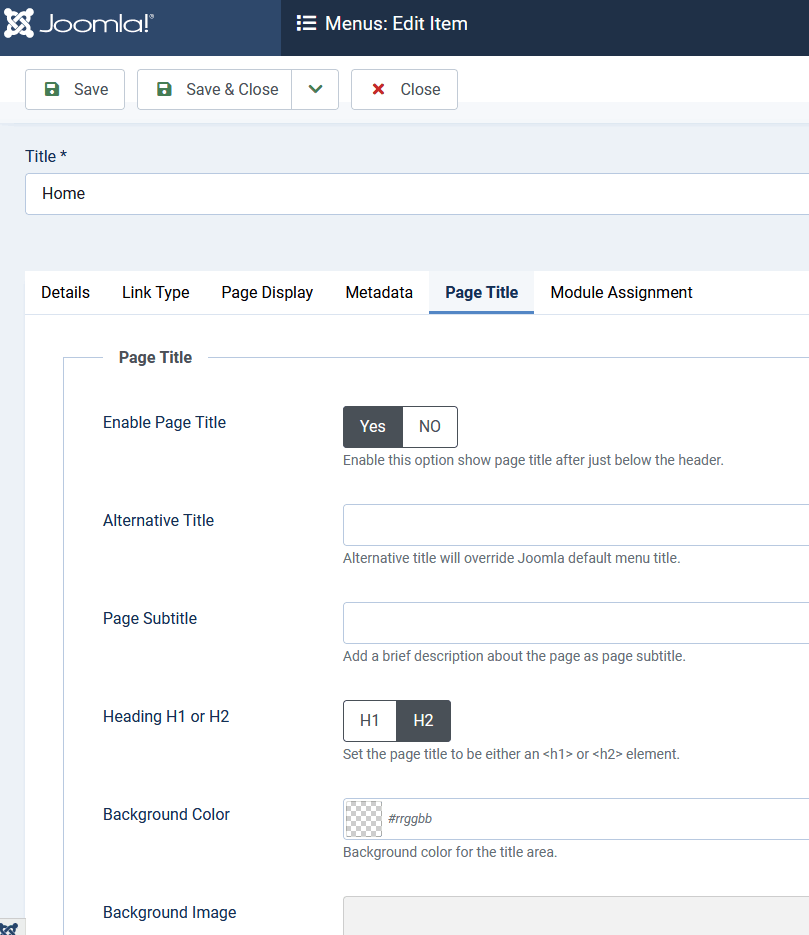
In Enable Page Title : NO
and remove all subtiles if you have any text
Thanks, but I did that before.
Let me tell you that such settings belong to Joomla menu items.
BTW ---Your button to insert image doesn't work----!!!!!
Please visit www.polyrob.net
You will see right now a blue band with a white text: INICIO.
That is because I chose "YES" in the Menu: Edit Item settings.
If I choose "NO" the blue line and obviously the word INICIO will hide
The problem is not "INICIO" but "portada" which is the name of the page I performed inSP Page Builder.
Do I explain myself?
Thank you.
Your site is infected by phishing script, My Avast firewall said it's too danger to vist it. And I don't want to risk.

Anyway,
In Home menu item setting > Page Display (tab) > Show Page Heading: Hide
if you don't use Page Titles at all, maybe in Template Options > Layout > remove "Title"
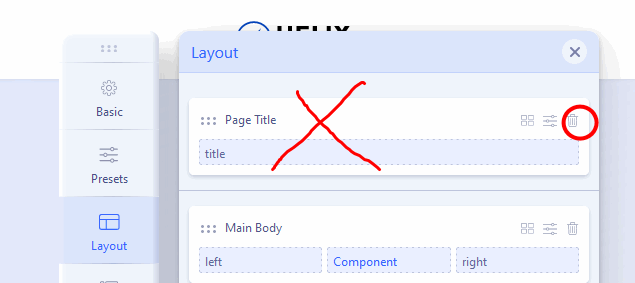
if you use it only on few subpages, you can always can duplicate templat style and use it on selected menu items.
Hi,
It does't work, sadly.
Regards,
Beatriz
