Solved SP Page Builder

Picture with coloured border

Asked by Patrick Ladner 3 years ago Last activity 3 years ago

Hello all.

I would like to give a picture a coloured border. But this is not possible with SPPB 5.0.9.
The border goes over the whole width of the container.

Do you have a solution?

It should be possible to give each picture a border.

Thank you very much.

https://prnt.sc/uektJpsJR_yZ

Accepted answer

Marked as the solution
Paul Frankowski Senior Staff

Yes, we planned to improve that one day.


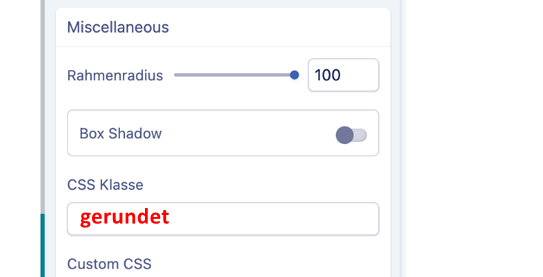
You can also use "CSS Klasse" with: gerundet

info_1536_2023.gif

Then in Template Options > Custom CSS or custom.css file add:

.sppb-addon-single-image.gerundet img {
  border: 2px solid #038E9C;
  border-radius: 100% !important;
}

eine einfache und zuverlässige Methode :)

3 more replies

Paul Frankowski Senior Staff
3 years ago · edited

Hi Patric,

by now only via Custom CSS :/

.sppb-addon-single-image img {
  border: 2px solid #038E9C; }

but remember to set radius for image in settings, or use

.sppb-addon-single-image img {
  border: 2px solid #038E9C;
  border-radius: 100% !important;
}

Use it for that page (Page Settings > CSS) or in addon (Custom CSS) only.

Patrick Ladner Asked this

Hello Paul

Thank you very much. I have created a custom.css and it works wonderfully with the class.

Thank you very much.

PS:
This is the second website I am building, only with Helix and SPPB 5.x.
So far I haven't had any major problems except for a few small things.

Paul Frankowski Senior Staff

You're welcome.

  1. Good to know :)
  2. You can add review on JED.
Log in to reply.