Staff replied Templates

I am using Joomlashaper Wimble Template How I can make my site menu Transparent or Black ate least for for both homepage and also subpages

Asked by Mohammed 3 years ago Last activity 3 years ago

Hi There

have a problem with the Wimble Transparent Style for the sticky menu whereby if I go into the Template options and make any changes, the header colour changes and but not coming transparent. I am using Joomlashaper Wimble Template How I can make my site menu sticky with Black Background or Transparent for both homepage and Also subpages, I tried to put custom css code but it is not working with me

sp-header { background: #000000 !important; }

I also tried to put the template to production mode but with out any luck

HomePage:
https://onlinezoneit.com/cdc-demo/index.php

Subpage Sample:
https://onlinezoneit.com/cdc-demo/index.php/aboutus/who-we-are

2 replies

Pavel
3 years ago · edited

Hi.

I do not know this template, but in theory it should be in the settings.

If you will not find the settings, then in addition to your code try this one.

.nav-placeholder {
    height: 0 !important;
}
#sp-header {
    position: absolute;
}

And adjust padding-top in first SPPB section.

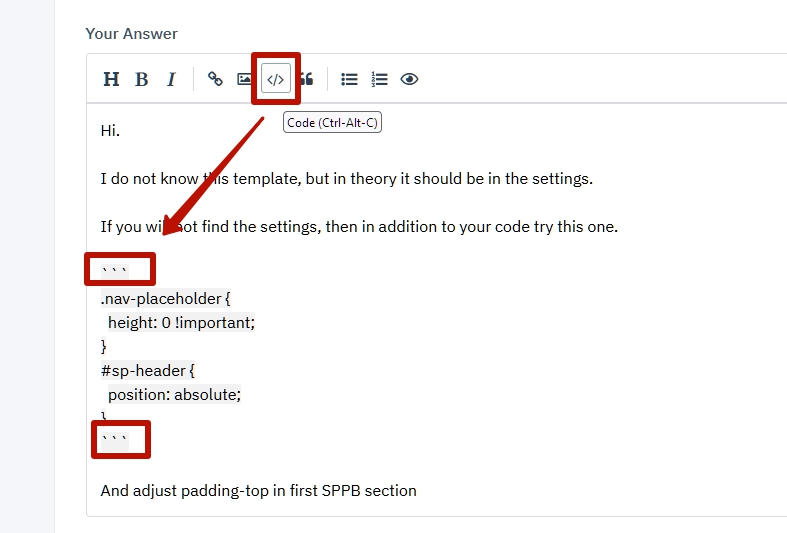
Tip: Use this icon to add code example to the post

Rashida Rahman Staff

Hi Mohammed,

Did Pavel's suggestion works for you? Kindly let us know.

Best Regards

Log in to reply.