Make Add on Feature clickable - Forum | JoomShaper
Solved SP Page Builder

Make Add on Feature clickable

Asked by Roger Elsig 3 years ago Last activity 3 years ago

Hello

https://postimg.cc/D4vthFG7

On my start page I have four feature add ons. I would like the whole feature to be clickable like a huge button. Is this possible? I know I can make the icon and/or the title clickable.

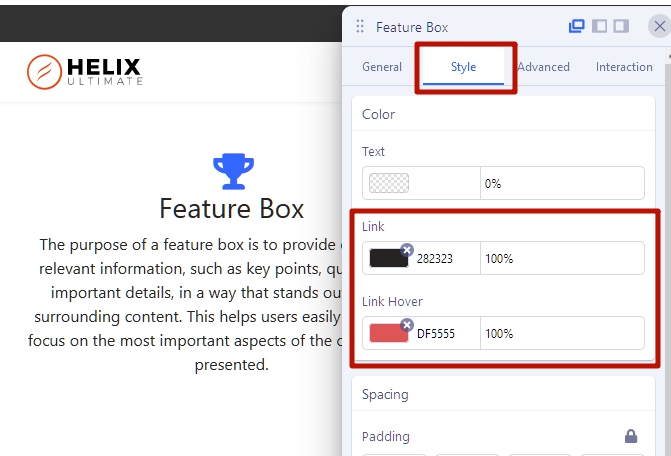
Alternative all my links on the whole page are displayed in red. Is it possible to change the title link into #666666 instead of red. The red takes a little too much attention.

Thank you

Accepted answer

Marked as the solution
Pavel

Hi.

Add link to the Title only.

Set colors as you like.

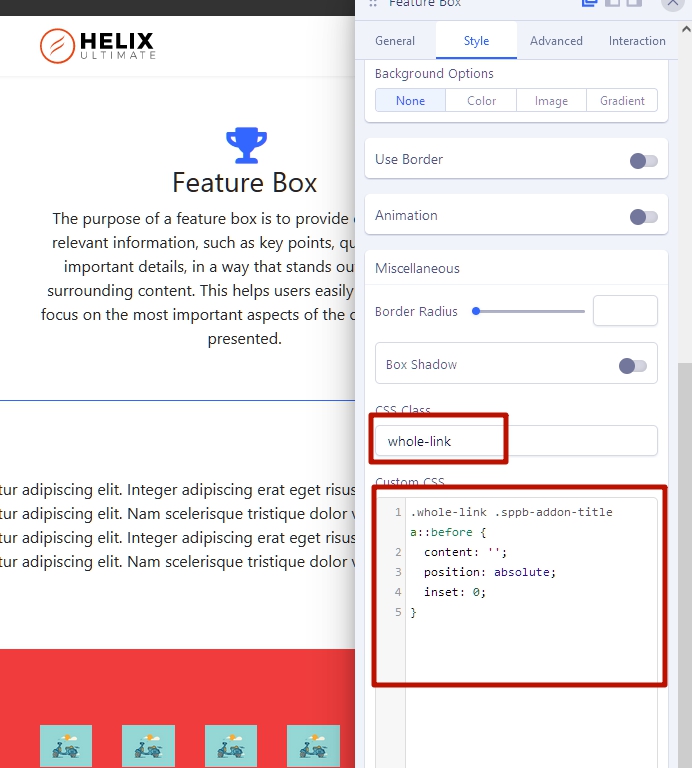
Add class whole-link and css

.whole-link .sppb-addon-title a::before {
    content: '';
    position: absolute;
    inset: 0;
}

3 more replies

Mehtaz Afsana Borsha Staff

Hi Roger,

Thanks for contacting us. You can follow Pavel's instructions. And thanks Pavel for helping him.

-Regards.

Roger Elsig Asked this

Perfect, thank you Pavel

Roger Elsig Asked this

One more question concerning the same feature box.

How can I make sure that all boxes as shown in the screenshot are the same heigth?

https://postimg.cc/vDd73p98

.whole-link .sppb-addon-title a::before {
    content: '';
    position: absolute;
    inset: 0;
        height: 200px;
}

didn't help.

Log in to reply.