my site uses J3.10, PHP 7.4.9, Helix 3 frame work 3.0.5, sppb 3.8.7, french pack langage, slider CK, IC Agenda and it works fine on a local wampserver 3.3.3
I tried to update to J4.4.1 as J3 no longer supported. I made all the checks proposed accordding to the migration documentation and got 500 errors with only J4.4.1, Helix3framework 3.0.5, and sppb 3.8.7 as the compatibility helix document not found on your site. I think the template helix3 shoud be update but i can't find the package. I don't know what version of sppb i can use: do the latest versions of sppb (i mean version 5 and later) work with J4 AND Helix3 framework. Please could you help me?
regards
jluc
Solved
SP Page Builder
updating from J3.10 to J4.4.1 causes a lot of errors and doesnot work
Accepted answer
Marked as the solution
Paul Frankowski Senior Staff
Yes, on your place I would use Helix Ultimate (set as default) - that is the most current template & framework. Good idea :)
Remember to disable all Helix3 plugins to reduce conflicts.
12 more replies
Paul Frankowski Senior Staff
2 years ago
· edited
Hi Jean,
-
The last version of Helix3 (if it's a raw template) works inside Joomla 4.4 (!)
-
About SP Page Builder 3.x - please first update to version 3.8.10, and that version works inside Joomla 4.4.x And yes, you can still find it in download section, just scroll down to find it. More you can read here: https://www.joomshaper.com/documentation/sp-page-builder/technical-requirements
-
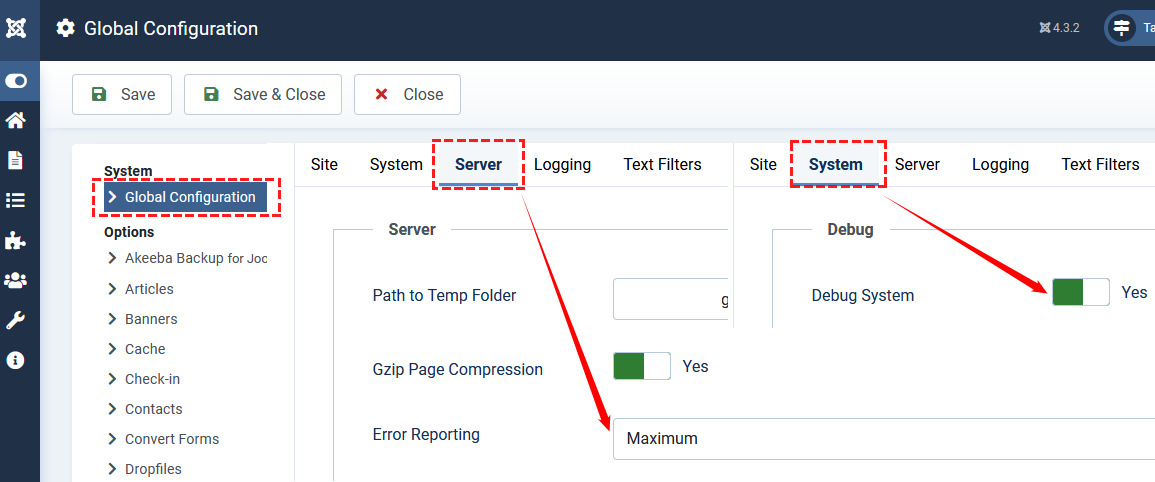
To preview what cause the problem, in Joomla Admin enable that
jean-luc herrouin Asked this
thanks paul, i will try again, after a new check.
regards
Paul Frankowski Senior Staff
2 years ago
· edited
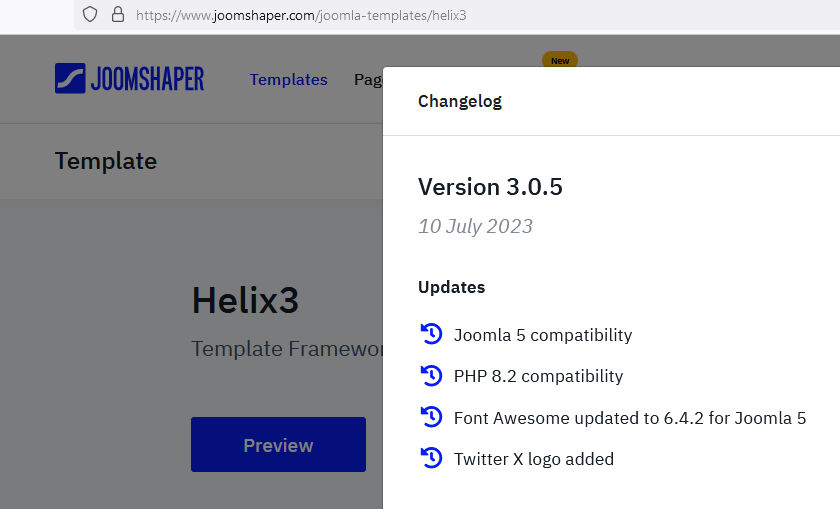
compatibility helix document not found on your site.
Info was in Changelog ;)
and some info is here: https://www.joomshaper.com/documentation/helix-framework/helix3/what-is-helix3
Helix3 documenation is "hidden" under Helix Ultimate docs, for obvious reasons, this is an old framework.
jean-luc herrouin Asked this
2 years ago
· edited
Again, thanks. However, as Helix 3 is an old framework, what is the best substitute according to you? I other words, is there a template similar to helix3, as much as compatible with it so i can run it with no or minimum changes;
I understood that helix ultimate is only a template, not a framework. I did not try it. Maybe is it a good replacement for helix3. Right or stupid idea?
regards.
jluc
jean-luc herrouin Asked this
Hi
thanks for your help solving previous issues
finally i succeed upgrading my site from J310 to J441.
It is now J441, Helix3 305, SPPB 523 icAgenda 3824 PHP 8126
Every thing rises up however i get a warning i don't succeed solving.
) Warning: Undefined property: stdClass::$content in D:\wamp364\www\bpp\administrator\components\com_sppagebuilder\editor\helpers\ApplicationHelper.php on line 89
anybody to help?
Thanks
jluc
Paul Frankowski Senior Staff
Jean,
- Is that raw Helix3 template or template based on Helix3?
- Please switch to Casopea template for a moment and check that same view again.
- What editor you have set as default: TinyMCE or JCE? If JCE make sure it was updated.
- DO you have that same error message on all pages with SPPB or only one?
jean-luc herrouin Asked this
Paul, thanks for yor reply,
- it is raw helix3 template.
- Casiopea gives the same warning message.
- Both editors Tiny MCE and JCE have been tested. JCE release 2 9 55. The same warning message happens with both editors.
- Regarding pages that present the problem: not all pages present the problem. Pages wich make a simple link to an external website do not have the warning message
I got back to sppb 3810 : the warning message is not there, but another error message comes as soon as i try to access page for editing. Unfortunately i lost the error message, when my previous session expired. It does not matter, because then i got back to sppb 524 as i saw this version could match the installation. I got some sppb 524 installed but install ended with error message Call to a member function children() on null.
I tried to deinstall everything sppb. Got the rrror Call to a member function children() on null.. Some elements still present after desinstall. I reinstalled sppb 523 and got the same error message Call to a member function children() on null.. However release 523 seems to be there. Maybe partially. in the frontend still the warning message. In the backend i tried to edit somme sp pages. And i got an error message : error status code 500. In fact i can't access no sp pages for editing.
So, to resume:
SPPB release 523 installed 3 elements and ended with error Call to a member function children() on null. Elements installed are:
1.Menu admin SP Page Builder SP Page Builder Administration Module 1.4 01-08-2014
2.SP Page Builder Administration Composant 5.2.3 01-09-2014
3.SP Page Builder (fr-FR) Site Fichier 1.0 13-04-2017
Frontend has the warning message.
Backend doesnt allow to edit any sp pages: error code 500 as soon as i try to access pages.
Paul Frankowski Senior Staff
- Thanks
- OK
- Thanks
- Ok, it means that can be problem with one(?) used addon, can you can export-zip-share link to that page file, I want to check on my demo site.
Please DO NOT reinstall with older version otherwise you will make (or already did) BIG MESS in SPPB tables! Which cannot be fixed by Me! Recover website from backup or ask hosting support to do that!
jean-luc herrouin Asked this
hello
i made an export from a faulty sppb page. In fact all pages have the same problem. The one that do not present the problem are not sp pages. I was wrong.
The export is a json file. I made two exports (2 different pages). I can attach also a word file with screen shot of what i see on my screen when i display or edit or try to modify pages.
The question is how can i share this.
here is a link on a google drive. Please let me know if it reachable:
https://drive.google.com/file/d/1-j2-ODvpaaDvJ8NnlYjLXd77WaDDNM3z/view?usp=drive_link
regards
jluc
jean-luc herrouin Asked this
hello paul,
Finally i uninstalled every SP Page Builder from joomla. I tried using admin extension uninstall. But it did not uninstall all. I got some errors. I have to do manual uninstall, delete each directory "sp page builder" given by uninstall process from admin dashboard, and then delete sp page builder from database. I made a new installation from SP Pagebuilder 5.2.4 pro. Now every went ok. Probably some thing went wrond when uninstalling and then installing new or old version. I suppose uninstall process not working as expected, or maybe i did not follow what uninstall process told me ???. And the sp pb datage went corrupted. uninstalling manually solved the problem.
Please, i don't know how to indicate the problem and issue are solved. Can i let you do? By the way thanks a lot for your help.
regards
jluc
Paul Frankowski Senior Staff
Are all pages working? Even those which you had in exported page?
jean-luc herrouin Asked this
2 years ago
· edited
Well, once again you are right. Since i update to sppb 524 pro, All pages do not work. SP Pages are working fine, even the pages i had in exported pages. Only sliders do not work.
Sliders are handled by Slider CK. Don't remember if it was a free version i had under J310. for J441, I update slider ck free 2.3.1. But looking at change log it seems that sliderck pro should be used. I ordered sliderck pro.
The problem i encounter if an out of memory error as soon as i want display a slider is either fatal error, or deprecated sisstr()
-
Fatal error: Allowed memory size of 134217728 bytes exhausted (tried to allocate 2097160 bytes) in D:\wamp364\www\bpp\libraries\regularlabs\src\ArrayHelper.php on line 578
It seems to come from regularlabs library. But i don't find such extension. I just found Regular labs extension manager. Don't know if it is the right component to use. Do i need to install it?
really what i have is
Regular Labs - Library Pack version :23.12.1338 date:01-12-2023
and
Regular Labs - Library bibliotheque version :23.12.1338 date:01-12-2023
both from Regular Labs (Peter van Westen)
and
a plugin same version and date : Système - Regular Labs Library
looking at regular labs free products, i found advance module manager recently updated. Is it the needed module replacing regular labs library? I am a little bit confused. -
Deprecated: stristr(): Passing null to parameter #1 ($haystack) of type string is deprecated in D:\wamp364\www\bpp\plugins\sliderck\folder\helper\helper_folder.php on line 83
Finally, updating from sliderck free 231 to sliderck pro 231 (€28,80) solved this issue.
All pgages work fine sp pb pages and sliders
Two remaining points of attention: one about the font size which is different from sppb 523 to sppb 524. And the srcond one with the message "Failed To Fetch Template List" continuously displaying when editing and pressing page layout button.
about font size, Firstly it was bigger, and now it is smaller. I don't know why. I saw a question about that in the forum. some thing like "Update Problem SP Pagebilder V5.2.4"
from HG Henk de Gans
one week ago
regards
Regards
jluc
Eleanora
Salut Jean-Luc,
Juste un petit truc pour t'aider 'police' (de caractères) est en faux ami en Anglais, pour être facile à comprendre il faut dire: typeface size ou font size.
Bonne fin d'année 2023 ! :)
E.
jean-luc herrouin Asked this
mais que fait la police ???? ;-)
tu as raison, Eleanora cela m'a echappé, la fatigue ?
je corrige.
merci
bonne saint sylvestre, et meilleurs voeux 2024
jluc
Log in to reply.