Hi,
In the article category view, all articles display everthing: intro image, title and contents.
How to hide the content but only display the article intro image and title in the template "Themis" category view?
Thank you.
John
Hi,
In the article category view, all articles display everthing: intro image, title and contents.
How to hide the content but only display the article intro image and title in the template "Themis" category view?
Thank you.
John
I am using the build-in Joomla Editor, so didn't find the "Insert Read More"
Hi John.
Here is
One more question: I find the 1st article Intro Image is on the top, and 2nd article Intro Image is on the bottom, how can I adjust them to the same, all on the top?
By default, image order should be the same in all articles. Your site is closed, so I can't see
Hi Pavel,
Thank you a lot.
I opened the site, thanks again.
Happay New Year!
John
Hi
Thanks for contacting us. Could you please give me your site URL and also screenshot of your issue?
-Regards.
Hi Mehtaz,
The site is still under construction, please check the hidden information.
You can see all the article details are showing in the category view link.
Thanks.
Hi. Add "read more" button to the each article. This applies to the general knowledge of Joomla, but not to the JoomShaper
Hi,
Thanks, I tested that many times, but it seems don't work.
John
Check the general settings of articles or settings of the blog menu item so that the Read More is turned on.
Thank you Pavel, I have set as below, but still not work, anything elso I missed?
Hi. Without access to your site, I no longer have ideas. But I'm not an employee of support.
Thanks, I tested that many times, but it seems don't work.
Hi. Judging by your site I assume that you add it manually as a simple link. Right?
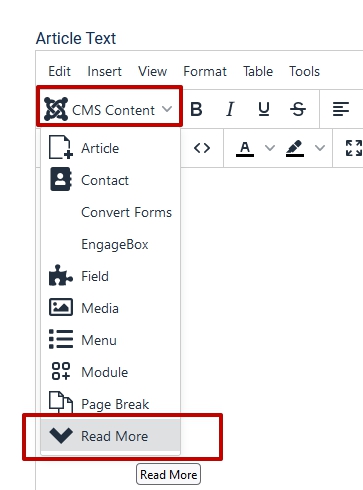
It doesn't work like that. You must add Read More by means of the editor.
Example (JCE editor)

Hi Pavel,
Thank you very much, you helped me a lot.
I am using the build-in Joomla Editor, so didn't find the "Insert Read More".
https://prnt.sc/kyIdWSolZqY9
But I managed to do that by adding below code:
<hr id="system-readmore" />
One more question:
I find the 1st article Intro Image is on the top, and 2nd article Intro Image is on the bottom, how can I adjust them to the same, all on the top?
Thank you.
John
Hi. Happy New Year!
Try this CSS
.col-md-6.item-even .article.type-intro {
    display: grid;
}
.col-md-6.item-even .article.type-intro .article-intro-image {
    order: -1;
}Hi Pavel,
It works, thank you so much.
Have a nice day!
John

