Image Overlay - Forum | JoomShaper
Solved SP Page Builder

Image Overlay

Asked by Andrew Freeman 2 years ago Last activity 2 years ago

Hey,

I'm trying to use the image overlay addon. The issue I have is that I need the images to be round, but there is a limit of 100px radius. I've but in custom css to make it 100%, but the issue I have is that it only really works on desktop.

The second I reduce the size of the browser window, the image become ovals. How can I just get these to show as circles no matter what size the browser window?

Accepted answer

Marked as the solution
Pavel
2 years ago · edited

Hi Andrew.

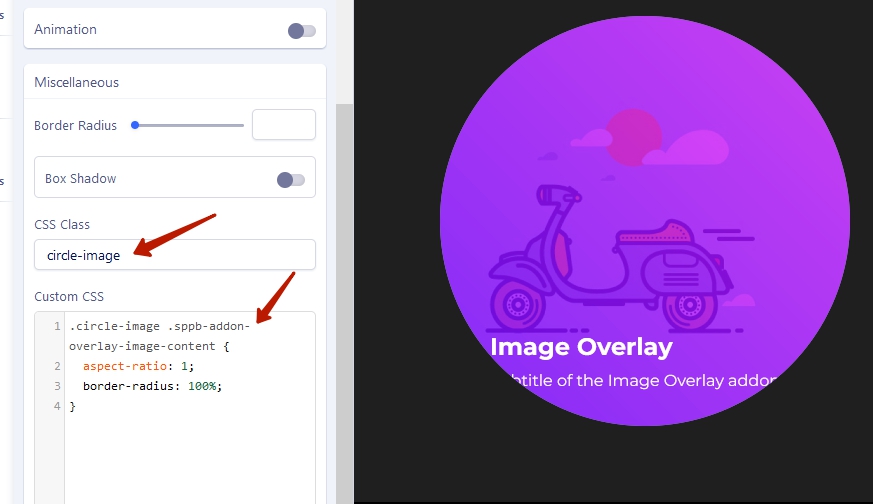
Clean height value and border-radius value in addon settings, add class circle-image and CSS code

.circle-image .sppb-addon-overlay-image-content {
    aspect-ratio: 1;
    border-radius: 100%;
}

4 more replies

Mehtaz Afsana Borsha Staff

Hi

Thanks for contacting us. Could you please try border-radius: 50% on those images? It should work on all devices around. Please let me know if this is working or not.

-Regards.

Andrew Freeman Asked this

Hi, no still the same. I presume the issue is because in the addon you can only specify a height of the image, so when you go down to mobile size for instance it tries to fill the width and stretches the circle to an oval?

Pic below of what I mean.

Mehtaz Afsana Borsha Staff

It seems working in my end.

Andrew Freeman Asked this

Hi,

I've improved it by controllig the picture height and the column width on each device (seems a labour intensive way of doing things). But if you drag your browser window to its smallest width, you still get an oval?

Mehtaz Afsana Borsha Staff

Please set it by adjusting height otherwise no option available.

Andrew Freeman Asked this

Thank you so much Pavel.

Log in to reply.
