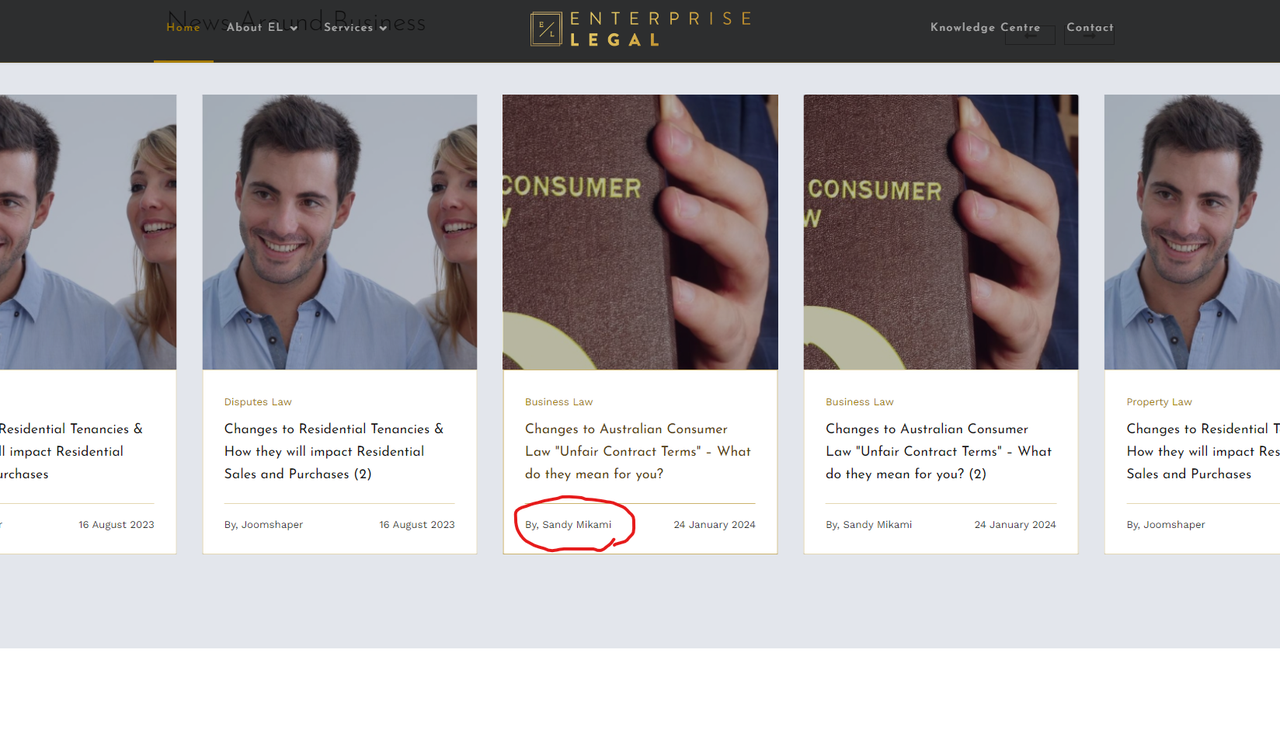
Hi Joomshaper
On the Wayne Corp template home page, there is a custom, full width article slider. Is there a way to hide the author, but show custom fields? There is no hide author option in the settings.
Hi Joomshaper
On the Wayne Corp template home page, there is a custom, full width article slider. Is there a way to hide the author, but show custom fields? There is no hide author option in the settings.
Hi
Thanks for contacting us. Could you please give me a screenshot of your issue?
-Regards.
Here is the Wayne Corp full width slider (from the home page of Wayne Corp template):
https://i.postimg.cc/HnBbnqYq/New-screenshot.png
I need to remove the author field and replace with my custom fields if possible.
But if not possible, I need it to show author aliases, not the user who created the article.
Hi,
Is there a way to hide the author, but show custom fields...
In general No. But you can customize that addon code:
templates\shaper_wayne_corp\sppagebuilder\addons\articles_slider\site.php
Edit line 119:
$output .= '<span class="sppb-meta-author">'. Jtext::_("COM_SPPAGEBUILDER_ADDON_ARTICLES_SLIDER_AUTHOR_BY") . ', ' . $item->username .'</span>';
You can delete it to remove author's name, or/and add your custom code below/instead of.
Extra tip!
To protect that file from override by next template update - change file rights (Attributes) from 644 to 444.
That's all we can help by now. Whole rest is on your hands, becuase php code customization is beyond support.