

Solid-header Default Keynote

chierasr
is there a way or css to have solid-header class as default for keynote template and transparent as a class as component links use default that is transparent and generate ton of work to adapt best
example https://demo.eventovirtual.com.ar/component/rsform/form/3-registro
best
7 Answers
Order by
Oldest

Ariba
Accepted AnswerHello
Could you kindly specify what you mean by solid header class here? Also, in the demo you provided the content is clashing with the menu as i can see from my end, so in that case could you please give a screenshot or give more details regarding that? It would be helpful.
Thank you
chierasr
Accepted Answersolid-header is a class that use keynote template into the menues, to transform the header solid with color instead of transparent Transparent is the default in that menu and solid-header is a css class for menu item best
Ariba
Accepted AnswerHello
You can check out the solution on the screenshot & link provided below
https://www.joomshaper.com/documentation/joomla-templates/keynote/extra-info-tips
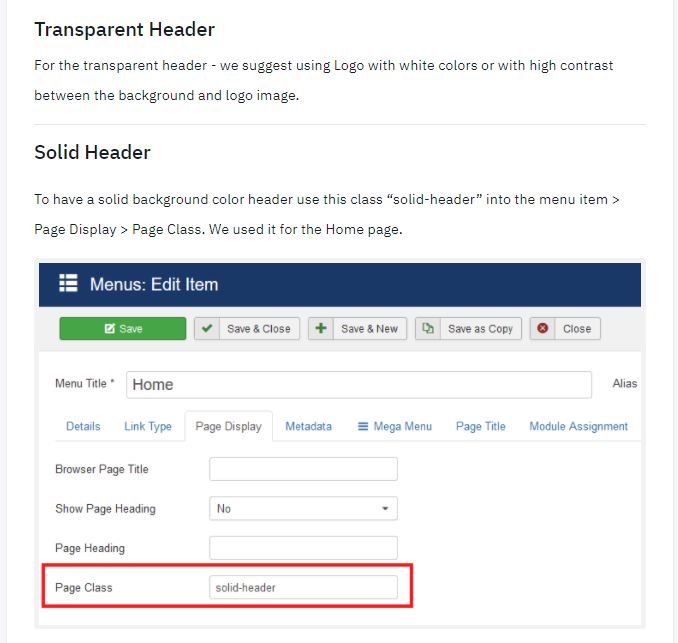
If the solution does not work, please provide your administrative access here in hidden mode. I will check from my end, thank you.
chierasr
Accepted Answerariba, thanks for that, but ptobably im not explaining well im already use that class for menu items but a page like https://demo.eventovirtual.com.ar/component/rsform/form/3-registro is automatically generated by the login module when select the option not registered or not have an account yet i need the opposite, trnasform the main template as solid-header and use a class like transparent-header as option
check those situations when website trigger component url and you can see that problem click here https://demo.eventovirtual.com.ar/login create an account (crea una cuenta) and the result is an url auto generate with component regsitration
best

Rashida Rahman
Accepted AnswerHi there!
Sorry for the delay!
If I get it right, you want the header element to appear as it looks while scrolling down.
So I am sharing some code with you to change the header appearance specifically for the form view. Please use the following code in your custom CSS:
body.com-rsform #sp-main-body {
    padding-top: 150px !important;
}
body.com-rsform:not(.solid-header) #sp-header .sp-megamenu-parent > li > a {
    color: #252525;
}
body.com-rsform:not(.solid-header) #sp-header .logo-image {
  display:block!important;
}
body.com-rsform #sp-header .logo .logo-image.white-logo {
    display: none!important;
}
Hope this will closure to your wish!
Let me know the result.
Best Regards
chierasr
Accepted AnswerRashida, thank you very much, thats excellent and working!!!
here how its look https://demo.eventovirtual.com.ar/component/rsform/form/3-registro