
I edited the "about" page in pagebuilder and on returning to view the results my about page shows this message - see https://prnt.sc/0LkYKEQyMjvE
Awaiting an answer
SP Page Builder
Luxyort: Object of class stdClass could not be converted to string
Asked by hillary_h
1 year ago
Last activity 1 year ago
9 replies

Asfakur Rahman Saikat Staff
Hi Hillary_h,
Thank you for reaching out, and I am sorry for the inconvenience. Could you please check the Joomla admin credentials? The current ones is not working.
Best regards
hillary_h Asked this
Hi,
Please see an error report as suggested by Mr Frankowski
Part 1 https://prnt.sc/hS2cJ4LD5wfR
part2. https://prnt.sc/Gtq7q0IQCe7G
I have edited the path to the site to make it easier by removing /index.php from the end of the adress.
I hope this helps.
Thanks
Asfakur Rahman Saikat Staff
Hi,
If our senior teammate Paul Frankowski’s suggestion helped resolve the issue, that’s great news!
If the problem is still not resolved, please double-check the credentials you provided, as they may not be active yet.
From the screenshot you provided, it seems the issue may not be related to an overridden addon.
I don't even know which version of SPPB you are using.
Best regards
hillary_h Asked this
Dear Asfakur,
Several things.
- If you read Mr Frankowskis note. You would clearly see that it produces a REPORT.
- It has NOT solved the issue.
- The priviledges to access the back end WORK and are provided.
- Please apply yourself to resolving the issue which is NOT resolved.
- If you are unable to fix it then please send the error to someone who can.
Thnking you kindly. Today is day 4 of this issue NOt being resolved.

Paul Frankowski Senior Staff
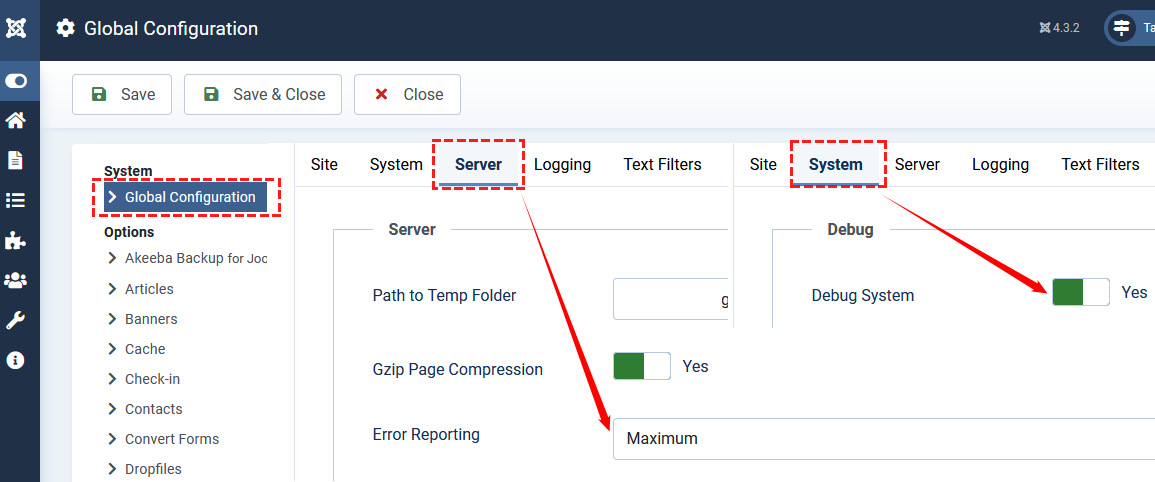
BTW
There is "MAGIC" tool for Joomla (3x, 4x, 5x) Webmasters that helps in similar cases, it shows what file(s) make a problem.
hillary_h Asked this
No "MAGIC" required.
Paul Frankowski Senior Staff
1 year ago
· edited
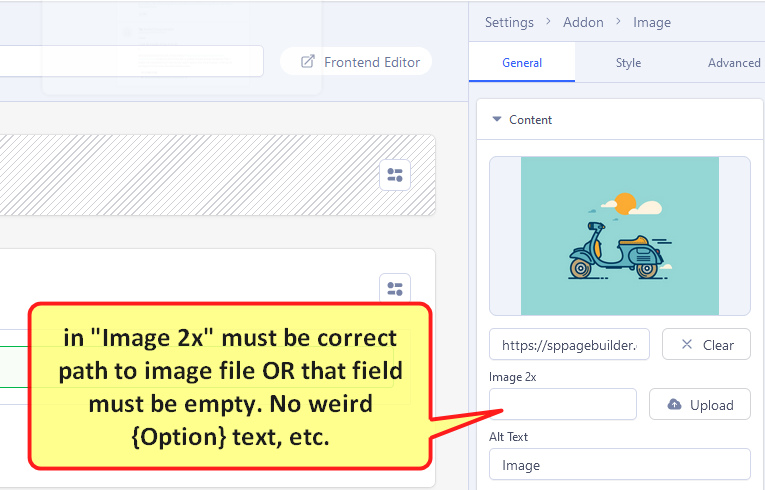
Thx, In most cases that problem exist if in Image addon in 2x image field have bad value. There must be URL to image file or empty field. Edit that page in SPPB back-end editor and check all Image addons there, one by one. Correct and Save changes.
Tip
hillary_h Asked this
Hi Sir,
When I go to the backend of SPPB and try access the 'about' page i get this. https://prnt.sc/ygtoz8pDYItl
Paul Frankowski Senior Staff
- Do you have the same error on each page, or only on that one?
- That About page was created by You, or was imported, or what included in QuickStart?
hillary_h Asked this
1 year ago
· edited
Only on the about page from the front end. However, from the backend i cannot access any SPPB pages.
Installation from a full pack quick start.
Paul Frankowski Senior Staff
1 year ago
· edited
I think, if you really need that page, we can export it from our demo and send you as .zip file to unzip and import. Hmm?
Asfakur Rahman Saikat Staff
1 year ago
· edited
Dear hillary_h,
I’m very sorry to hear that your issue hasn’t been resolved yet. Please find the following steps to assist you:
-
Unhandled error while editing pages:
The error you encountered (as shown in your screenshot: https://prnt.sc/ygtoz8pDYItl) is usually related to browser cache. Please clear your browser cache following the instructions here:
https://www.joomshaper.com/documentation/sp-page-builder/troubleshooting#unhandled-runtime-error-typeerror-undefined-is-not-an-object-evaluating-i-e-call -
Login issue:
Honestly saying, I tried logging into your site several times, but the username and password you provided didn’t work on any occasion. Please see the following record in the hidden content: -
About page matching original template:
If your About page is the same as the original template, please download the page, unzip it, and import the JSON file into SP Page Builder.
about_page_original.json.zip
Please let me know how things go after following these steps. I appreciate your understanding.
Best regards
Log in to reply.