

Fixed Button In The Smartphone Header
FZ
FIRST ANIMAZIONE ITALIA S.R.L. - Matteo Zannoni
I am using Luxevista template (based on Helix Framework) and SP Page Builder 5 and I would like to place a fixed button in the header (next to the logo) for the smartphone version. But I can't. However, working on the template and modules it should be possible. Can anyone help me?
10 Answers
Order by
Oldest

Paul Frankowski
Accepted AnswerCiao,
As always there are a few methods to achieve this.
Quick Idea 01:
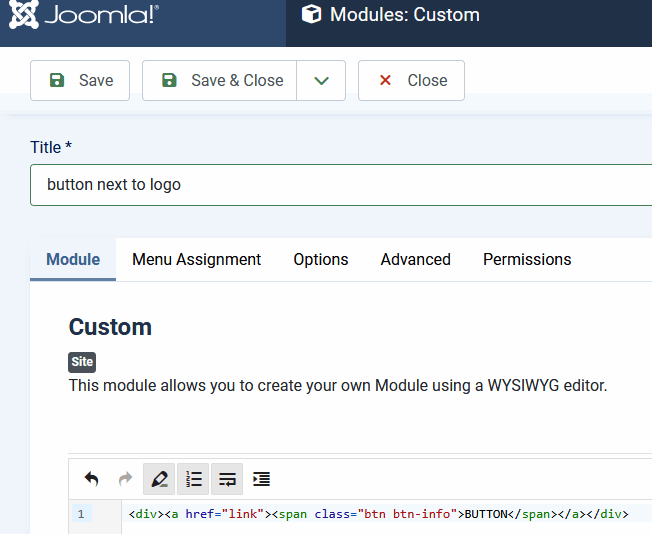
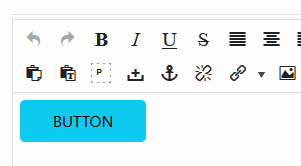
- Create a new Custom Module (native) with button inside, just use bootstrap classes (screenshot) or your design concept.
- Then publish that module on "logo" position.
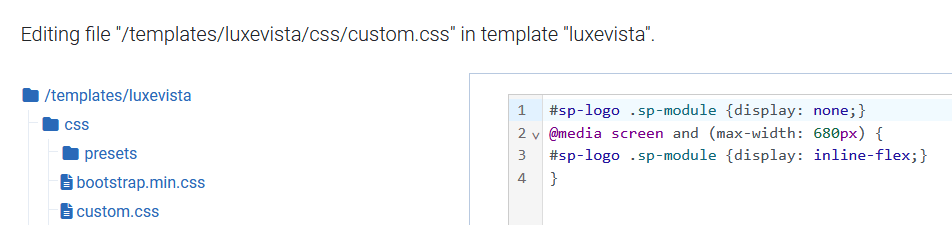
- Then use following Custom CSS (example):
#sp-logo .sp-module {display: none;}
@media screen and (max-width: 680px) {
#sp-logo .sp-module {display: inline-flex;}
}
Desktop & tablet - Hide button, Show on Mobile.
FZ
FIRST ANIMAZIONE ITALIA S.R.L. - Matteo Zannoni
Accepted AnswerThanks but I'm obviously doing something wrong. If I don't insert the CSS I see the button on both desktop and mobile but under the logo section; if I insert the CSS I don't see the button on mobile either.
Paul Frankowski
Accepted Answerprobably becuase, I ate "d" in below word, I had to be hungry ;)
width: 680px
1st line was/is fully OK, it should hide it. All works on my demo site. Evidence.

FZ
FIRST ANIMAZIONE ITALIA S.R.L. - Matteo Zannoni
Accepted AnswerIt works great. Thanks. Now if you could also tell me how to change the color of the button I would be grateful. I can't find the right CSS. I thought it was here: "/templates/luxevista/css/presets/preset1.css" in the "luxevista" template. But apparently it is not.
FZ
FIRST ANIMAZIONE ITALIA S.R.L. - Matteo Zannoni
Accepted AnswerOr here: "/templates/luxevista/css/bootstrap.min.css" in the "luxevista" template. But not even that.
Paul Frankowski
Accepted AnswerI was honestly surprised by this question, I thought you were professionally involved in web development. If not, please check:
- https://getbootstrap.com/docs/5.0/components/buttons/
- Yes, You can override any bg color using Custom CSS.
Default BT style for btn-info class used in my example
.btn-info {
  color: #000;
  background-color: #0dcaf0;
  border-color: #0dcaf0;
}

.btn-info:hover {
  color:#000;
  background-color:#31d2f2;
  border-color:#25cff2
}Paul Frankowski
Accepted AnswerThere is, but better use Custom CSS fort custom color or just ready class names. Less stress ;)
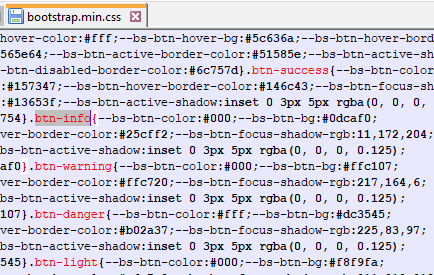
Then use custom.css file, and do not edit other template .css files.
FZ
FIRST ANIMAZIONE ITALIA S.R.L. - Matteo Zannoni
Accepted AnswerI am truly sorry to have disappointed you. On the other hand, I can do many things. For example, I am very good at recognizing unsurpassed availability and professionalism. Now everything is ok. Thank you very much.
Paul Frankowski
Accepted AnswerNo problem, I thought you are deeper in CSS topic, and you needed only basic tip. Now I know :)
You're welcome.
FZ
FIRST ANIMAZIONE ITALIA S.R.L. - Matteo Zannoni
Accepted AnswerCan you give me one last help? I configured the button as follows to leave room for the language flags: .btn-success { color: #fff; background-color: #859163; padding: 2px auto; text-align: center; width: 116px; } Why can't I center align the text?