shaper_restore v 2.0.1
<nav class="sp-megamenu-wrapper d-flex" role="HELIX_ULTIMATE_AIRA_NAVIGATION">
get accessibility error because [role] values are not valid, ARIA roles must have valid values in order to perform their intended accessibility functions.
It should be: <nav class="sp-megamenu-wrapper d-flex" role="navigation">
How can I change it, please? Thanks
Solved
Templates
shaper_restora HELIX_ULTIMATE_AIRA_NAVIGATION
Accepted answer
Marked as the solution
Paul Frankowski Senior Staff
1 year ago
· edited
Ciao Gianluca,
easy to fix it in 60sec.
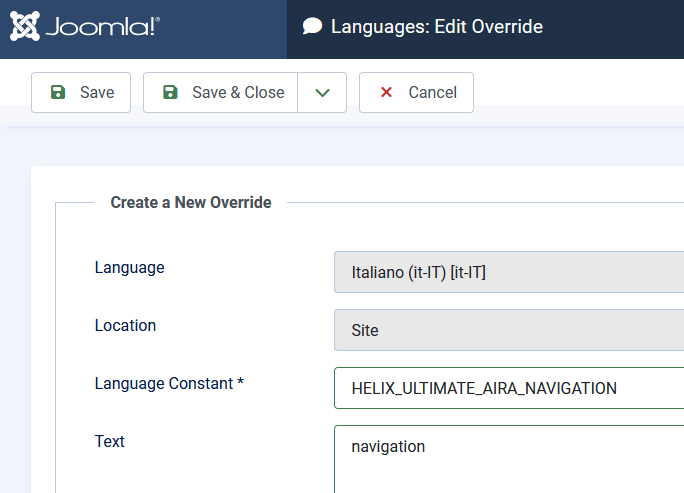
Go to Manage > Language Overrides > choose your native language (Site) > click "New" and override phrase
HELIX_ULTIMATE_AIRA_NAVIGATION
yes, using word navigation > Save & Close.
I agree, it shouldn't be phrase but static text.
2 more replies
Gianluca Pantaleo Asked this
Ok it works, Thanks.
Than another accessibility error I found about: <a href="#" class="close-offcanvas"><span class="fa fa-remove"></span></a>
Links do not have a discernible name, Link text (and alternate text for images, when used as links) that is discernible, unique, and focusable improves the navigation experience for screen reader users.
I edit it in:
<a href="#" class="close-offcanvas" aria-label="close offcanvas">
<span class="fa fa-remove" aria-hidden="true"></span>
</a>
Paul Frankowski Senior Staff
I agree, I will ask for that change. Thx
In raw Helix Ultimate template (in index.php file) we used that
<a href="#" class="close-offcanvas" aria-label="<?php echo Text::_('HELIX_ULTIMATE_CLOSE_OFFCANVAS_ARIA_LABEL'); ?>"><span class="fas fa-times" aria-hidden="true"></span></a>
Log in to reply.