
Hello,
I'm trying to use the table add-on. I disabled the headers but when I do that, the first row of the table gets a different style (the style normally used for the headers). How do I turn that off ?
Thanks
Hello,
I'm trying to use the table add-on. I disabled the headers but when I do that, the first row of the table gets a different style (the style normally used for the headers). How do I turn that off ?
Thanks
Here is a screenshot of the issue... With header disabled, the first line shouldn't have a purple background :
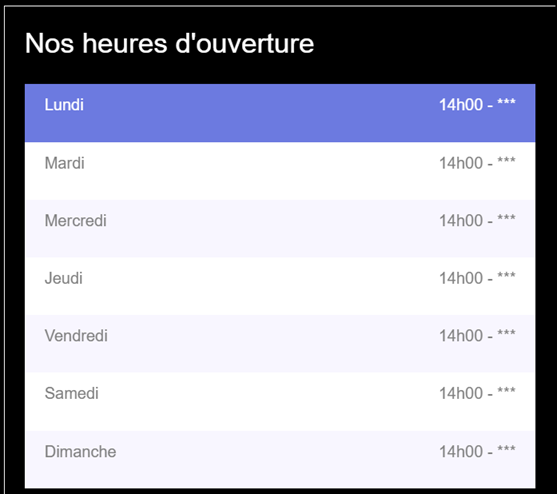
I solved it with this CSS but don't get why I should need this. This background should be used for the headers (th) not for the first line of the table :
#sppb-addon-1748250641125 .sppb-addon-table-main tbody tr:first-child td {
    color: grey;
    background: inherit;
}Ok no problem, I will also solve it via CSS.
Glad to know that, its solved, you can now close this post by accepting the answer.
Indeed, my custom css does "solve" this specific situation, but it's still not a normal behaviour that when you disable headers, the formatting of the headers applies to the first line of the table... the css should be on the th element only. Hope this can be corrected in a future update.
Thanks for your opinion Stephane and thanks for accepting the answer.
Hi
Thanks for contacting us and sorry for your issue. Could you please give me your site URL and also a screenshot of your issue? So that I can check.
-Regards.
