
Hi,
How to add new currency to SP Property?
Hi,
How to add new currency to SP Property?
Hello
You can follow the steps below:
1.Login to the admin.
2.Select Sp Property component
3.Click Options in the right corner
4. From the Basic Tab, choose the currency
Hi,
No, i mean, my currency is not there. How to add my currency there so i can select...
I understand, thank you for clarifying.
Please go to the file location & you will get the idea on how to add the new currency.
administrator/components/com_spproperty/config.xml
Hi Yofie Setiawan,
If you are interested to add a new currency to the SP Property Extension then no default way to add it, but there is a workaround you can try.
Here is how to change or add a new currency:
Go to the file location-
\administrator\components\com_spproperty\models\fields\spcurrency.php
Please edit this as follows:
Duplicate an item and change value and text.
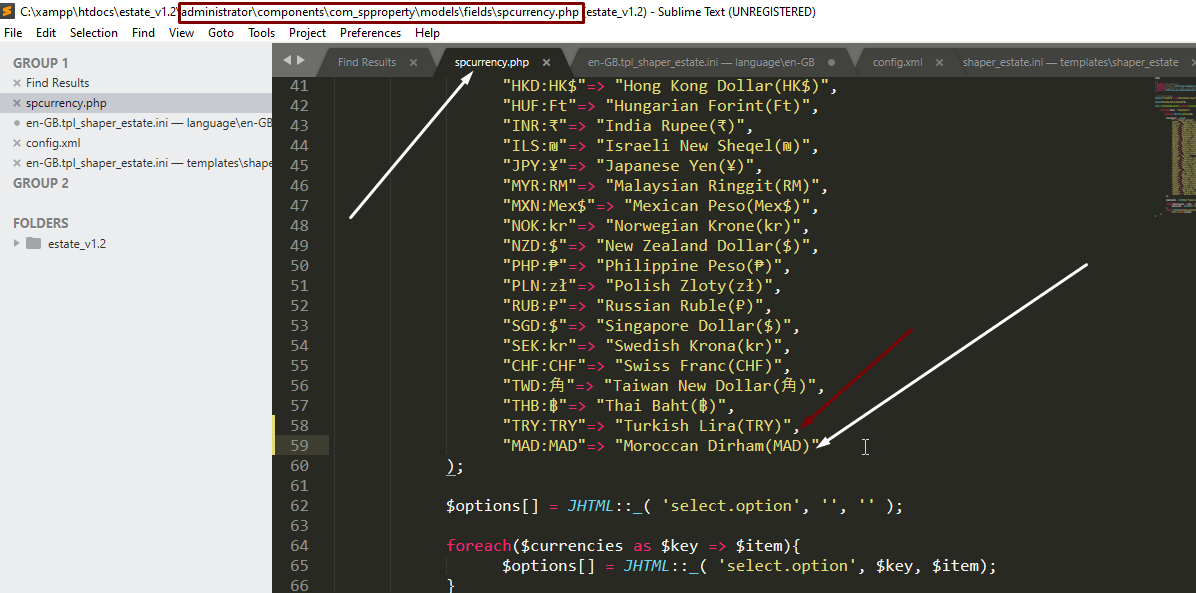
Here is the output:
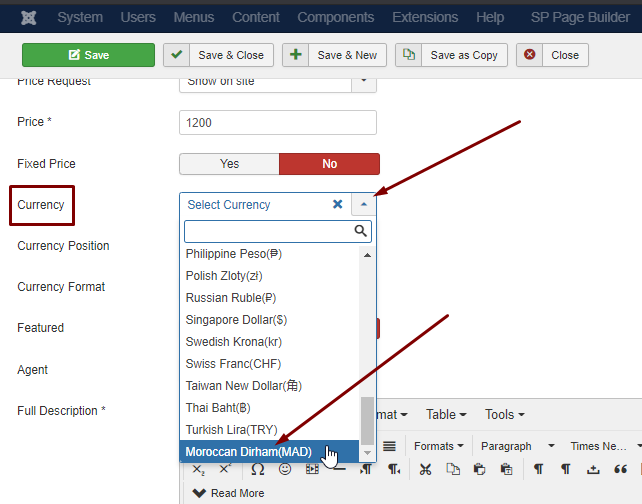
Note: Customization support is prohibited here.
Hope this helps!
Best Regards
Hi Ariba,</br>
Okay thanks, that solve my issue to add my country currency from the OPTIONS menu of SP Property.
Hi Rashida,</br>
Okay thanks, that solve my issue to add new currency to the property edit details, i actually already did this one before.
But i still have another related problems. Please check these screenshots.
https://ibb.co/87FNTJX </br>
How can i change the currency here on the mega menu? If you check there, the number also doesn't match from my input. It suppose to 900million and 690million.</br>
https://ibb.co/JHpPRzj </br>
How can i change the currency here on the property list?</br>
https://atapbaru.com/buy/half-map-list.html
Hi,
Any update regarding this? Here i attached the login credentials...