

Google Maps Or Openstreet Maps Customization
S
serge
Hello, I would like to add some customization to the maps (Google or openstreet no matter). Like:
- itinerary between two points
- Draw circles around a selected point.
Is it possible and how?
Thank you.
Website
https://aramis-paris.com
8 Answers
Order by
Oldest

Ariba
Accepted AnswerHello
Thank you for your query. If you want to draw circles around a selected point, you can try following the code in this link https://developers.google.com/maps/documentation/javascript/examples/circle-simple#maps_circle_simple-typescript
S
serge
Accepted AnswerThank you Ariba! But where to put this javascript code, how to access to a particular map on the particular page of SP Page builder?
Ariba
Accepted AnswerYou are most welcome.
Kindly check the screenshot below:
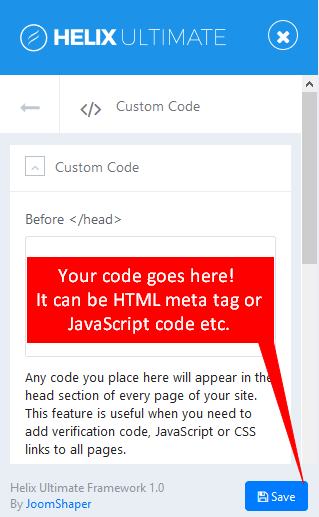
You can insert custom Javascript code in the Custom Code section if you are using Helix framework.

Paul Frankowski
Accepted AnswerHi, In that case read tip "How to use custom JavaScript" from our documenation for SPPB Pro
https://www.joomshaper.com/documentation/sp-page-builder/sp-page-builder-3/how-to-tips
this is universal method, that works in all templates
S
serge
Accepted AnswerShould I link the javascript code to the #id of the native SPPage builder google map : sppb-addon-gmap-1622223646265
Or I should create a custom module with all google map's html and javascript and then publish it in SpPage builder?
S
serge
Accepted AnswerI've put this code into the js file, but nothing happens. I use #id of the existing Pagebulder google map.
        const citymap = {
    paris: {
      center: { lat: 48.85648185039337, lng: 2.3498061650287094 },
      population: 2714856,
    },
  };

  function initMap() {
    // Create the map.
    const map = new google.maps.Map(document.getElementById("**sppb-addon-gmap-1622293635357**"), {
      zoom: 4,
      center: { lat: 48.85648185039337, lng: 2.3498061650287094 },
      mapTypeId: "roadmap",
    });

    // Construct the circle for each value in citymap.
    // Note: We scale the area of the circle based on the population.
    for (const city in citymap) {
      // Add the circle for this city to the map.
      const cityCircle = new google.maps.Circle({
        strokeColor: "#FF0000",
        strokeOpacity: 0.8,
        strokeWeight: 2,
        fillColor: "#FF0000",
        fillOpacity: 0.35,
        map,
        center: citymap[city].center,
        radius: Math.sqrt(citymap[city].population) * 100,
      });
    }
  }