Solved SP Page Builder Locked

space between section is not managed well

Asked by Simmetria Institute 10 months ago Last activity 10 months ago

I have designed a home page for my web site.
I'm having issue because between 2 sections where should not be so much space.... when I see in the frontend view the space is very big, mostly in the Smartphone visualization.

I forced the padding between sections to 0 everywhere but in the preview these changes do not take effect.
See here:
https://prnt.sc/KkVZiHZqRCAL

Accepted answer

Marked as the solution
Paul Frankowski Senior Staff

So in that case please add top & bottom margins between sections using "Spacing" tab.

This is the BOX concept, basics of HTML & CSS.

4 more replies

Paul Frankowski Senior Staff
10 months ago · edited

Ciao.

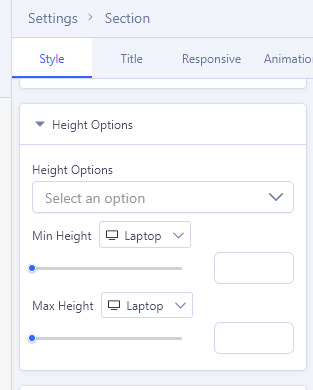
You made small mistake in settings, so space (padding/margin) is not a problem but Height value.

In 2nd Section you set Height value for Section. Please remove current settings (values) in "Height Options". Make it look like this "empty".

info_3673_2025.jpg

Paul Frankowski Senior Staff

Is not, Must be empty "Select an Option" (default value) !!!

look again at my screenshot 0.0

This question is locked, so it takes no new replies. Have a similar problem? Ask a new question.