

Probleme After Update Template

Free Worker
Hello,
I have the same problem when i update Rythm (home page to great) and is very slow.
I checkthe site but no problem, no virus or other.
Image : https://postimg.cc/TphR7qjP
15 Answers
Order by
Oldest

Ziaul Kabir
Accepted AnswerHello Free,
Thanks for reaching out to us.
Your site uses a background video, which can cause it to take a bit longer to load. On our end, the loading speed appears to be normal.
Please try changing your internet connection or testing the site from a different ISP to see if the issue persists.
Thank you.
Ziaul Kabir
Accepted AnswerHello,
I’ve reviewed the screenshot you attached—thank you for sharing it.
Could you please provide a bit more detail about the issue you’re experiencing? Specifically, let us know what happens when you update the template and what behavior you’re expecting versus what you’re seeing. This will help us better understand the problem and assist you more effectively.
Looking forward to your clarification.
Thank you.
Free Worker
Accepted AnswerHello,
Before update on this template ou see this form (to see all i set 33%) normaly in 100%
Image : https://postimg.cc/18f2X7VM
Into 100% and after update
Image : https://postimg.cc/TphR7qjP
Is terrible, i do your works.
Last problem solve by Joomshaper
https://www.joomshaper.com/forum/question/30657
Regards
Please give me your code for the next time.
Ziaul Kabir
Accepted AnswerHello,
The issue you are experiencing appears to be a responsive issue, possibly caused by missing CSS files after the update.
Are you referring to this fix mentioned in the following forum post? https://www.joomshaper.com/forum/question/30140
Please let us know so we can assist you further.
Thanks,
Free Worker
Accepted AnswerHello,
I allways used this topic, for Jommla 5 is okey but not on Jommla 6 and new template.
I think somtnig change into this code for joomla 6 and new update template.
.rythm-slider .sppb-col-sm-12>.sppb-row>div:nth-child(2){
    left: 0px !important;
}
.dot-controller-position-vertical_right.sp-slider .sp-dots{
    right: 0px !important;
}
The slider have this css into this css custums
@media (max-width:1199px){
  #addonId .sp-slider .sp-slider_number {
  display:none;
  }
}
@media (max-width:1199px) and (min-width:992px){
#addonId .sppb-addon-sp-slider .sppb-sp-slider-title {
    font-size:80px !important;
    line-height:100px !important;
}

  @media (max-width:1700px) and (min-width:1420px){
  #addonId .rythm-slider.dot-controller-position-vertical_right.sp-slider .sp-dots {
    right: -30px;
   }
    #addonId .rythm-slider.sp-slider .sp-slider_number {
          left: 1320px;
    }
  }

  @media (max-width:1420px) and (min-width:992px){
  #addonId .rythm-slider.dot-controller-position-vertical_right.sp-slider .sp-dots {
    right: 0px;
   }

  #addonId .rythm-slider.sp-slider .sp-slider_number {
      display:none;
   }
  }
Regards
Free Worker
Accepted AnswerDear Kabir,
I need your expertive too resolve this site, beacause it's does'nt wotks after your new template.
Your have all the code to do this.
Is it possible, for my customer, to see a nice site web.
Regards
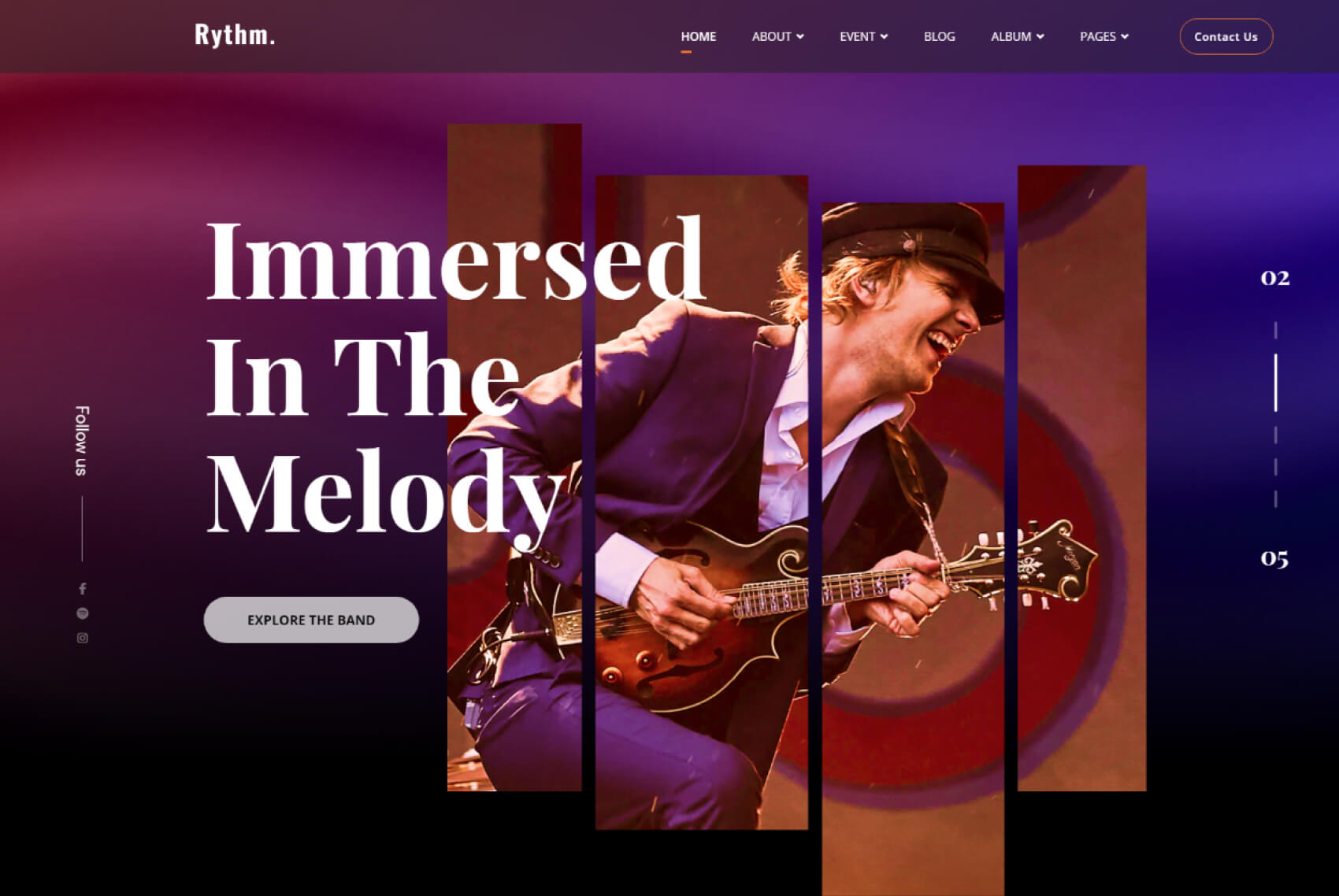
PS: Your template preview, is very bad too. See you picture into the détail of your template.
I would like the same of this
https://www.joomshaper.com/images/2021/07/31/Slider_image_01.jpg
Free Worker
Accepted AnswerSorry guys, is it possible to change support. I paied for a good support, not for a Bot
Please ready my message.
I paied for that : https://www.joomshaper.com/images/2021/07/31/Slider_image_01.jpg
And you give this : https://postimg.cc/TphR7qjP after yours update.
Regards
Or you are Russian no?
Free Worker
Accepted AnswerLol
Like the scool
Slide 1 : https://postimg.cc/kDmCDD6c Slide 2 : https://postimg.cc/nXgbxLfs Slide 3 : https://postimg.cc/T5RB0LnY Slide 4 : https://postimg.cc/zVG9RhJc Slide 5 : https://postimg.cc/21PJJX4R Slide 6 : https://postimg.cc/bSNFkXjp
And before your update : https://www.joomshaper.com/images/2021/07/31/Slider_image_01.jpg
The CSS is not correct after your update.
Ziaul Kabir
Accepted AnswerI have forwarded your request to our template team for further review. I hope they will identify the issue and provide a fix or workaround update soon.
Thank you for your understanding.