

Slideshow Addon
SH
Swiss Electronic - HU23592298
I was very happy that an eye icon was included for the slideshow elements, which can be used to turn the visibility of the elements on and off. But unfortunately this only works in the editor, not on the page anymore! So it's like it doesn't exist. Another big problem I have with the elements is that the vertical position of the content and image cannot be changed (top, middle, bottom). and this would be very important from the design point of view (especially in the case of images) Would it be possible to improve this frequently used addon in the future to make it professional? I think it would be a step forward to put the content and images characters in flex mode from the beginning in css! Thanks!
15 Answers
Order by
Oldest

Mehtaz Afsana Borsha
Accepted AnswerHi
Thank you for contacting us. Could you please provide a bit more detail about your request? If possible, an example would be very helpful so we can better understand your use case.
-Regards.
SH
Swiss Electronic - HU23592298
Accepted AnswerI described the problem in quite a bit of detail. I would have liked to upload pictures of my problem, but there is no possibility here, it was not allowed. My description outlines the problem well, a developer who develops addons can understand exactly what I described.
The slideshow elements have an eye icon, which can be used to turn the visibility of the elements on and off. But unfortunately this only works in the editor, not on the page anymore! .
Another big problem I have is a user suggestion for the elements that the vertical position of the content and the image cannot be changed (top, middle, bottom), and this would be very important from the design point of view (especially in the case of images) Would it be possible to improve this frequently used addon in the future to make it professional? I think it would be a step forward to put the content and images characters in flex mode from the beginning in css! Thanks!
Mehtaz Afsana Borsha
Accepted AnswerHi
You can use this for uploading screenshots.
And for your new issues, please post your issues in a new thread, our team will help you.

Paul Frankowski
Accepted AnswerHi,
I have question, what template you're using, full template name please. Becuase on some templates Slideshow addon was overriden, and some features from core component may not fully work.
About 2nd. You talk about bg image or content over ? Can you make mock-up and share link to image. Our developers are Tech Guys, so picture tell more than 100 words.
SH
Swiss Electronic - HU23592298
Accepted AnswerI would use the default helix ultimate template, no extra templates. In order to see the problem exactly, I will send you the information required for entry. You can see in the editor that the visibility of the button is turned off on the first slide, but it is still there, visible on the page. (The visibility switch works for the main slide elements)
My second suggestion is that for the individual elements where you can insert text, images, buttons, for images, I would recommend a vertical position switch. You can see in the example why this would be important from the point of view of design. I am currently solving this problem with an extra css that can be inserted here. (And here the related css question arises. I had to separately decide that these content parts should be in the flex class, because the positions can be handled much more easily, perhaps it would be worthwhile to consider introducing this at the factory)
Thank you for your attention!
Paul Frankowski
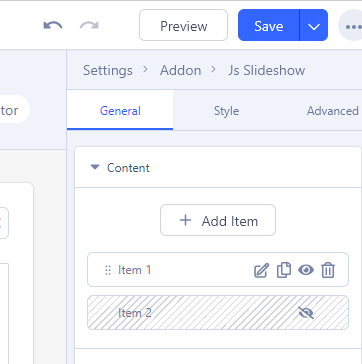
Accepted AnswerTo be sure, I made test on my own site. And with two slides, and one disabled in back-end editor (screenshot) on the front-end view, I see only one active slide
Paul Frankowski
Accepted AnswerI made test on your website , and all works as it should using back-end editor, screenshots as evidence
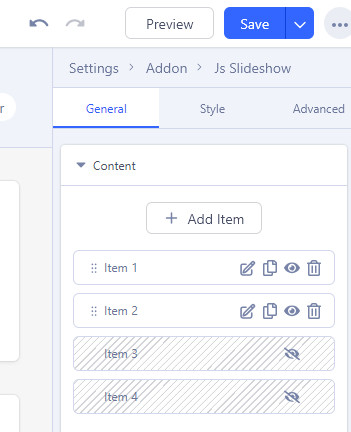

I also checked using the front-end editor, if this was your case, and it worked too.
I can make video, if that may help somehow.
SH
Swiss Electronic - HU23592298
Accepted AnswerDear Paul!
As I wrote before, the problem is not with turning the slide (slider items) on/off, it works. When we go to the first slide in the editor, there are elements below (slider content), that's the problem. If you go there, there are four content elements ( introducing ..., text item, button, image ) If I turn off something there (either a button or an image - currently a button and an image are disabled), in the editor it really turns off, but not on the site! So the on/off doesn't actually happen, so the problem is with these content parts!
Here is a screenshot that clearly shows the problem. the red exclamation mark shows its location: https://imgur.com/a/BrEOicN
Check it out, please.
Paul Frankowski
Accepted AnswerItems inside Slide, oh... now I see. Thx 4 img.
I will ask our developer to take a look next week. By now, I don't have any fixes from the pocket.
SH
Swiss Electronic - HU23592298
Accepted AnswerThank you very much for your help and let the developers know!
SH
Swiss Electronic - HU23592298
Accepted AnswerI was saddened to find that in the recently released v6.3.0 Page Builder, the functionality error of the slider visibility switches indicated earlier has not been fixed. I have written about this problem at length here because this function is important to me. I would like an answer as to why the fix has not been made when they mention that there have been many fixes.
I think that user feedback actually helps developers so that they don't have to separately search and test for errors in a complex system, feedback should be meaningful, that's what forums are for.
We can agree that development innovations are always exciting, but basic operational errors should not be carried forward in many version releases!
Thanks!
Paul Frankowski
Accepted AnswerIt's still on the wish/bug list. I agree, but .... we both have to wait a little bit more.
By now, just make clone of current slide item, make changes in clone, and disable orginal slide.
SH
Swiss Electronic - HU23592298
Accepted Answerthe latest version 6.3.1 is already out, but I see that this problem is still not fixed. I miss you so much! When do you think it is expected?
SH
Swiss Electronic - HU23592298
Accepted AnswerI waited again for the slider show/hide problem to be solved, which I have already written about so many times on the forum, but I had to be disappointed. In the new update of the SP page builder (version 6.3.2), you wrote: "Added show/hide control for Slideshow addon items." But in the slider, show/hide only applies if the ITEM CONTENT option is not activated the "Show Caption image in Column". This is a big problem because I would often use content & image with split appearance. As soon as I turn that switch on, it doesn't work to remove any items again. The attached screen shot shows the problem. Why is this so? https://imgur.com/a/H6U8gi9