
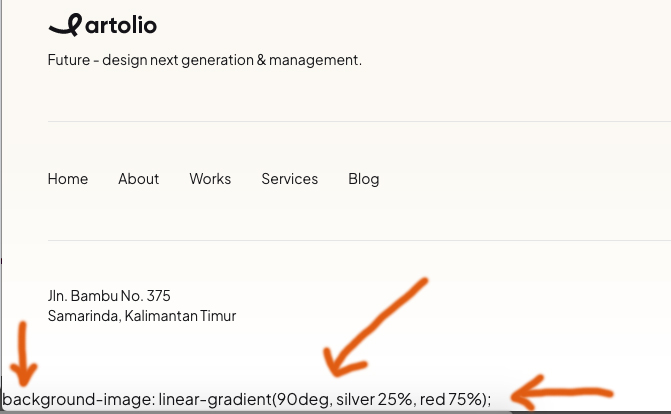
Hi!
Where is the mistake based and why is it?
"background-image: linear-gradient(90deg, silver 25%, red 75%); "
Hi!
Where is the mistake based and why is it?
"background-image: linear-gradient(90deg, silver 25%, red 75%); "
Hello BassLast,
Thank you for reporting this issue. I apologize for the inconvenience you're experiencing with the error on your test site.
To investigate this further and hopefully resolve it quickly, would you be willing to grant me temporary administrative access? Before you do, I highly recommend creating a full backup of your site to ensure data security.
Looking forward to your response.
Best regards
Hi Atick!
I found the thing.
Now everything is fine.
Best!
Hi ,
Thanks for the update — glad to hear you were able to identify the cause and that everything is working fine now.
If you need any further assistance or run into any other issues, feel free to reach out.
Please marked the issue as solved
Best regards
In CSS, the property background-image: linear-gradient(90deg, silver 25%, red 75%); defines a smooth color transition across an element.
Here is the breakdown of how the browser interprets this:
90degThe angle 90 degrees tells the gradient to move horizontally from left to right.
The percentages (25% and 75%) act as "anchors" for the colors. They control how much of each color is solid versus how much is blending.
Why use percentages?
Without percentages (linear-gradient(90deg, silver, red)), the transition would start at 0% and end at 100%, making the entire element look "blurry." By using 25% and 75%, you create a more defined look with solid color blocks on the sides and a controlled blend in the middle.
So I am not sure what does it mean "error" in your case ??
Okay, sorry for the incorrect expression! In any case, that shouldn't be displayed below. I tried to comment it out, but it doesn't work. Which script is affecting it?
You forgot to mention full template name (!), becuase here we support only our templates, not from other providers/sellers.
Sure, its Artolio!
Thank you!
Hi Paul!
I found the thing.
Now everything is fine.
Thank you.
Best!
And what it was: Addon or Section settings, Template style?
Great, I am pround of you. Mark topic as solved.

