
There's nowhere to put the license
I don't even know where to put my license details; there's no section for the license in Ettings.
Staff replied
SP Page Builder
There's nowhere to put the license
Asked by LadyWeb_Pty
6 months ago
Last activity 6 months ago
7 replies

Rashida Rahman Staff
6 months ago
· edited
Hi there!
Thanks for reaching out.
Please install the pro version of SP Page Builder then you will find the licence field there. It seems you are using the lite version.
Best regards,

Mehtaz Afsana Borsha Staff
6 months ago
· edited
Hi
Thanks for contacting us. Please make sure you have installed the latest version or Pro version of the page builder.
If the issue still persists after updating, please let us know your current version and provide more details so we can assist you further.
-Regards.
LadyWeb_Pty Asked this
If I install the pro version, will I lose the site's content?
Mehtaz Afsana Borsha Staff
Hi
No you will not lose the site's content. But for safety please first keep a full site backup and then install the pro version.
Rashida Rahman Staff
No, not at all. Even it is suggested that you need to install the pro over the lite one. No need to uninstall the lite one.
But keeping a full site backup before trying anything is a very good practice to be on the safer side.
Thanks!
Mehtaz Afsana Borsha Staff
Hi LadyWeb_Pty,
Is this solved now? If yes, you can then close this post by accepting the answer,
Rashida Rahman Staff
Hello,
We haven’t heard back from you regarding this issue. Could you please confirm if everything is working fine now?
If so, kindly accept the most helpful answer to close the post.
Best regards,
Rashida Rahman Staff
Hello @LadyWeb_Pty,
Hope you are doing well.
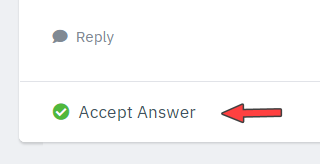
There is an Accept button below each reply. You can accept an answer there to officially close the post.
Thanks!
Mehtaz Afsana Borsha Staff
Hi,
Here is the accepting button under the reply, you can accept the answer from here:
Log in to reply.