

JCE Editor - Security Concerns - Update is Needed (!)

Paul Frankowski
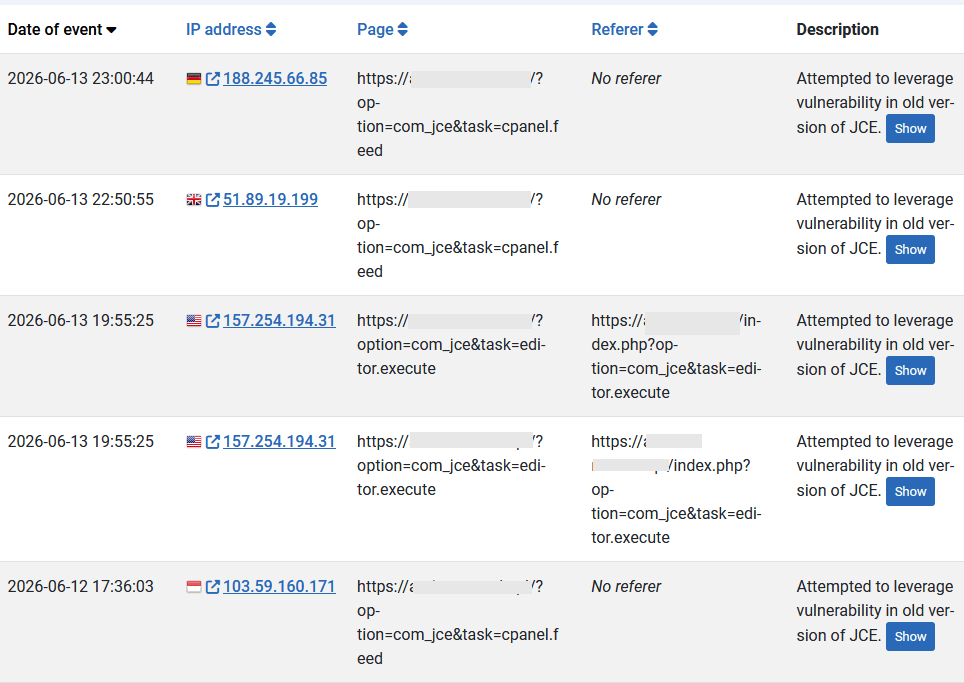
Yes, I realize that the JCE editor isn’t ours, but I see every day that a lot of people use it. The problem is that you (webmasters) often forget to update it. And over the past few days, several vulnerabilities that hackers could exploit have been discovered in it. Fortunately, the latest version fixes these known issues. But the number of attacks labeled “Attempted to leverage vulnerability in old version of JCE” will grow every day.
Please check and update to JCE 2.9.99.6 (Core/Pro) ASAP
14 Answers
Order by
Oldest
Paul Frankowski
Accepted AnswerIf you have not updated JCE so far, please do so immediately. The vulnerability is being actively exploited, working exploit code is public, and the attacks are automated, so a site with no public registration is not safe.
Notice! JCE updating closes the entry point but does not clean a site that was already compromised. If you were hit before updating, the update will not remove what the attacker left behind.
Official note: https://www.joomlacontenteditor.net/news
Looking at my private sites, I also noticed:
- Attempted to leverage vulnerability in old version of Novarain Framework (below v6.0.37)
- Attempted to leverage vulnerability in old version of Opening Hours module (below v6.1.0)
R
Rvdzande
Accepted AnswerAlso consider a manual update. I've had many sites which were 'up-to-date' but still had an old version because the update mechanism didn't see / get the newer versions. So it was shown as up-to-date.
Paul Frankowski
Accepted AnswerYes, I also noticed that JCE doesn't display notes about new versions in Joomla Admin as regularly as other extensions. That's why: download JCE and reinstall on every single site that you have it.
Update JCE today, not tomorrow!
GB
Gregory Belaus
Accepted AnswerGot hacked overnight with this. Working on updating and JCE (free core version) and removing issues. https://mysites.guru/blog/jce-pro-2-9-99-6-security-update/
Paul Frankowski
Accepted Answer@Gregory
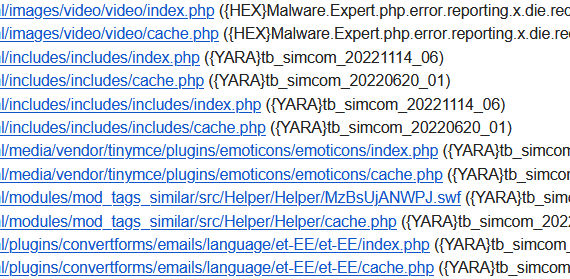
Remember to scan whole site, most "hackers" could upload over 20-30 extra malware files after success. Many of them (but not all!) are visible as new folders in the root. Some hidden files can be also inside core structure "/includes/". Real Example:
Example requests / IPs
GB
Gregory Belaus
Accepted AnswerI got sorted, but it was a lot of work. Gemini was useful for looking at what might have been touched. @Paul, yes there were many places. Luckily there was nothing destructive. If anyone else get's hacked, I can help with a list of things to look for. Thx
Paul Frankowski
Accepted AnswerToday, I saw two other websites damaged by JCE hole, so I guess there are many more.
Fixing it - seems to be easy, but it's always better to do more then just cleaning & updating.
R
Rvdzande
Accepted AnswerWhat I have seen that (mentioned by mysites.guru) a site is also shown in their scan as hacked, while I cannot find the hacked files.
Another site has an up-to-date version of JCE but keeps getting hacked (only two files got uploaded). Fortunately it is a test site.
Paul Frankowski
Accepted AnswerIt’s also a matter of hosting; if the accounts aren’t segregated, if a hacker gains access to one, they can jump to another account. Plus, you need a really good malware scanner to find infected or new backdoor files. On top of that, you have to search the directory structure manually.
GB
Gregory Belaus
Accepted AnswerHere's a quick run through:
Issue Found
- hosting company notification of 3 malware .php files
- end user reporting site down, 500 error
- uptimerobot service email reporting site down, 500 error
First Steps
- quick google search found that JCE was the likely cause
- confirmed when I found multiple JCE profiles starting with "Pwned", that I immediate deleted
- also saw touched files and directories with timestamp in last 24 hours
- Gemini confirmed the issue and I used Gemini conversation to walk through cleanup
Main Cleanup
- installed latest JCE core (not Pro) from https://www.joomlacontenteditor.net/downloads/editor/core
- /tmp directory
- deleted 7 new .xml files
- /images directory
- deleted 3 new .php files (these are the ones that hosting company identified in scan)
- /libraries
- deleted 1 new file called "tmp"
- truncated the session table in the main db, which causes all users to be logged out of Joomla (in case hack still has access)
- confirmed no user admin accounts created in Joomla
- change .htaccess permissions to 444 (per recommendation of Gemini); note that .htaccess was touched during the hack but was not modified or infected; confirmed that configuration.php was already 444
There's More Upon running an Akeeba backup on what I thought was a clean site, I got warning about a few directories not having read permission. These permissions had been set to execture only for /language and /api/language.
- Changed the permissions back to 755
- removed 3 malware directories that were in each of these directories
- Reran backup without warnings
- Downloaded backup for safe keeping
Also, I ran a free scan using https://manage.mysites.guru/ and it identied a core file as being modified, /libraries/src/Document/HtmlDocument.php. I then used Joomla Update to Reinstall Joomla core files.
The scan also identified a new hidden directory /.modules. My notes aren't great but I believe that I deleted that entire directory as well.
Last Steps
- Change db password
- Change password on all admin/super admin accounts in Joomla
Paul Frankowski
Accepted Answercheck also /images folder. No .php file shouldn't be there.
In general, good steps. I always done a little bit more, but this is not Security forum to talk about details.
GB
Gregory Belaus
Accepted AnswerThanks Paul. Had already checked images and nothing out of sorts. BUT, I did miss something. A new directory "th" at the public_html level that had an index.php that was very susipicous. Removed!
Paul Frankowski
Accepted AnswerBTW
Video about that topic (not mine): https://www.youtube.com/watch?v=FHA7jeY-DyU