

@keyframes Not Working
S
Scott
I'm using a text block with the following: <div class="marquee-container"> <div class="marquee-content"> Assistant Branch Manager | 1st Shift | Oregon, IL | BOE • Automation Technician | 3rd Shift | Hebron, IL | $28.53/hr • Converting Machine Operator | Night Shift | Crystal Lake, IL | $17.50/hr • </div> <div class="marquee-content"> Assistant Branch Manager | 1st Shift | Oregon, IL | BOE • Automation Technician | 3rd Shift | Hebron, IL | $28.53/hr • Converting Machine Operator | Night Shift | Crystal Lake, IL | $17.50/hr • </div> </div>
And I've placed the following in the Custom CSS area under Style: .marquee-container { overflow: hidden; / Hides text outside the box / white-space: nowrap; / Forces text into a single line / background: #60BA47; color: #ffffff; font-size: 16px; padding: 10px 0; }
.marquee-content { display: inline-block; animation-name: modern-marquee; animation-duration: 15s; animation-timing-function: linear; animation-iteration-count: infinite; }
@keyframes modern-marquee { 0% { transform: translateX(0); } 100% { transform: translateX(-100%); } }
The text is not scrolling at the top of the homepage https://sustainable.fortifydev.com/
I've tried placing the CSS in Page Setting->Page CSS->Custom CSS and that doesn't work either. In that scenario, no formating is displayed.
I've tested this code in https://www.w3schools.com/css/tryit.asp?filename=trycss3_animation1 and it works.
5 Answers
Order by
Oldest

Paul Frankowski
Accepted AnswerHi Scott,
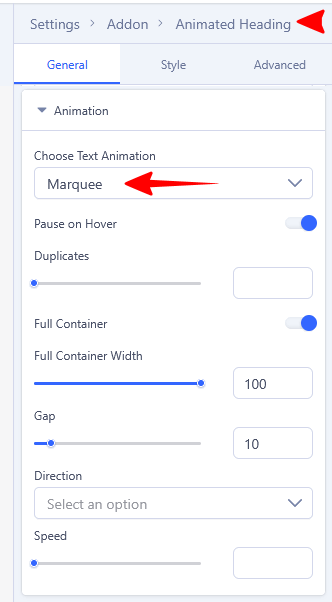
About Custom Code, I cannot help, but please use Animated heading addon it has marquee effect.
In tomorrow version you will get even more settings for that addon. Screenshot from SP Page Builder v6.6.1

Rashida Rahman
Accepted AnswerHello,
Thank you for the detailed explanation and code samples.
It seems the main issue is the CSS comments in your code are written incorrectly. In CSS, comments should use:
/* comment */instead of:
/ comment /Because of the invalid comment syntax, the browser stops parsing the CSS properly, which prevents the animation from working.
Please replace your CSS with the following corrected version:
.marquee-container {
    overflow: hidden; /* Hides text outside the box */
    white-space: nowrap; /* Forces text into a single line */
    background: #60BA47;
    color: #ffffff;
    font-size: 16px;
    padding: 10px 0;
}

.marquee-content {
    display: inline-block;
    animation-name: modern-marquee;
    animation-duration: 15s;
    animation-timing-function: linear;
    animation-iteration-count: infinite;
}

@keyframes modern-marquee {
    0% {
        transform: translateX(0);
    }
    100% {
        transform: translateX(-100%);
    }
}
You may place this CSS either:
- Inside the addon’s Custom CSS area
- Or in Page Settings → Custom CSS
After updating the code, please clear your Joomla/cache/browser cache and check again.
Best regards,
S
Scott
Accepted AnswerHi Rashida,
The comments were properly formatted. I believe the asterick was stripped out when I submitted my question. To test that theory I have placed a properly formatted comment here: / Hides text outside the box /