Critical Security Issue – Website Compromised Again After Updating SP Page Builder - Question | JoomShaper

Critical Security Issue – Website Compromised Again After Updating SP Page Builder

M

Moni

SP Page Builder 19 hours ago

Hi!

Unfortunately, we have very bad news regarding one of our websites.

We would like to explain the sequence of events as clearly as possible:

  • We first detected that the website had been compromised. During our inspection we found numerous unauthorized folders and files with random names, indicating that malicious files had been uploaded to the server.
  • At the same time, SP Page Builder stopped working correctly. The component became unusable, which immediately raised our concerns.
  • Our server administrator investigated the incident and concluded that the compromise was related to SP Page Builder. While researching the issue, we also found several discussions in your support forum where other users reported experiencing the same problem. The recommended solution in those discussions was to update SP Page Builder to the latest version.
  • Following that recommendation, we restored the website from a clean backup, installed the latest version of SP Page Builder, and verified that everything was working correctly.

Unfortunately, despite restoring the site from a clean backup and updating to the latest version, the website has now been completely compromised again. The attacker has taken control of the site.

At this point we are very concerned that there may be an undiscovered security vulnerability affecting SP Page Builder or one of its components.

Could you please investigate whether there are any known security issues, recently discovered vulnerabilities, or additional security measures that should be implemented?

This issue is having a significant impact on our institution, so we would greatly appreciate your assistance as soon as possible.

Thank you very much for your support.

Best regards,
0
5 Answers
PH
Pascal - HTProtect.org
Accepted Answer
18 hours ago #227504

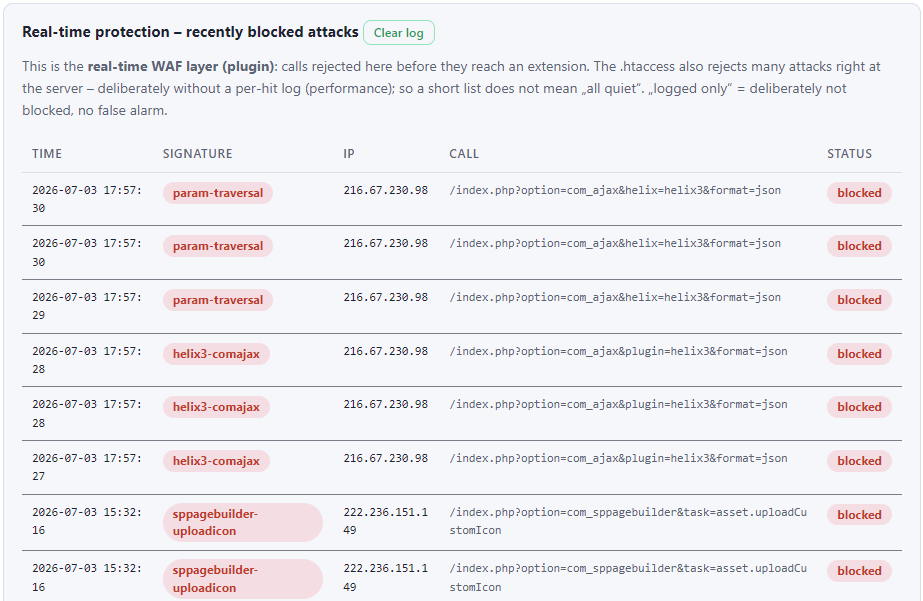
Do you also use Helix3? There was another vulnerability.

And did you clean up all bad Super Users?

0
M
Moni
Accepted Answer
17 hours ago #227508

Yes, we are using Helix3.

We also checked all administrator accounts after restoring the website, and we can confirm that there are no unauthorized or suspicious Super Users. That was one of the first things we verified during the cleanup process.

Thank you for mentioning the Helix3 vulnerability. Could you please let us know which vulnerability you are referring to, or point us to the relevant advisory? We would appreciate any additional information that could help us investigate this incident.

0
PH
Pascal - HTProtect.org
Accepted Answer
16 hours ago #227511

https://htprotect.org/en/helix3

Was it a defacement - the second hack? The HTProtect extension should detect that if the Helix3 Template Options have som malicious JavaScript included.

And it blocks those attacks.

0
T
Torsten.S
Accepted Answer
16 hours ago #227509

Summary of Our Cleanup and Recovery Process After a Joomla Compromise

After recovering several compromised Joomla websites, I wanted to share the steps we took to successfully clean the systems. Hopefully this may help others facing a similar incident.

  1. Assume the attacker had full administrative access

Do not assume that removing a single malicious file is sufficient.

Perform a complete review of:

Joomla administrator accounts User groups and permissions Access control entries Installed extensions Database integrity 2. Remove all unauthorized administrator accounts

In our case, several unauthorized Super Users had been created.

Verify:

all administrator accounts user groups creation dates last login information

Remove every account you cannot positively identify.

  1. Inspect the database

Besides users, also inspect permission-related tables.

Look for:

orphaned permission records suspicious assets unexpected ACL entries

Attackers may leave persistence mechanisms inside the database.

  1. Restore Joomla core files

Do not rely on individual file cleaning.

Replace Joomla core files with fresh copies from the official Joomla release matching your installed version.

This ensures no modified core files remain.

  1. Inspect uploaded files

Search your web space for:

unexpected PHP files alternative PHP extensions executable scripts in upload locations suspicious configuration files

Do not only search by filename—inspect file contents where necessary.

  1. Remove malicious uploads completely

If an extension-specific upload directory was abused, remove all suspicious content.

If possible, rebuild that directory from a clean installation instead of trying to identify every malicious file individually.

  1. Prevent code execution in upload directories

Where appropriate, configure your web server so uploaded files cannot be executed as PHP.

This significantly limits the impact of future upload vulnerabilities.

  1. Rotate secrets and credentials

After any compromise:

change Joomla secrets change administrator passwords change hosting passwords rotate database credentials if appropriate review SSH keys and API tokens

Assume all credentials may have been exposed.

  1. Review web server logs

Analyze access logs for:

exploitation attempts suspicious POST requests newly created users administrator logins unusual client IPs

This often reveals how the compromise occurred.

  1. Verify the vulnerability has been patched

Cleaning a hacked site without fixing the original vulnerability only leads to reinfection.

Update:

Joomla all extensions all templates

Remove extensions you no longer use.

  1. Create a clean backup only after verification

Do not restore from an unknown backup.

Only create a new backup after:

all malicious files are removed database has been verified administrator accounts have been checked logs no longer show successful exploitation 12. Continue monitoring

Even after cleanup:

monitor web server logs monitor new administrator accounts monitor file changes monitor extension updates

Most internet-facing Joomla sites continue to receive automated scans every day.

Final assessment

In our case, the original compromise was successfully removed.

Subsequent log analysis showed only:

automated vulnerability scanners bot traffic spam account registrations search engine crawlers AI crawlers

There was no evidence of a second successful compromise after the cleanup.

0
Atick Eashrak Shuvo
Atick Eashrak Shuvo
Accepted Answer
Support Agent 4 hours ago #227576

Hi,

Thank you for reaching out and for providing detailed information about the incident.

If you have a clean and verified backup from before the compromise, we recommend restoring that backup first. After confirming the website is clean, update both the System - Helix3 Framework and Helix3 - Ajax plugins to the latest version (v3.1.2). This is the safest and most reliable recovery approach.

If you do not have a clean backup available, please follow these steps:

  1. Go to Site Template Styles → Your Template → Template Options → Custom Code → Custom JavaScript.
  2. Check the Custom JavaScript field for any suspicious or unknown JavaScript code. If you find any injected code, remove it and save the changes. This should remove the malicious message if it was injected through the template settings.
  3. Update both the System - Helix3 Framework plugin and the Helix3 - Ajax plugin to the latest version (v3.1.2).

If the update is not available through your Joomla Update Manager, you can download the latest Helix3 package from the following page and install it manually via Extensions → Install:

https://www.joomshaper.com/joomla-templates/helix3

Please note that when updating Helix3, some template settings—such as the logo, Custom CSS, and other template configuration options—may need to be reconfigured manually afterward. We recommend taking screenshots or exporting your current template settings, if possible, before performing the update.

If the website has been compromised beyond the injected JavaScript, we also recommend performing a full security audit of the Joomla installation, including checking core files, third-party extensions, administrator accounts, and the hosting environment to ensure no additional malicious files or backdoors remain.

Please let us know if you encounter any issues during the recovery process, and we'll be happy to assist you further.

Best regards

0
