Menu Assignment Not Following Admin Settings - Joomla 5.4.7 / + Helix Ultimate ? - Question | JoomShaper

Menu Assignment Not Following Admin Settings - Joomla 5.4.7 / + Helix Ultimate ?

P

paul

Template 2 weeks ago

hi

I'm reading that joomla's ( 5.4.7 ) menu assignment may be conflicting with helix template, in that assignments don't display as set in the admin for the modules. I'm having this issue with latest helix template & menu assignment.

Details are in the hidden section, but has anyone heard or having this issue at all ? AS I said the internet AIs are saying it's believed to be a clash between the template ( not updating to the joomla core updates ) and joomla 5.4.7. So I'm asking you guys if you know anything about this, or can investigate, seeing it may be a template related thing ( helix ultimate ).

I want this module to only display at the top of one page, and settings I've made indicate that, but it's displaying on every page I think.

Appreciate any help here.

paul

0
7 Answers
Paul Frankowski
Paul Frankowski
Accepted Answer
Senior Staff 2 weeks ago #231891

you know that we are not RegularLabs support, right

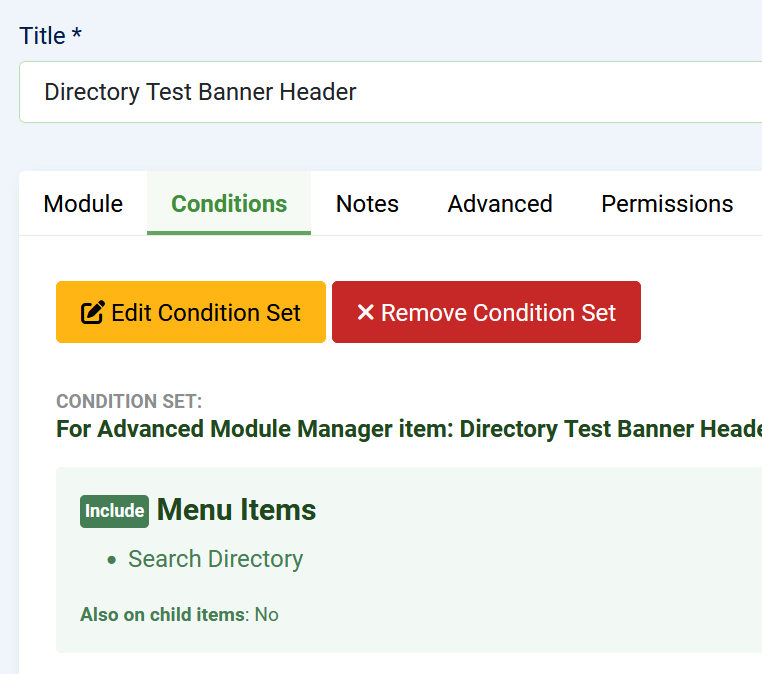
  1. You forgot to set conditions.
  2. You used template position from Casiopea not Helix

Now works, check screenshots as evidence. Now your turn, and check topic as solved

screenshot_17-2026.jpg

0
P
paul
Accepted Answer
2 weeks ago #231884

I want the banner to display in content-top position, but only on search-directory-mainmenu page. The settings are set to do that, but it displays on all pages.

Also see the AI Assistant response on this question I posed :

https://duckduckgo.com/?t=ffab&q=joomla+5.4.7+helix+menu+assignment+not+working&atb=v432-1&ia=web

0
Paul Frankowski
Paul Frankowski
Accepted Answer
Senior Staff 2 weeks ago #231885

Hi Paul,

I don't think so that Helix is source of problem, I also use this kind of settings etc.

Besides, you can always AMM from RegularLabs. It's a great extension to display module using advanced settings.


Username and password do not match or you do not have an account yet.

please recheck!

0
P
paul
Accepted Answer
2 weeks ago #231889

hi - I'll check the passwords. I already have AMM, not pro, but don't know howI'd use menu assigning inside that. Will have to look.

PS I think that's what I'm using for MA.

At first I couldn't find it. Didn't realise I had to change the setting to administrator modules ( or whatever that option is called )

0
P
paul
Accepted Answer
2 weeks ago #231890

Seems not every page, after checking, but homepage, about us, and some others. None of which I designated.

0
P
paul
Accepted Answer
2 weeks ago #231893

Oh, ok. I know nothing about conditions in joomla yet. Not quite up to that. Really appreciate the pointing that out. Of course I know you're not RL support but I was just going off what the internet AI was saying, and the previous related issues I'd seen posted in Github.

Everything you do to help JS clients, even if it's a little outside the company guidelines of support, creates good PR and makes the experience of JS products more agreeable & usable for clients, which keeps customers in the family, keeps them coming back, keeps them recommending others. Good personal & business karma.

Very greatly appreciated.

0
Paul Frankowski
Paul Frankowski
Accepted Answer
Senior Staff 1 week ago #231895

No problem. You're welcome.

Yesterday, I disabled Casiopea template, to reduce module position names problems on the select list ;p

Have fun.

0