

Image Order Template Empire
W
Wernher
Hi Guys
I cant upload images in Empire in the correct order i.e. lounge / diningroom / kitchen / bedroom / bathroom. its all scrambeled so I have a kitchen / bathroom / lounge / garage. This make my hole layout bad!
Can you help?
Website
https://manzellaestates.co.za
15 Answers
Order by
Oldest

Anne
Accepted AnswerHello Wernher,
Thanks for contacting with us. Can you tell us in which page you are facing the problem? It would be very helpful if you share a screenshot with us.
-Regards
W
Wernher
Accepted AnswerThank you for your quick responce Note I have a longe, then a bathroom, then the rest of the lounge picture. Is supose to be a proper flow as if you walking trough the house. https://www.manzellaestates.co.za/index.php/properties-2/29-86-11th-ave-kensington-offers-from-r-1-799-000
Its within SP Propertie - Gallery - where you upload the images for the property- look at the link - the images are all messed up - and even if you drop and drag them one by one, SP Property mess up the order. look I have a lounge /bath/loung/bath image.
hope this help
Anne
Accepted AnswerHello Warner,
Please share your administrator access here to check the issue. Use the Hidden Content box to share the credentials.
Best regards
Anne
Accepted AnswerHello Warner,
There is a 404 error on the link that you have provided. I have checked the images of other properties. They are absolutely fine. They are following the order that you have given in the sp property.
-Regards
W
Wernher
Accepted AnswerHi Anne
Go Component SP Property New ** Now in this Gallery "Load 20 Images" NOTE: you now cant controll the image layout - you cant move images in the gallary. It takes its own format - this equal that you have a lounge / toilet/lounge
Anne
Accepted AnswerHello Wernher,
Can you check your administrator access, please. I can't login to your site.
-Regards
Anne
Accepted AnswerHello Wernher,
https://prnt.sc/1ojbz06. Please, check the screenshot. Would you mind to check your username and password again?
-Regards
W
Wernher
Accepted AnswerHi Anne
Hope you well. Sorry the password changes all the time, the site consistently needs restoring from backups.
That gallery cant be managed, even if you put the images 1 by 1 Front end:
You see lounge / toilet / kitchen / outside - that is not how you walk trough a house / You must be able to controll images in Gallery
Anne
Accepted AnswerHello Wernher,
Please, take my apology for the problem that you are facing . In the frontend it is shown as slideshow at the top of property details page. The sorting is explained in the below screenshot. The latest upload comes first, then it starts from the oldest to the second latest.
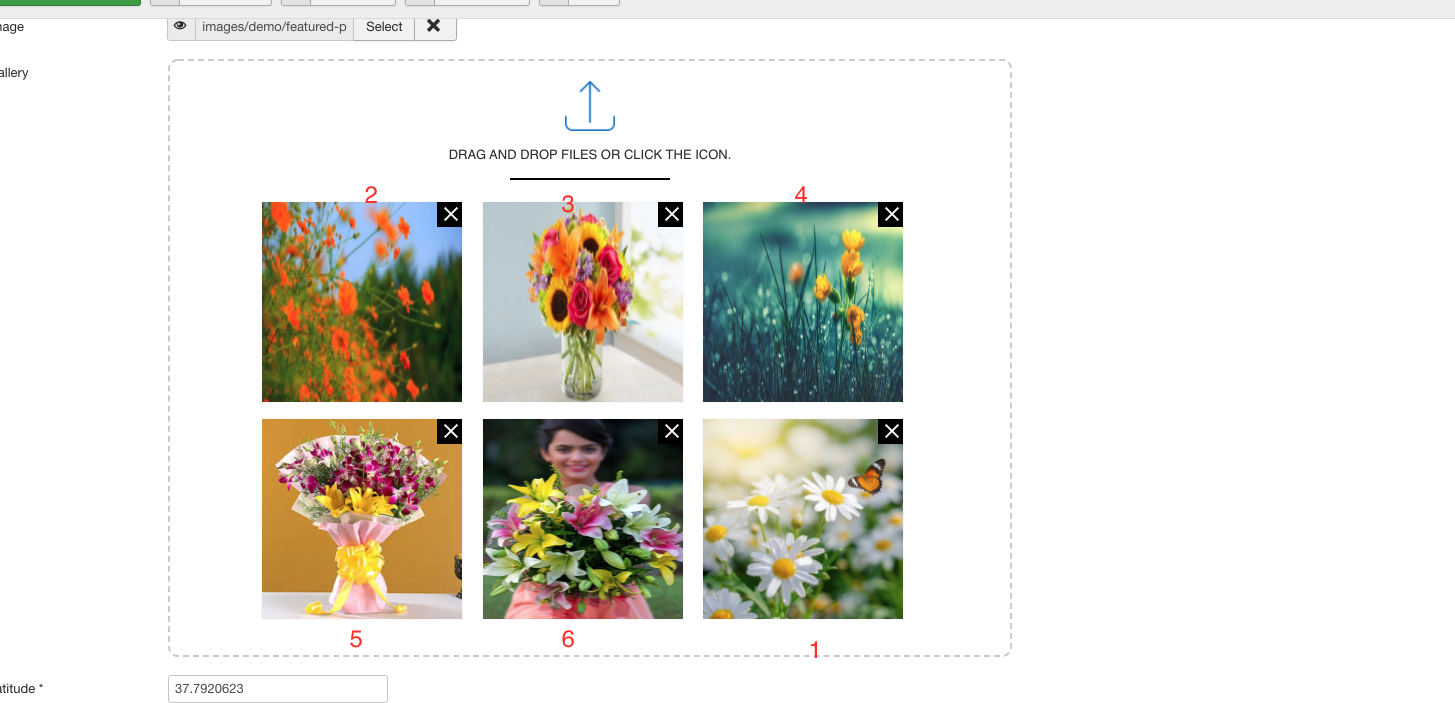 https://prnt.sc/1pkz44m
-Regards
W
Wernher
Accepted AnswerHi Anne
I got your answer and understand what you saying.
MY PROBLEM:
You cannot in Empire fix the order of 2/3/4/5/6 & 1 – Every time you upload the images the order will change i.e. Image 2 will now be 3 / Image 3 will be 6 and so own. Even when I load the images 1 x 1 it take on its own order.
So what am I after: When I load the images, 2 must always be image 2 and 3 must always be image 3, but the upload make its own order regardless of me uploading all at once, or me uploading it 1 by 1 i.e. 2 first then 3 then 4 then 5 then 6 then image 1
If you reload your 6 images (as per your example) on your side, you will find the order have changed 2 is now 4, 4 is now 3, 3 is now 2. You can’t manipulate the correct order so you will start with all the outside images then move forward with all the lounge images, then the kitchen, then the bedrooms and last the bathrooms.
MOST other real estate templets have Back/Forward Arrows in the image gallery to miniplate the order in which you see the images.
Regards Wernher
Anne
Accepted AnswerHello Wernher,
Thanks for the explanation. Please, take my sincere apology for the entire issue. It seems like a bug. We have informed the developer team about the issue. They will fix it on the next update.
-Regards
W
Wernher
Accepted AnswerHello Anne
I can live with your awswer. While we at it, we not upgrading to the lates ver. of Empire as the new ver. includes cents. I.e. R1 000 000.00 - no one use cents in real estates, would be great if they fix same.
Regards Wernher