

Unei Template Product Display
C
cristian
how can i get the uniei product template show the main image, and when someone clicks on one of the options, the main image changes, like in any regular shopping cart but still minatain the pagebuilder options in the page? I just need to know where to modify the code or what code to modufy in orgere to get this? basically when someone clicks on a variant product or color the main image should change to that one.
https://test.jnmhome.ca/shop/cowhide-rug
i'm looking to place the options on the top again and replace the carussel with the main image to change when an option is selected
thank you
Website
https://www.jnmhome.ca
5 Answers
Order by
Oldest

Rashida Rahman
Accepted AnswerHi there!
Thanks for contacting us.
Can I have a screencast to illustrate the issue better, please?
Best Regards
C
cristian
Accepted Answerhow can i attache a screenshot here? the image option only ask me for a url.
any way here is the link to my example https://test.jnmhome.ca/images/example.jpg

this is the page. https://test.jnmhome.ca/shop/cowhide-rug
i turned off view_simple.php and left defaul_simple, but it does not do what i needs as the extra images appair but i need them to change with the option images instead. i have reverted to view_simple now.
this is what i need:
split the main section to haave the main image on th eleft and options on the right, then when clicked on any of the options the main image changes to the one in th eoption.
C
cristian
Accepted Answeri have been playing with the templates and the way you call the simple product and info with css "unei-product-button-area" how can i also call the product image when is a variable product. I need to be able to use the variable products option with the template. turning off the template to revert to main cart view is not an option.
please help

Pavel
Accepted AnswerHi Cristian. I am not an employee of the support, just a user as you. But let me explain how it works, so that you would not waste your time.
I am not familiar with this template, but the study of code accurately shows what is happening.
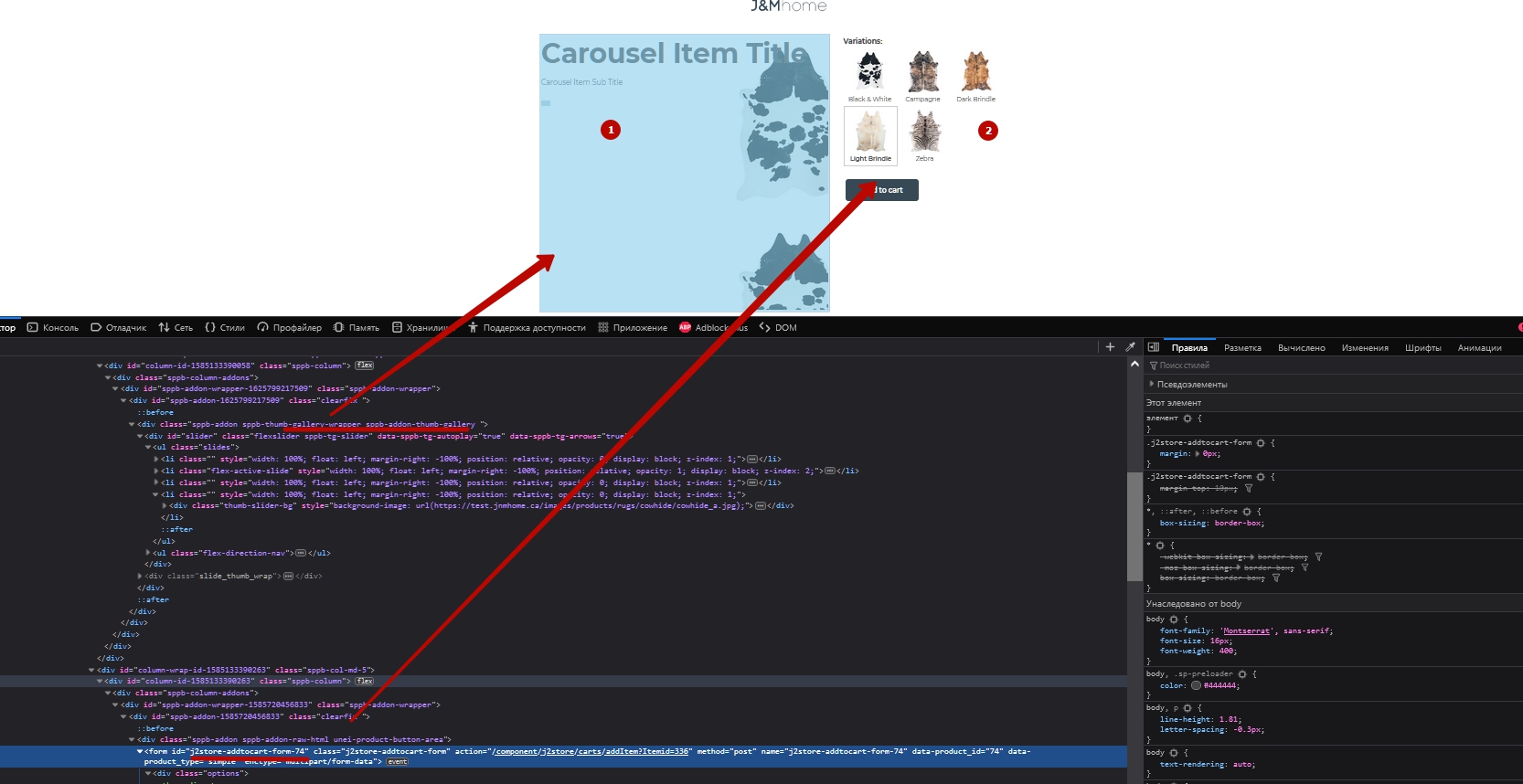
- This is addon Thumb gallery
- This is a special addon, the Product Button that displays a piece of the J2Store form. But it can only display the form and nothing else.
Addons are not dynamic and cannot transmit information from one to another. Therefore, with this layout you will not succeed in achieving what you want.
If in the Unei Product Button settings, it is not possible to display a full-fledged product card, with the behavior as you want, then you need to use a product card from J2Store by default without using SP PB. And customize its appearance through CSS.
Using Sp Pb inside J2Store is half a fake product card, as it does not possess and cannot have a full-fledged store functionality.
That is why I completely refused to use J2Store + SP PB and I use JoomShopping + сustom сoding in my projects.
Perhaps I do not know something about J2Store + SP PB integration. In the forehead case, this is my private opinion. And the support team can confirm or disprove it.