

Where The Image is Placed, Which is Displayed On All Menu Pages At The Top, Above The Slideshow Position (the Menu is Located On This Picture)
F
Fedor
Hello, please tell me where the image is placed, which is displayed on all menu pages at the top, above the slideshow position (the menu is located on this picture) Look: http://iamrussia.net/index.php/en/contuct-us# and http://iamrussia.net/index.php/en/about
6 Answers
Order by
Oldest

Ariba
Accepted AnswerHello
Thank you for your query. Could you kindly tell me which template are you using, please?
Ariba
Accepted AnswerPlease go to Template Styles > select your default template -> Layout -> provide subheader backgound color as shown in the screenshot below:
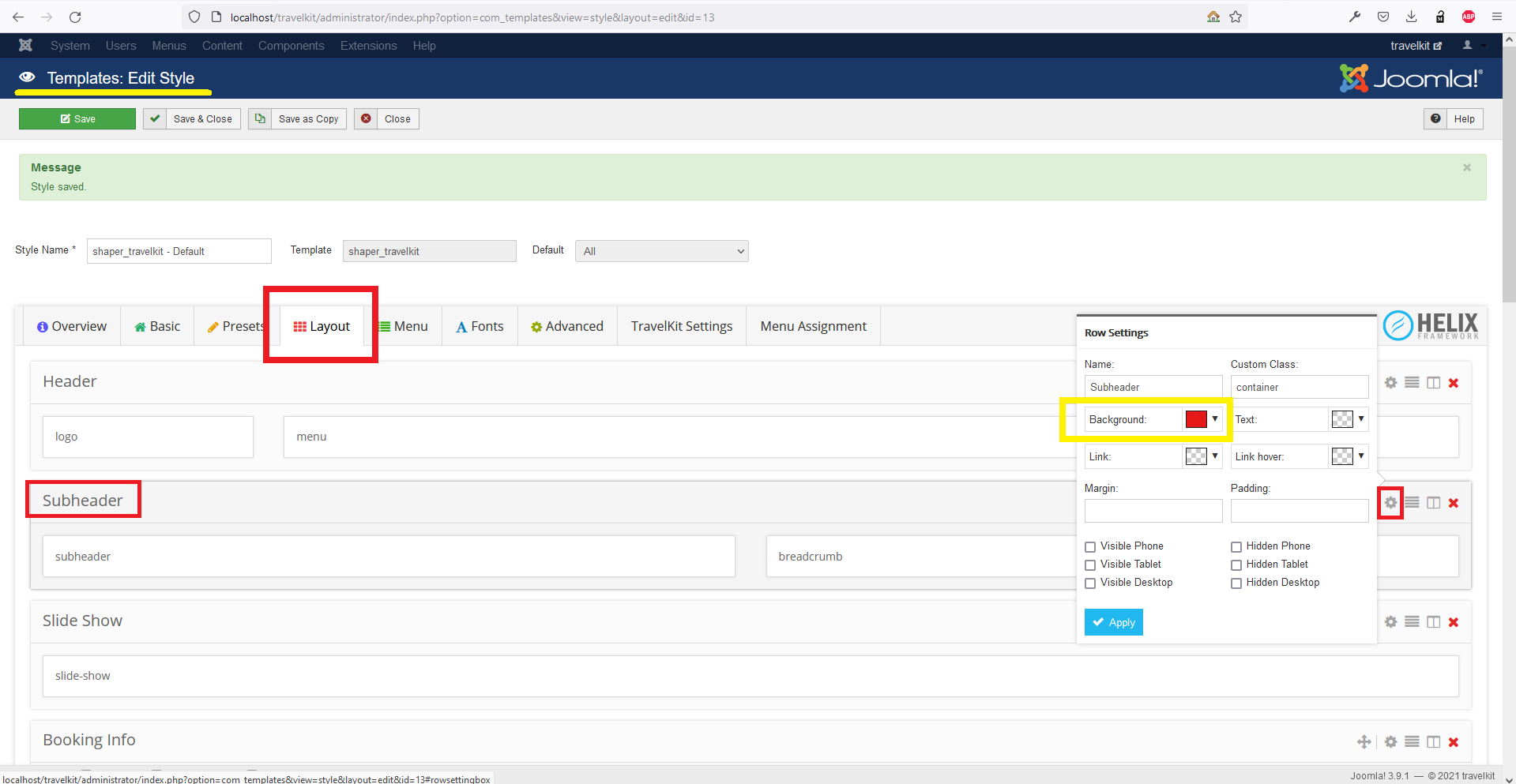
The background color you will set is going to replace the dummy image in the "About" and "Contact" pages.
Kindly do let me know if that works.
F
Fedor
Accepted AnswerI need:
- remove this image (position subheader) only from the front home page: https://iamrussia.net/index.php/en/
- leave it on other pages How to do it?
F
Fedor
Accepted AnswerI need:
remove this image (position subheader and header) only from the front home page: https://iamrussia.net/index.php/en/ leave it on other pages How to do it?