Bottom Area After Update To Joomla 4.0 Vertical, Before Horizontal
JD
Joerg Distler
Hello,
After the Update to Joomla 4.0 the Bottom area shows vertical, before horizontal. It is only with helix ultimate template
13 Answers
Order by
Oldest
JD
Joerg Distler
Accepted AnswerHello Paul,
our Question:
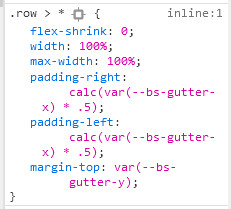
I think the problem is with custom CSS code ! The 2nd line (width:100%) make this mess. (Was it added by you?)
It isnt from us.
After the update (not to Jommla 4.0 we have the same problem at `https://www.brasilien-akademie.com/de/. I saw the problem today.... .
JD
Joerg Distler
Accepted AnswerHello Mehtaz,
I use at this "undersite" shaper_helixultimate - Standard.
JD
Joerg Distler
Accepted AnswerI can see the same problem at https://www.brasilien-akademie.com/de/
JD
Joerg Distler
Accepted AnswerIn the Bottom area there are 4 moduls insight... . Bottom1 - Bottom2 -Bottom 3 Bottom4 horizontal.
After the update it is an vertical positioning: Bottom1 Bottom2 Bottom3 Bottom4

Mehtaz Afsana Borsha
Accepted AnswerCould you please give me your super admin access on the hidden content?So that I can check?

Paul Frankowski
Accepted AnswerHi Ilaine.
I will check if you don't mind. Thanks / Danke for access.
Paul Frankowski
Accepted Answer- Can you disable The two factor authentication -- becuase we cannot login :(
- Please clean JCH_Optimze cache as well.
I think the problem is with custom CSS code ! The 2nd line (width:100%) make this mess. (Was it added by you?)
JD
Joerg Distler
Accepted AnswerHello Paul,
at this page, there is no two factor .... . This domain is only for working... .
Paul Frankowski
Accepted AnswerDanke. Fixed.
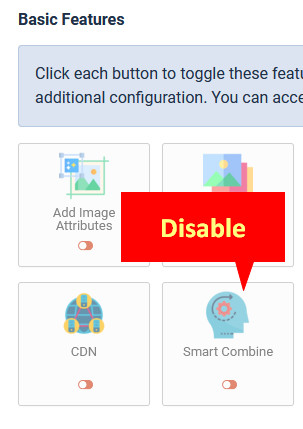
It was problem with one of JCH Optimize Pro settings - please do not enable "Smart Combine" there - it made that bottom mess.
Paul Frankowski
Accepted AnswerDon't worry, I was guessing because the code was highly compressed.
Please read my above/below respond.
Too high CSS compression is not always perfect, styles goes crazy.
2nd domain - probably this same reason, please Disable "Smart Combine" then Clear Cache in JCH Optimize Pro.