Black Friday 2026 50% off every plan Our biggest deal of the year on #1 Joomla products.
Ends in 11d 18h 11m 45s
Claim 50% off
Solved Templates

Response to Paul Frankowski about Helix 2

Asked by Daniel Jubelt 5 years ago Last activity 5 years ago

I respond to you: You are now Super User.

  1. Go to Template Layout Manager in Helix. Look at layout. Look at Template Preview
    They are totally different and I wouldn't know where to start.
  2. Compare Helix layout - Layout builder layout and what you see. They're all different!
  3. TopBar and footer colors won't change.
  4. We do not want Social icons but they will not turn off.

Accepted answer

Marked as the solution
Daniel Jubelt Asked this

Thank you for your help and advise. Be safe.

11 more replies

Rashida Rahman Staff

Hi there!

Thanks for your response.

But can you mention for which forum post you have replied these, kindly? So that I can forward it to Paul?

Best Regards

Paul Frankowski Senior Staff
5 years ago · edited

Hi,
I responded you yesterday, and I asked for Access as Super User to fix issue 3. Still waiting !!

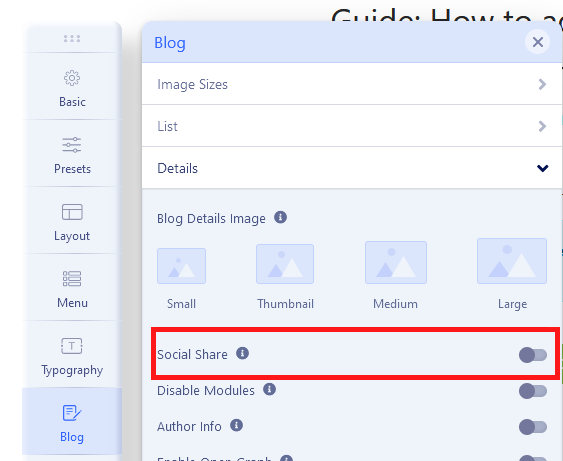
ad 4) They can be - just go to Template Options - Blog - Details - Social Share (Off)

4.jpg

Daniel Jubelt Asked this

This is one of the things that does not work. You are a super user

Paul Frankowski Senior Staff

I disabled social icons under article view - I guess you wanted this.

Thanks. I sent access data to our developer already - he will check.

Paul Frankowski Senior Staff

Daniel, as we could predict,
your Preset color problem was caused by extensions conflict.

With disabled "Astroid Plugin" all is OK, as it should be.

Daniel Jubelt Asked this

Your service is exceptional. Those icons have now moved to the footer. Ill try and delete them.
I have to get rid of the space between the menu and content and the huge space at the start of each dropdown.. It's not good.
I've ordered a second monitor. You can't watch a video of adding a button and do it with a single monitor. At work I gave 4 monitors but here I don't. I'm still trying to find that link your sent me. It got lost when Rashida came in the message stream. My fault i think.

Paul Frankowski Senior Staff

I mixed two things, In Helix there are built-in two kinds of icons:

  1. Social Share icons - which I disabled in Template Options - Blog - Details
  2. "Classic" Social icons (NOT Share) and also those you can disabled, but I remember you asked me to put them on bottom (I put on the footer2 to show you that is possible)
    Yes, you can move it or just disable in Template Options - Basic - Social Icons (on/Off)

I've ordered a second monitor.

Sorry, but we are not shop, you cannot order a monitor here ;p

Daniel Jubelt Asked this

I did not order it from you. I ordered from Amazon so I could watch the video and the application at the same time.

Paul Frankowski Senior Staff

And I thought only women had a split attention ;)

So you would have real IT center and higher electricity charges.

Daniel Jubelt Asked this

Social Icond fixed. Tried to delete space between content and menu but the template does not match the layout builder. Menu's have a large space before first item.
I'm thinking that the easiest thing would be to download a template like we need with the button and set the colors. The basic Helix Ultimate is taking too much time.
The other option is to start all over again and rebuild all the pages and forms. Thoughts?

Log in to reply.