I was wondering how the sign-in button was created on the Manufacturer template as I don't see it included in the downloadable template. I was also wondering where I can set the image that appears to the left of the login box on that same template's login page. Thanks for your help!
Staff replied
Templates
Manufacturer template sign-in button and login image
2 replies

Paul Frankowski Senior Staff
5 years ago
· edited
Hi,
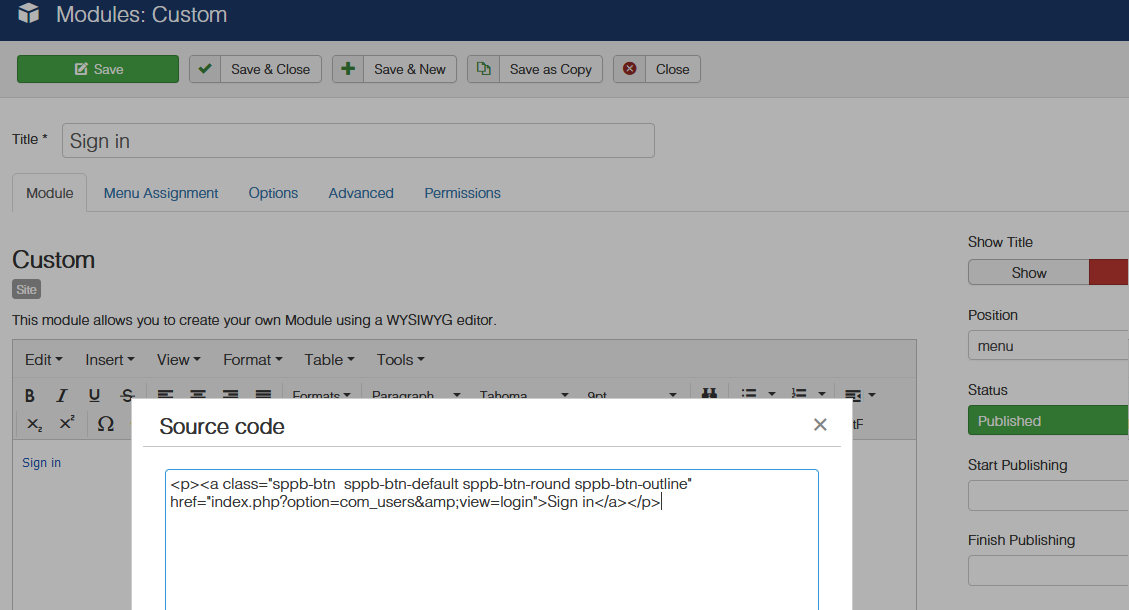
This kinds of buttons are not part of template. In some templates there are module, like here. Create a NEW Custom module, switch to Source Code (in TinyMCE or JCE) and put below code, and publish on "menu" position, hide title, assign module to all pages.
<p><a class="sppb-btn sppb-btn-default sppb-btn-round sppb-btn-outline" href="/component/users/?amp;view=login&Itemid=101">Sign in</a></p>
Paul Frankowski Senior Staff
About Login image, replace that file (.jpg):
templates/manufacturer/images/login-image.jpg
Log in to reply.