

Template Empire Changes
F
fabrice
Hi everyone,
I'd like to make some changes on the Empire template.
At First : How to put my Main Menu transparent ? When I go to the layout of my template, in the Header settings, I can change the backgroung color but with a #rrggbb color only. When I put a rgba(255, 255, 255, 0.75) for ex. it just doesn't work. I'd like the picture of my slider appears through the main menu by transparence.
Then : On the menu, there is a green button under my menu link activated and on over. How to fix it to every menu links ? Is it possible to custom it ? Put it bigger ? Or different colors (a color for each menu link) ?
May someone please help me on this ? Thanks !
Website
https://www.demo5.ovh
7 Answers
Order by
Oldest

Mehtaz Afsana Borsha
Accepted AnswerHi,
Do you want to change this main menu background color?It seems ok on my end
You may use !important after that.
And are you talking about this green button?
Use this custom css
.btn-primary:hover, .sppb-btn-primary:hover{
  background-color:blue !important;
}
F
fabrice
Accepted AnswerHi,
No, I'm talking about this green button (which is not a button but I dont know how to call that...) https://demo5.ovh/images/2021-11-18_11-01-32.jpg Is that possible add it under every link menu and not just on over ? And is it possible to custom their color (one different color for every menu link ) ?

For the menu, I tried to put !imoportant like you told me but it's just transparent when I scroll down. I'd like to see the content of my main body (the slider of my home page) by transparence under the menu. Could you explain me how to do this ?
Thanks

Pavel
Accepted AnswerI'd like to see the content of my main body (the slider of my home page) by transparence under the menu. Could you explain me how to do this ?
Hi. Try this code
#sp-header-sticky-wrapper {
    position: absolute;
    width: 100%;
}
F
fabrice
Accepted AnswerWhat about those green buttons (which are not buttons but I dont know how to call that...) https://demo5.ovh/images/2021-11-18_11-01-32.jpg Is that possible add it under every link menu and not just on over ? And is it possible to custom their color (one different color for every menu link ) ?
Thanks
Pavel
Accepted AnswerHi.
This is possible. But the CSS skills will be required. Through the code inspector, you can define an element that you need to change.
If you want these elements to be constantly displayed, you need to release their code from under the influence of :hover and .active class.
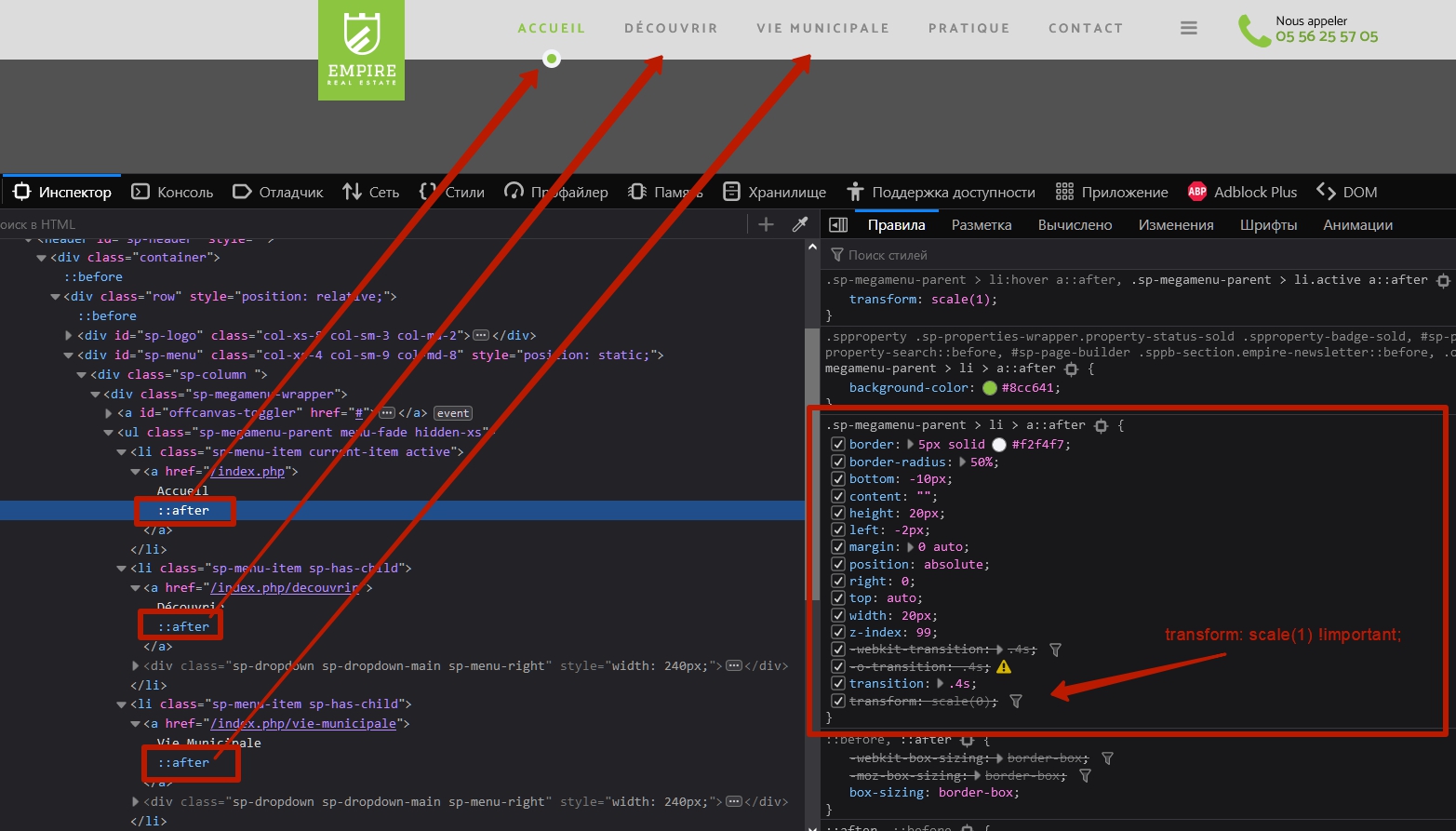
.sp-megamenu-parent > li > a::after {
    transform: scale(1) !important;
}
If you want different colors for each menu item, you need to add an unique class to each menu item link and use it to configure unique color.
Something like
.sp-megamenu-parent > li > a.your-class-for-red-color::after {
    background-color: red;
}

.sp-megamenu-parent > li > a.your-class-for-yellow-color::after {
    background-color: yellow;
}
/* ...and ect... */
or use :nth-child() pseudo-class for <li>