

Sp Page Builder Not Working

AOFIRS Association
Hello Support,
We have updated latest version of SP Page builder but it is not woking and showing no elements
Please fix it asap becuase issue is occurring on our live site.
Thank you
Website
https://aofirs.org/
46 Answers
Order by
Oldest

Paul Frankowski
Accepted AnswerOn page "online-investigative-research-specialist" - it's a big mess made by Font Awesome developer. Old icons comapre to new icons class name. Hopefully it's easy to fix using:
.fa.fa-long-arrow-right::before {content: "\f178" !important;}
I already fixed.

Rashida Rahman
Accepted AnswerHi there!
Sorry for the inconvenience.
Kindly, check the following FAQs to see if they helps:
Best Regards
AOFIRS Association
Accepted AnswerHello Rashida,
First of all i am talking about frontend editor backend is working.
We have already did all these practicess
Even Disabled Rocket for the whole site but still fronend editor not working Added rules already in cloudflare. https://prnt.sc/1zntxlk Using already updated version of JCE Editor. https://prnt.sc/1znu0xg
nothing is working out please check.
Thank you
Paul Frankowski
Accepted AnswerHi,
- you updated SP Page Builder - but you forgot to update Joomla.
- Tell me which Page (give me its ID) we should test? I checked few and all I could preview on your test subdomain.
Paul Frankowski
Accepted AnswerTry to open and edit page "Home - backup"
if it's OK, you can use it as default Home page.
Paul Frankowski
Accepted AnswerI see, but what I disovered so far.
I exported your home page to my website/server and I can edit via front and back-end, it means that page is OK, but something else lock loading editor.
It may be extension conflict (probably) - becuase even a basic test page cannot be edited by front-end editor on your site. Maybe start searching by disabling a chat, alter disable cloudflare insights.com/beacon.min.js
Paul Frankowski
Accepted AnswerFile beacon.min.js is loaded - but it was added by someone from your team. it's not our file.
AOFIRS Association
Accepted Answerplease send me complete link of this file beacon.min.js
What is the use of it?
AOFIRS Association
Accepted AnswerHello Paul,
I am able to edit other pages but only home page is not showing editing option fron frontend and backend both. Please suggest.
Thank you

Paul Frankowski
Accepted Answerin that case probably problem is somehow inside that page.
Question what SP Page Builder you had before, when you could edit 3.7.15?
Paul Frankowski
Accepted AnswerIf you said it was OK, I want to check if t was a really that reason.
AOFIRS Association
Accepted AnswerI have disabled option fro browser insight https://prnt.sc/1zru8j7 Now. I dont see any error with this file name beacon.min.json on home page. But Now home page editing is working but no add on is showing https://prnt.sc/1zrvhk2
Paul Frankowski
Accepted AnswerI installed you SPPB 3.7.15 which you claimed that worked, but no progress ... I still cannot edit home page nor my Homa -backup page from front-end editor. Hmm
Paul Frankowski
Accepted AnswerBut I'll tell you what I discovered.
I made clone of home page "Home - backup - for testing only" I removed from it all "Testimonial" addons (it was 4 of them), and now I can edit from front-end and back-end.
I will do extra experiment.
Paul Frankowski
Accepted AnswerPlease try to edit using front-end editor page "Home - backup" - if it's OK, just set it as default home.
the only difference is that at the bottom I used Module addon to load "What Our Members are Saying?" section from module.
Probably somehow your server PHP memory settings doesn't allow you to load all content if the page is "too" long.
AOFIRS Association
Accepted AnswerHello Paul,
Basially when we edit page and use any add-on see this error and we save page so page show like this untill we recrete that. That is error coming in update versions of Sp Page builder.
Anyway home page backup is working fine.
you can import that page to Home page. Please make sure all information should same as our old page.
AOFIRS Association
Accepted AnswerHello Paul,
Thank you for all your help. Frontend editing is working now but I think i got the issue testimonial add-on is creating issue when I copy and paste the add-on from module to page all add-on hide looks like there is a bug in page builder testimonial add-on i got the same issue on Certification page where i have added testimonial
Also I have noticed that copy add-on function not working. When I tried to copy in SP Page builder Module it is not working in admin.
Please suggest what we can do to fix it.
Thank you once again for all your efforts.
AOFIRS Association
Accepted AnswerHello Paul,
I just enabled Rocket Loader™ from cloudflare and again page builder is not working from frontend editing can you please let me know how to disable cloudflare for frontend users.
Paul Frankowski
Accepted AnswerSorry, but I don't know, it's question for Rocket Loader developer this time.
Save addon works, Save Row also works , I used it yesterday from admin editor.
AOFIRS Association
Accepted AnswerHi Paul,
Rocket loader is cloudflare function. which developer are you talking about. I want to know how we can add rule in cloudflare to get rid of the error.
I am not talking about save addon I am saying it is not copying.
Paul Frankowski
Accepted AnswerAs you know I cannot change cloudflare software - so question which you asked me "how to disable cloudflare for frontend users" - is not for me, nor Joomshaper team. Beyond our support / access.
You cannot copy addon in admin editor OR front-end editor?
AOFIRS Association
Accepted AnswerHi Paul,
Thank you for your clarifications,
Yes, in admin editor we can not copy addon.
Also I noticed that icons are not loading on our page https://aofirs.org/product/online-investigative-research-specialist
please give any suggestion to fix it.
Thanks in advanced.
Paul Frankowski
Accepted AnswerThe clone (Duplicate) icon works - tested.
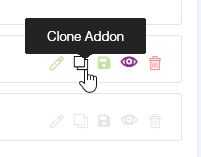
we don't have copy button for addons or we are talking about something else. Please use screenshot.
AOFIRS Association
Accepted AnswerTalking about this in module
Paul Frankowski
Accepted AnswerI don't recommend using Copy Row, becuase it creates row with this same ID.
Clone icon works?
Paul Frankowski
Accepted AnswerIt does not work this way in SPPB modules. Modules are not pages.
Save addon, then use it from the list of saved addons. Then it will work. You used this method before.