

Pagination Newsberg Template
C
CalzadosFAL
I'm working with the quickstar from the Newsberg template. I don't know how to change the language of the pagination of the articles in blog format. Everything is in Spanish but there is no way to remove the word Next, I have tried overrides but nothing. Do you know which file to modify? Thanks
16 Answers
Order by
Oldest

Paul Frankowski
Accepted AnswerHi / Hola,
Can you show me a screenshot link or share link to that view ?
Paul Frankowski
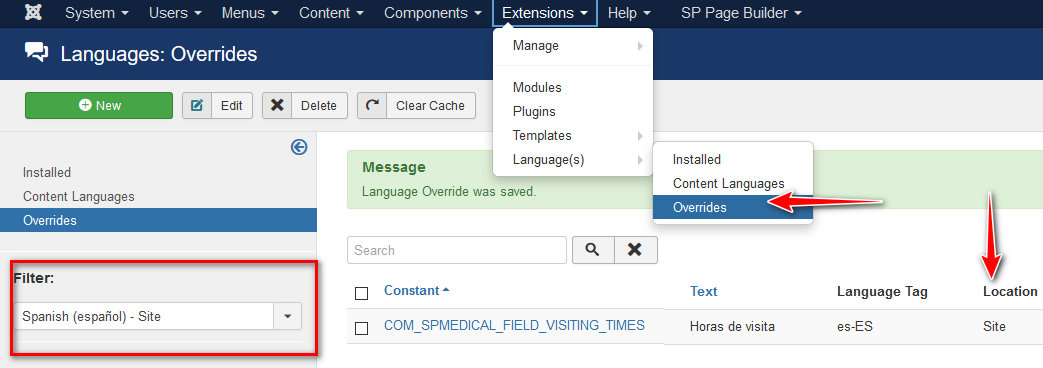
Accepted AnswerTry to override those phrases
JNEXT

JNEXT_TITLE

JPREV

JPREVIOUS_TITLE
but they seems to be from Joomla core.
Use this method
C
CalzadosFAL
Accepted AnswerI had already done that, but they are well translated, so it does not take it from there. I don't know where the Next text can come from, in languages you can't find it anywhere. The project is made in joomla 4. Can the text be changed to arrows? This would solve the problem
Paul Frankowski
Accepted Answertranslate also those 3 above, as they are now. Don't search, just use those phrases.
If wil not help
C
CalzadosFAL
Accepted AnswerI do not understand what you mean. There are 3 languages installed in quickstar, I have installed Spanish, I have it as the default language in Joomla, I have changed everything to Spanish in all languages and it still does not come out. I think this text catches it from another side, but I don't know where, I've searched many sites, but I can't find anything. Do you know where I have to make the changes so that they appear in Spanish or put icons?
Paul Frankowski
Accepted AnswerSorry, somehow I cannot login. Can you create me a NEW (Super User) account for 48h.
C
CalzadosFAL
Accepted AnswerGood morning, on Friday I left work and I no longer had access to the computer. I create a username and password for you so that you can tell me something. I'm waiting for news. Thanks
C
CalzadosFAL
Accepted AnswerThanks Can you tell me where the NEXT variable comes from? I have already seen that it has changed, but I did not find it before. Have you created it new?
Paul Frankowski
Accepted AnswerI had to edit template .php file, I have to talk with developer about this. By now, use my solution.