

Finion Module
JH
Jeff Honeyager
Where do I change the CSS?
Take a look at https://starbasevisitors.com/tr-220
The module that displays "Commercial Products" shows the menu items as a list with dot between items - that is fine.
Look where it puts the dots - on the border. I need them padded.
Here's the CSS
sppb-addon-1631465677479 {
box-shadow: 0 0 0 0 #ffffff;
border-width: 1px;
border-color: #dcdcdc;
border-style: solid;
padding: 10px 10px 10px 10px;
}
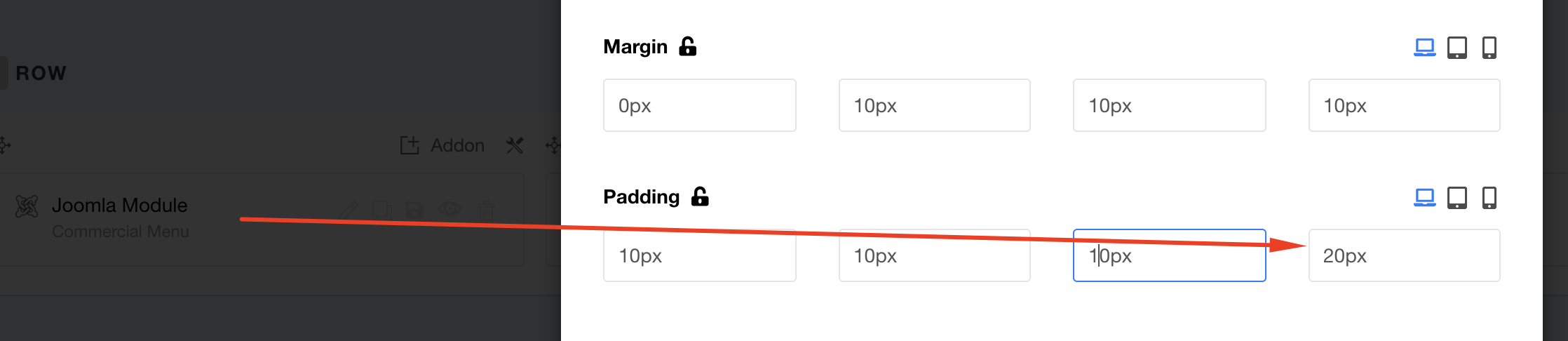
I need to change the padding to: padding: 10px 10px 10px 20px;
But where? It shows #sppb-addon-1631465677479 But obviously that is not correct.
I tried placing it in custom.css but no joy.
5 Answers
Order by
Oldest

Ofi Khan
Accepted AnswerHello Jeff Honeyager
It can be fixed in the module settings. Please share your administrator access here to fix the issue. Use the Hidden Content box to share the credentials.
Best regards
JH
Jeff Honeyager
Accepted AnswerHere is the login info.
This is a development site. When it is ready:
- move to live site (akeeba)
- convert to Joomla 4.x
Please give me what you changed and where so I can replicate it.
Thanks!
Ofi Khan
Accepted AnswerThanks for the access. Please go to the page: (v3) Commercial Products - TR-220 and in the Joomla Module addon setting, adjust the padding value.
JH
Jeff Honeyager
Accepted AnswerNever considered editing the padding in the Page Builder settings.
Thanks!!!